Wow, I wish I had your skills. Congratulations on your design — I haven’t seen anything comparable so far.
The on/off-induced wobbling you described does not occur with my simple, two-point-controlled DIY heater. Most likely because I’m using a very narrow temperature window of only 1.5 °C.
Like you, ABS and ASA are also among my favorite filaments. These materials need to be printed at high temperatures. I consider airflow — even warm airflow — in the extrusion area to be counterproductive. Even a 65 °C airflow passing over freshly extruded material at around 250 °C will locally cool it down significantly.
From my point of view, the build chamber for ABS and ASA should therefore be as warm as possible, but ideally without any significant circulating air currents.
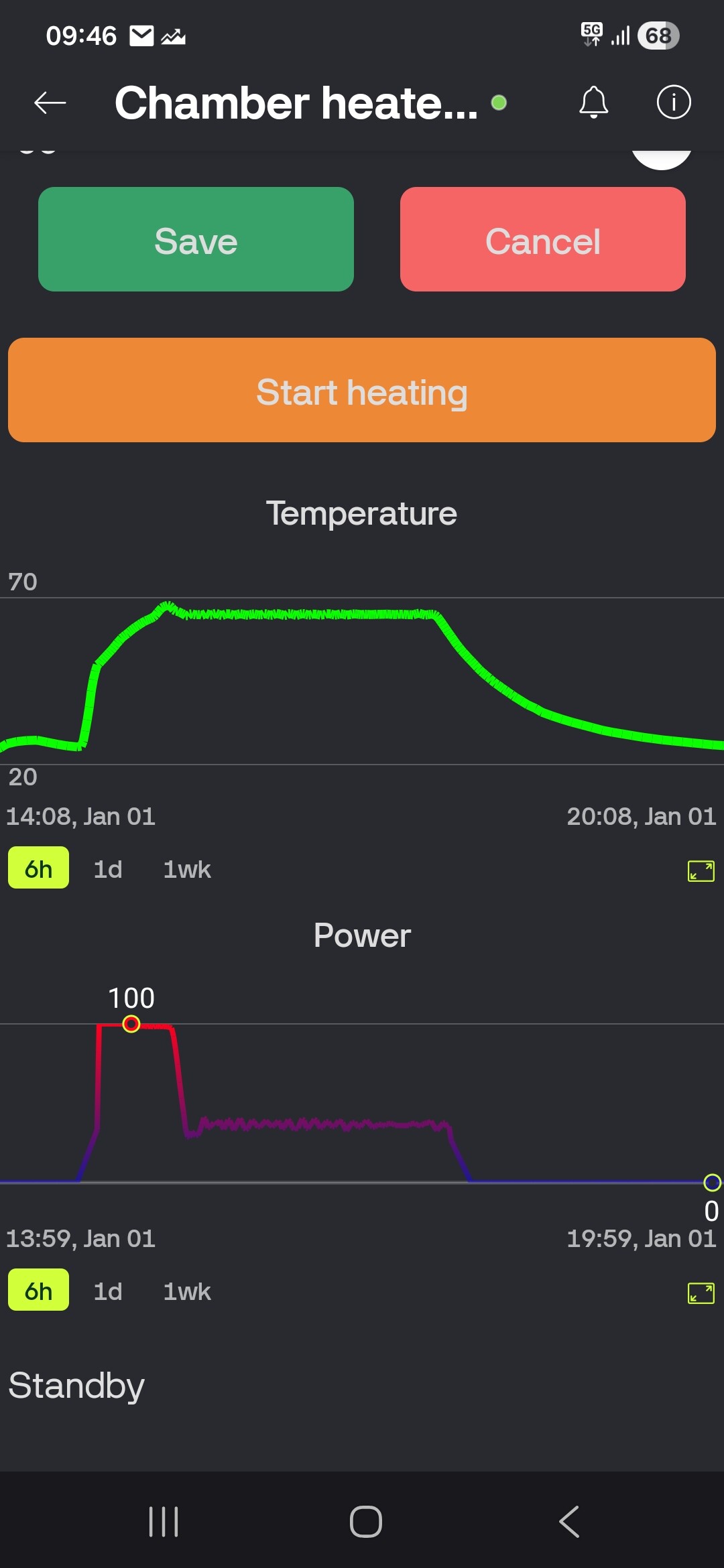
No matter how small the hysteresis you apply, when the heater is on, the air coming out of it is around 200°C, and when it’s off, it’s 65°C. Such a difference will always cause thermal expansion.I also didn’t notice the problem until I had to print the aforementioned lawnmower house. Due to its size, it couldn’t be moved away from the heater, and its height revealed the issue.With an on/off chamber heater, I recommend choosing solutions with upward exhaust and placing the printed model on the opposite side of the build plate.As for air circulation, it’s always a compromise here — lack of circulation will create a temperature gradient (hot air rises) and uneven distribution in the chamber. On the other hand, too much circulation will weaken bed and layers adhesion.I use 65°C and 10% speed on the auxiliary fan.
In the photo, you have a graph of power and temperature over time. Only at the beginning (when the model is low and it doesn’t matter) is the power high, and then it drops to a constant value, which means the temperature of the air from the heater remains consistently the same the whole time.
Your solution is both creative and outstanding. Had I come across it earlier, I would certainly have replicated it. Fortunately, modern printers now come with such features built in from the factory.
Don’t tell me I have the AMS and I’m currently working on upgrading it to the Pro 2 DIY. BTW, I’ve never been able to find out whether the enclosed chamber’s built-in heaters are PID-controlled or just simple thermostat units…
I know nothing about 3d printing and my son absolutely loves it. I received a pandas breath heater and filter from a buddy. I noticed that this unit is made for a bamboo printer, is there a controller I can buy to solely run the pandas breath in his enclosure? I hate it to go to waste. I know I can run it in auto mode which will work for what he is doing. I don’t really think he need it to run in manual mode but I do not know.
any help would be appreciated, and again I really know nothing about this stuff. Thanks again.
Did you get it to bind with your printer? I installed it, got the WiFi working, but it can’t seem to find my printer. Both are on the same network. Does it need to be in LAN mode, which mine isn’t? Not a peep in the instructions. You have to love these “it just works by magic” instructions.
Yes, I got mine working, I didn’t really have to do anything beyond what the instructions said. I’m not running LAN mode.
The whole app and process seemed a bit…weird…I honestly remember thinking “no way this actually will work”…and it just…works, despite my reservations. I keep mine set to auto, and when the printer comes on it turns on as well.
That’s good news. After taking everything apart I tracked the problem to the power switch. Then I noticed the fuse in the switch block. Talk about doing it the stupid way. I’ll replace the fuse today and hope that was the problem. Some of the connectors on one of the circuit boards did look a little worse for wear though. Let’s hope.
 I have the AMS and I’m currently working on upgrading it to the Pro 2 DIY. BTW, I’ve never been able to find out whether the enclosed chamber’s built-in heaters are PID-controlled or just simple thermostat units…