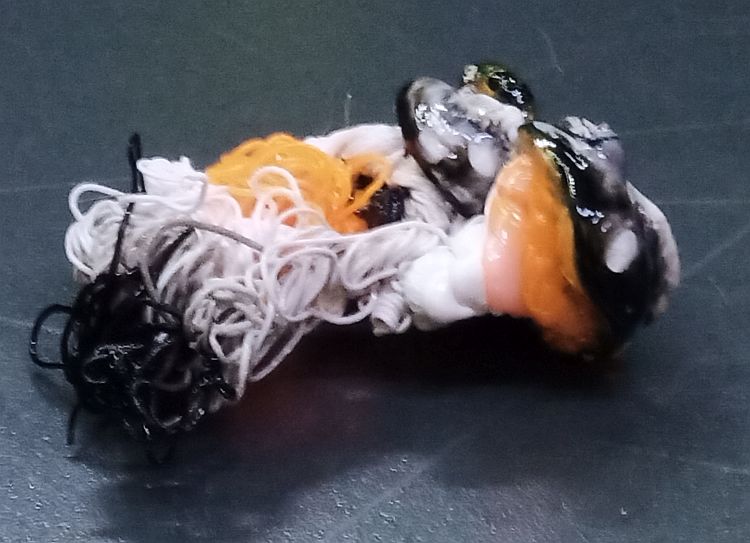
@GCFrenzic, I’m having the same issue as you when using Bambu’s Support Material for PLA/PETG. When it’s purging the support material it’s sticking to the side of the chute below the metal plate.
I’m going to try @tzian 's idea next.
@GCFrenzic, I’m having the same issue as you when using Bambu’s Support Material for PLA/PETG. When it’s purging the support material it’s sticking to the side of the chute below the metal plate.
I’m going to try @tzian 's idea next.
Has anyone tried removing that bar down inside the chute and/or that lever?
Why they are this is completely confusing. There should be a clean shot straight down the chute and out the back. Not something halfway down and in the middle of the path.
It’s like putting baffles in a drainpipe. If the wiper is cleaning the filament off the head properly then gravity should do the rest and let the purged filament drop out of the chute. Only analogy I can come up is one of those overly high speedbumps in a parking lot.
That’s sounds like it’s worth a try. A new chute is only $15. So a fairly low risk. Give it a try! To follow up on this thread since I started it, I switched from the silicone wiper that I had used to the A1 style scrubbers. There’s a number of them on Maker World for the X1C. They have been very good and better than the silicone. I would recommend trying them.
https://makerworld.com/en/models/437463-the-nozzle-wiper-v3-4-x-p-series#profileId-342665
Hey guys, I only had a couple hundred hours of printing in i guess and not one problem until a couple days ago, just all of a sudden i get a clog, like a radish size in the shoot. I noticed my collection bin had a lot in it so i cleaned it out just to make sure and noticed the shoot boot lever from the back side was in my waste bin. I almost missed it becasue I had been printing a lot of black. I reinstalled it on the back side of the shoot and no problems since, i have been watching the lever becasue the pin that holds it in is continually wanting to work its way out and that is what caused it to drop off to begin with. So that being said, make sure your boot lever ( or whatever its name is) has not fell off. It actually hits the poop and makes it fall if it is stuck.
…and if you don’t have one of them (you won’t if you have a first gen X1 or the first few X1Cs, here is the model bambu copied so you can fit one yourself: Poop Chute Boot - Tailored for X1/P1 Series by ProtoSpyre3D - MakerWorld
I’m a new Bambu X1C owner and have this problem all the time when using the Bambu support filament. When it purges it tends to squirt a little over the edge of the chute which prevents the rest from falling when the trap door opens. My thought was to add something in that spot to raise the top lip of the chute. Haven’t tried yet.
I cleared a very large clog in the purge chute of my X1C. In the clearing process a part in the top rear of the purge chute came loose and went out into my waste bin (undamaged). The part is about 3" long and 1/2" wide with 2 rubber “antlers” which I believe point downward into the chute. The part is attached to a bracket on the top rear of the purge chute with a very small horizontal pin (steel?) WHICH I AM NOW MISSING. Repair should be simple (removing the bracket, replacing the pin and re-installing the bracket but I need the name of the part and pin. I have reached out to Bambu technical support and sent them picture of the part but they have not responded yet. I sent them a couple pictures of the part in question.
Dry it and it will not be brittle
I have an X1C with the current firmware. What I find is that IF the waste chute clogs, first problem, is the print head makes it difficult to clear from both sides… it should optimally be out of the way to clear the chute.
Secondly, it should re-home X and Y afterwards… when the printer pauses due to a waste chute clog, it continues on with the material it has but it is slightly off on X or Y. Fine on Z… but definitely like 0.2 or so off. It should definitely go to center of the build area during a clog and then resume by re-homing X and Y.
Thanks for this info, when printing PETG I see an issue that I do not see when printing ABS, PLA, PLA-CF, etc… when printing with PETG, the cutting and nozzle wipe does not seem to do a clean cut (4 out of 6 times) and then the poop either hangs on to the nozzle or is thrown onto my plate (neither are good outcomes). Should I replace the cutter or other options? I have only 650 hours on print (rookie, lol)!
Thanks,
Alpine Racing
Hi @Alpineracing ,
PETG has a few peculiarities:
It reacts quite sensitively to moisture, so drying is a very good idea.
It tend to cling to anything, so avoid speed bumps for example from crossing infill. Use non-crossing infill and surfaces (monotonic, gyroid, honeycomb,…).
PETG likes to curl, warp and ooze (in particular if not dry enough): Try to avoid that for example by using lower layer heights.
I myself have made good experiences with “wipe on retract” in the filament settings not only for the final retract, but also for print quality overall. If there’s less to no ooze, there’s no problem 
 &
& 
Awesome, thanks @EnoTheThracian I will give that a try!
I agree with you. If the purge chute is clogged, the print head should stop clear of the chute. It make clearing a clog so much harder.
the printer doesn’t know if the shoot (did I really use shoot?- chute. My bad) is clogged until it forces the nozzle to stop. Believe me, I’m with you.
So i have used aluminum tape and this which is slick as snot.
I’ve put the tape around the inside and on the little floating divider. Seems to keep my poop screaming down.
I’d like to add this since it’s helped.
It’s a metal replacement for the swinging flap inside the chute. I’ve been using one on each of the P1S I have and it’s helped. Has not eliminated the problem but has drastically cut down on clogged chutes.
https://www.aliexpress.us/item/3256809681956120.html?spm=a2g0o.order_list.order_list_main.76.71591802PIDqLQ&gatewayAdapt=glo2usa
since I started using my new to me X1c, I discovered the various troubles listed here , mostly when printing PETG with 0.4 nozzle
I tried most of the fixes suggested here : various nozzle wipers (curently using the nozzle wipper V3), aluminium tape in the chute, but still got filament balls jumping on the build plate instead of falling through the chute.
I’ve already replaced the head rear cover, after noticing that the purged filament was not shaped in tight coils as before (the cause was clear when looking at the missing part from the head rear cover )
I usually print 1 or 2 colors prints, but had a try at a 4 colors miniature, wich stopped because of a massive clog at the top of the chute, blocking the head 
moving the head away , I was able to remove the said blob :
showing that keeping the hot end next to it melted the filament in a solid mess
The chute was indeed blocked by the amount of purge, which I could not see as it was 2 inches above the bin
I noticed that my chute lever has no “poop chute boot” , so will have a try with the model suggested by @ProtoSpyre and can also try the silicone nozzle wipper
I’ll follow this thread as I would love to get this sorted
You can use this tape or Aluminum tape on the inside of the chute starting at the top.
The catch is to make sure there are no edges lifting up or they’ll catch the purge and just back it all up anyway.
There are prints that can raise that flap up that will help. I have one on each of my P1’s that are aluminum or some metal I got from AliExpress. I looked for a link but couldn’t find it.
A good brush of some sort to replace the one that’s stock will help as well. Lastly dry filament does matter. Not as much as it will on your prints but for some reason I find my dry filaments didn’t bunch up as much.
I fitted some alumium tape (I had a roll at hand)
the metal flap could be another step, but would need to remove the nozzle cleaner which is visible on the first picture.
I’ve seen other system which may be more efficient or could accept both tools
I tried some printed flap extension parts, which didn’t fit because of nozzle swipper fixings
thanks for the pointers : I ordered and fitted the metal flap : nicely made, but a bit of trouble to install, as it needs to remove the back plate and the chute : the 3rd screw is almost impossible to reach
I also ordered and fitted some replacement BiQ (?) silicone brush, easy fit while the chute was out
the printer is all back together, and the first test print seems to be fine : I’ll see in the long run if the cloging risk is now gone