I have the same issue, and I have deleted the passage. Will see on the next print if the issue is resolved.
ps: I am using version 01.07.02.00
I have the same issue, and I have deleted the passage. Will see on the next print if the issue is resolved.
ps: I am using version 01.07.02.00
I just had the same issue: at some point my A1 mini kept pausing every 30 mins on a 13h print… Ended up ruining my print.
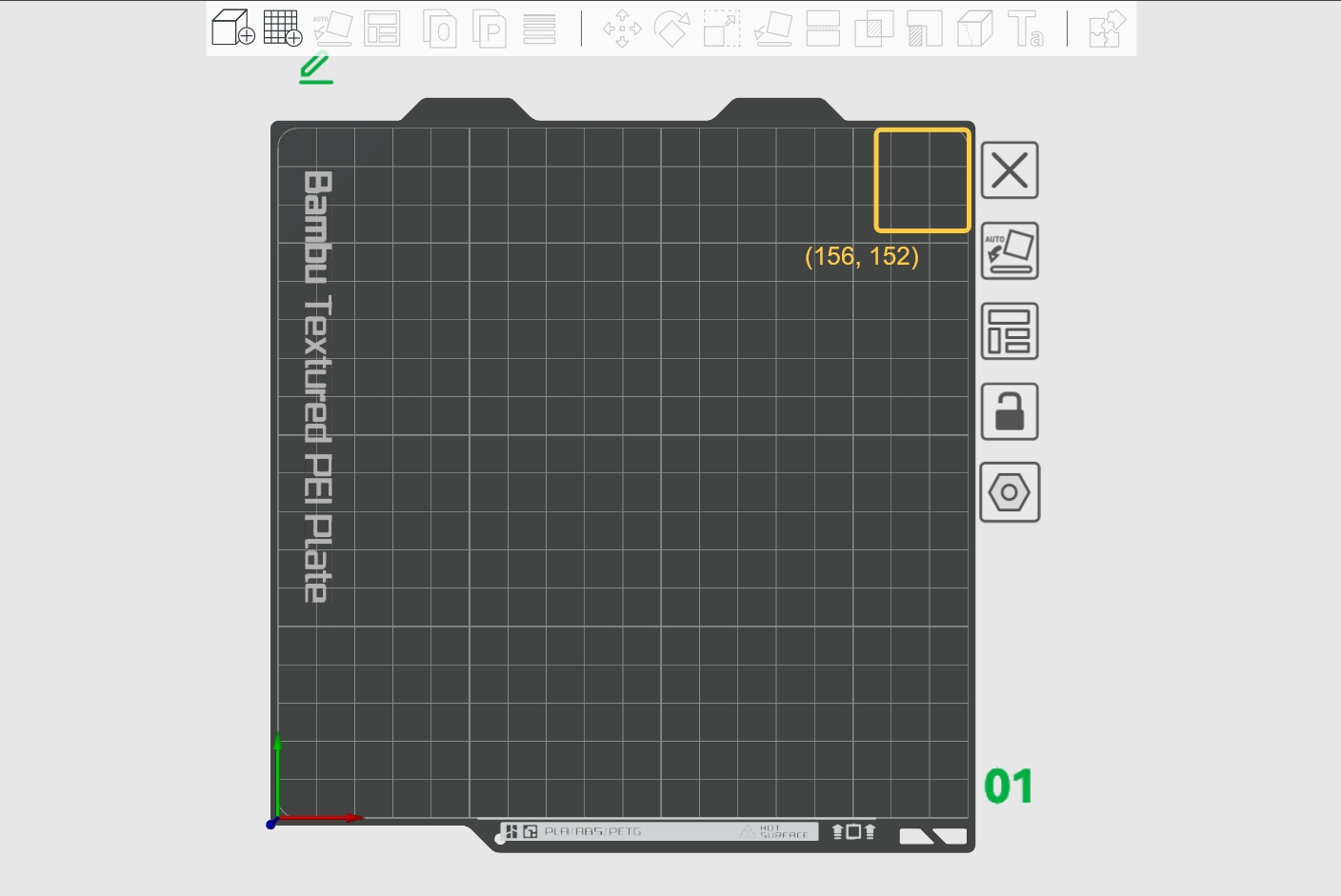
So I read a bit, found this thread and BL’s wiki on the topic. Did you know that if clump detection is ON, there is an area of the build plate on which you should NOT print anything! If you do, when the nozzle lowers, some part of the whole extruder/fan/nozzle could “touch” your print and the printer will detect this contact and trigger the pause+error. For the A1 mini I think it’s one of the part fan “arms”.
This “dead zone” is shown below for the A1 mini (looks like 28 x 25 mm). It is described in coordinates as “(156, 152) ->(180, 180)”, which I don’t understand.
I had the same problem. Here is the simple process I followed to resolve it:
-> Removed and cleaned the build plate
→ Cleaned the heated bed
→ Retightened the heated bed screws
→ Vacuumed up all the filament debris
→ Cleaned, re-oiled, and regreased the guide rails
→ Silicone sock had a small tear → replaced it
→ Removed and cleaned the nozzle—including the mating surface!
Problem solved!
I used isopropanol for the cleaning.
I been having the same problem from some time now, it happens not after the 3rd layer but when it is 70 or 80% printed. I have tried so many different configurations, but nothing seems to work. do you think that the print profile you created could work?, I mean is the same but different problem. it really is driving me nuts
have you been able to fix this? I have had the same problem for a while now.
I have, though it’s been quite awhile.
It’s likely I’ve updated the printer’s version and it fixed it, I don’t recall when I last had this issue.
But I sat in there and watched it for a few prints.
What I see on mine is that its starting the first layer print ridiculously close to the bed. This is why its flagging as clogged nozzle on mine I think its because the nozzle is laying almost flat against the bed while making the first layer.
**If anyone knows how, Please advise but I want to try to adjust the height off the deck for the first layer. Make it say, 0.15mm or 0.2mm thick. Right now in the middle, my height off the deck is 0.01mm right now.
I am googling how to adjust it and I am only getting old obsolete infomration from a year or two ago that is in old versions of the software that no longer exists. I cant figure out how to add height to the first layer.**
Any ideas?
9/14/2026 I am having this issue