can someone tell me how to improve my first layer with this plate? Its a BiQu Frostbite.
Is this normal if you print with a new plate? I have calibrated the printer again, change Z-offset in printer settings but it looks awful! Has someone the same issues with this plates?
Did you set the plate type to smooth ?
For the textured PEI plate Bambu uses a different extrusion rate on the first layer and of course z-offset but you already corrected that…
well that comment is irrelevant… the plate is flat and even if it wouldnt !and the bed mesh is made for that. to compensate and correct the first layer ! what you see here is because he is dropping too much material and probably at a too high temperature as well
Should the plate type be set to smooth? I am using the frostbite with no issues (aside that with elegoo rapid petg i had to raise temp to 65 to get strong adhesion) but using the textured pei settings
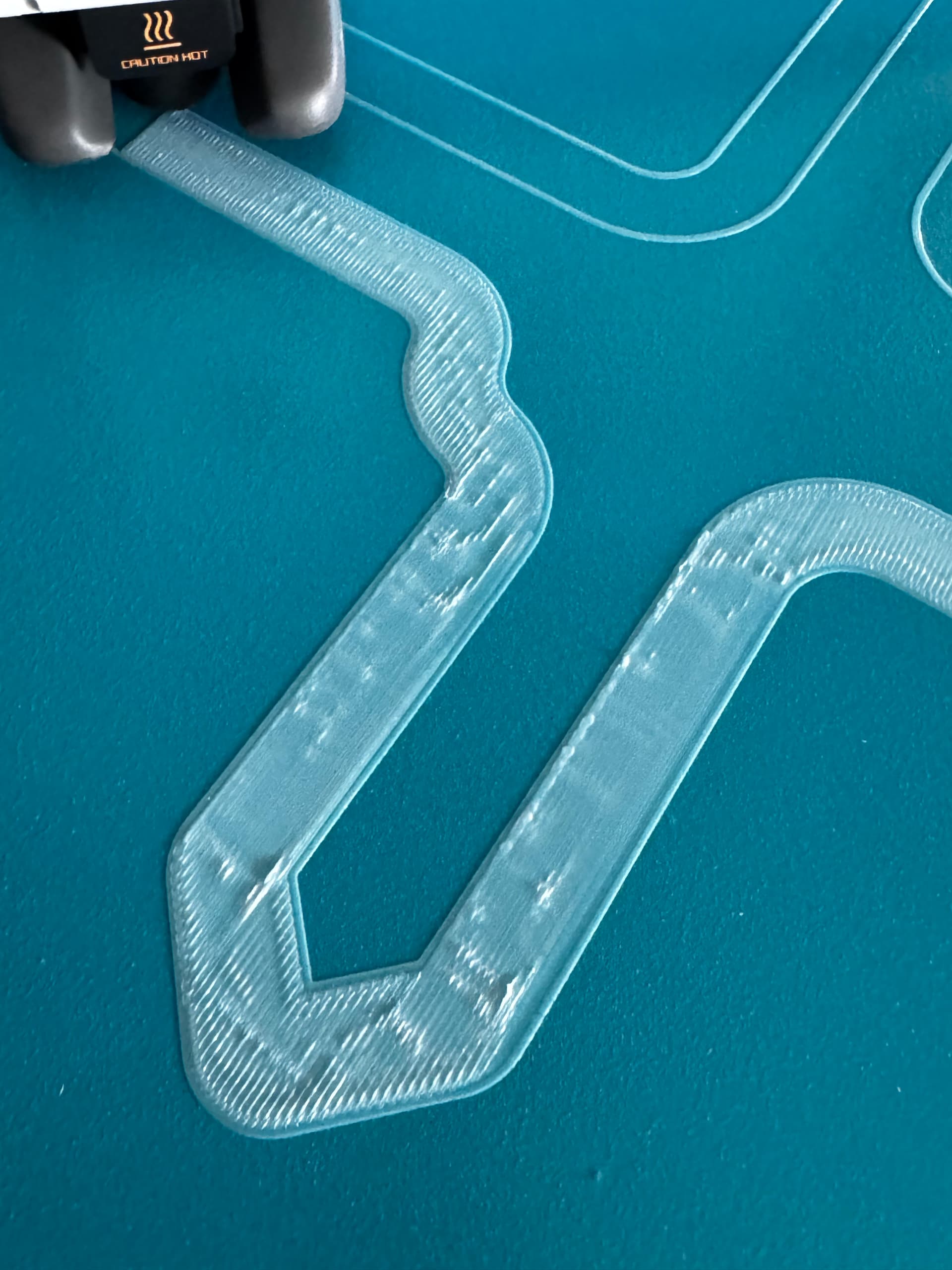
I have to agree. I did every kind of hardware fix possible on my A1 today… tightening screws, checking sensors, manual bed leveling, complete auto bed leveling, but first layer still remained trash on the Frostbite.
Then, I just switched the plate to the original Textured PEI, did complete auto calibration again, started another first layer print and it is just beautiful. Weird stuff :c
I had to realize that non of my plates has worked properly on my A1, only the Texture PEI, even though I have already tried every HW fix. Due to the Textured PEI structure it can mask Z-offset errors better. It is more forgiving to such errors. But not even my official Bambu Smooth PEI plate delivered good results…
Finally, I found out the solution for myself.
I had to tune the Z-offset settings in my A1’s Machine Start G-code.
By default, Bambu only sets -0.02 (closer to the bed) for the Textured PEI Plate, but no additional Z-offset setting for any other types of plates. So I included Cool Plate and Smooth plate. Find the relevant part and extend it on your end. 0.04 turned out great for me (increasing the number raises the extruder, so distance is increased from the bed).
;===== for Textured PEI Plate , lower the nozzle as the nozzle was touching topmost of the texture when homing ==
;curr_bed_type={curr_bed_type}
{if curr_bed_type==“Textured PEI Plate”}
G29.1 Z{-0.02} ; for Textured PEI Plate
{endif}
{if curr_bed_type==“Cool Plate”}
G29.1 Z{0.04} ; for Cool Plate
{endif}
{if curr_bed_type==“High Temp Plate”}
G29.1 Z{0.04} ; for Smooth PEI Plate or High Temp Plate
{endif}
You can also check out “THE TEST DISC | Z-Offset Calibration Disc” model on MakerWorld. It is really useful!
(For some reason I cannot add links here…)