Hi All,
So I finally got some time to test settings out. It seems like the paint tool has the highest priority when it is used on a part. Meaning anything that gets painted will override any modifiers or other setting below it.
So there are two methods to get around this.
Option 1 - Switch the main body of the part to the color that you want, then paint the other surfaces. In some cases this may not be doable so please refer to option 2.
Option 2 - major pain but doable, add a new modifier that is the exact shape of the surface you are trying to paint (or add a rectangle modifier with a thickness of 0.2mm thick). Right click the modifier in the tree and change the filament to the color you would like that surface to be. Verify this modifier is on top of any other modifiers that you are using. If they are reversed then it probably wont do what you want.
Should look something like this (notice rounded rectangle is a modifier)
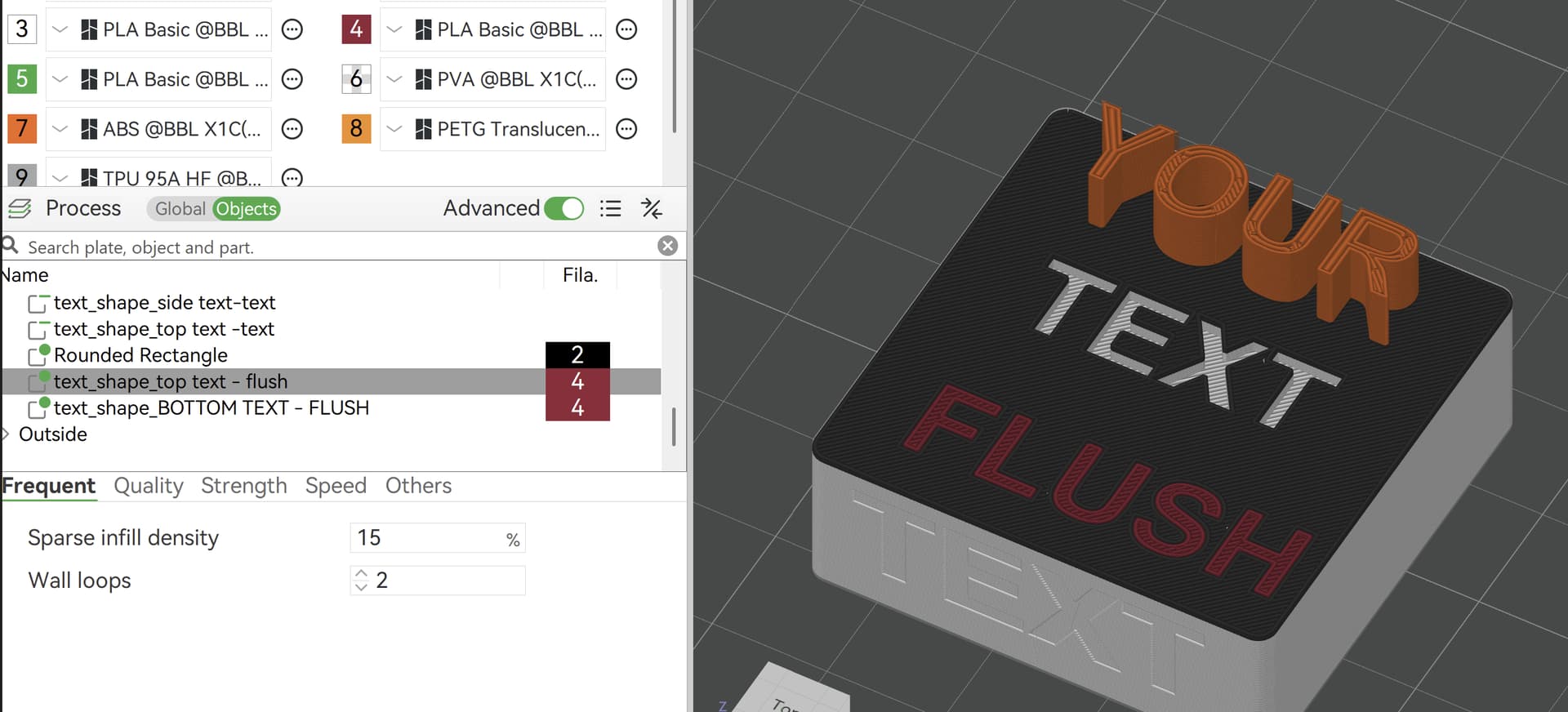
In my mind since the slicer can figure it out this way, then Bambu should be able to figure out how to ignore areas with modifiers when paint is applied. So I do plan on sending an enhancement request to allow painting to ignore painting modifiers.
Happy Printing!