I run my P1S in LAN-only mode and liked keeping it off the internet, but I missed two things from Bambu Handy: a notification when a print finishes or fails, and a quick camera look when I’m away.
So I wrote PrintWatch LAN, a small Python script that runs on a computer in the same network (Mac, Windows, Linux or a Raspberry Pi). It talks to the printer locally over MQTT and sends messages to your own Telegram bot. The printer itself stays LAN-only, only the computer talks to Telegram.
Automatic messages
Print started, with layer count
First layer done, with expected finish time (a good moment to check adhesion)
Paused, with the printer’s error code (e.g. filament runout)
Resumed, cancelled, failed, finished (with total duration)
Printer unreachable for 5 min during a print
Commands from your phone
/status: state, progress, layer, finish time, temperatures
/photo: camera snapshot
/light: chamber light on/off
/pause, /resume, /stop (stop needs a second confirmation)
The bot only answers your own Telegram account, and setup is a guided wizard (bot token check and chat ID detection included).
Status: beta. Tested on my P1S in LAN-only mode for a few days, including over weak Wi-Fi (~30% signal, printer behind a brick wall). A1 / A1 mini / P1P use the same protocol and should work, but I can’t test them. X1 camera is not supported yet. On newer firmware, the control commands may need Developer mode; notifications and status should work either way.
Now this is very interesting, especially as it can run on a raspberry pi. I’m a newbie when it comes to setting up this type of system, but I am going to look into this.
Those two features were definitely missed when I set my P1s to LAN only mode as well.
Thanks, glad it’s useful! A Raspberry Pi is actually a great fit, since it can stay on 24/7 with very little power.
Don’t worry about being new to this. Setup is mostly copy-paste: install Python, download the project, and run the setup wizard. It asks for the printer’s IP, serial number and access code, then checks your Telegram bot for you. The README has a step-by-step guide, including how to start it automatically on a Pi.
If you get stuck anywhere, just post here and I’ll help. Feedback from a first-time user would be really valuable for making the setup easier.
Quick update: PrintWatch LAN is now at v0.3.1 with two things I wanted most myself.
1. Timelapse videos in LAN-only mode
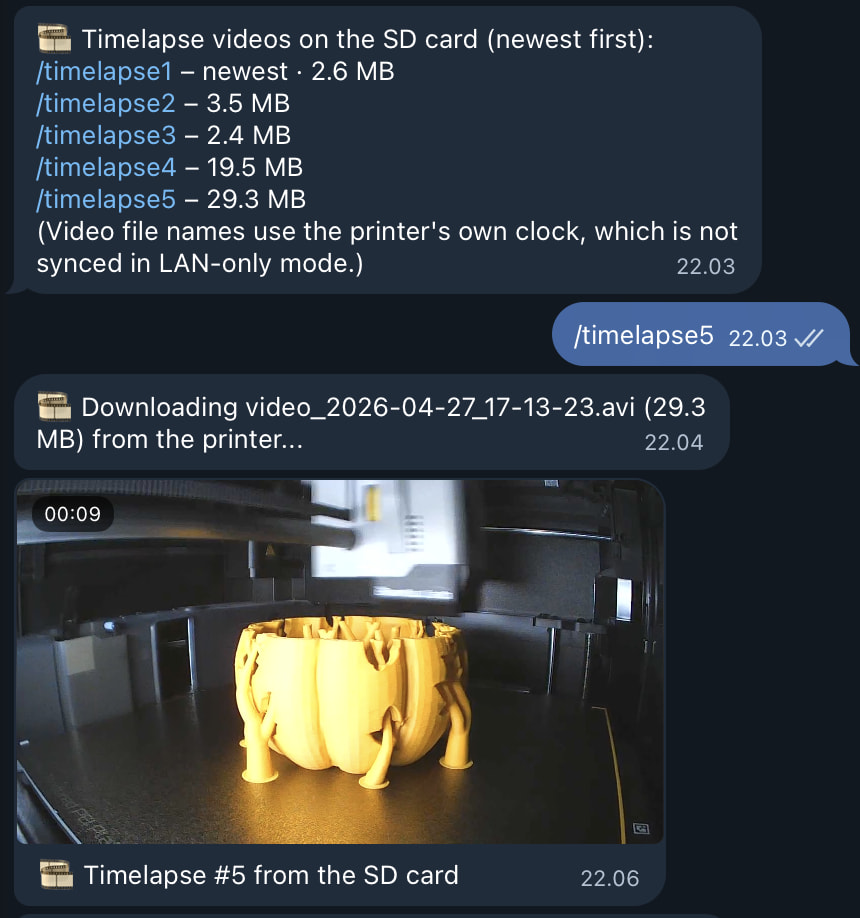
In LAN-only mode Bambu Studio says “Browsing file in storage is not supported”, and Handy can’t reach the printer at all. But the videos are on the SD card, and the printer still serves them over its local FTPS. So now:
/timelapses lists the last 5 videos on the SD card
/timelapse sends the newest one to Telegram
The printer records MJPEG .avi, which macOS and Telegram can’t play, so PrintWatch converts it to MP4 first (about 3x smaller). It arrives as a normal video you can watch on your phone.
Side finding: in LAN-only mode the printer’s clock isn’t synced, so the dates in the video file names can be months off. PrintWatch doesn’t show those dates and labels the newest video with the print name instead.
2. Automatic photos during a print (0.3.0)
This came from a real fail: I caught spaghetti with /photo and stopped the print from my phone, but only because I happened to check. Now the bot sends a photo by itself:
when the first layer is done
every 15 min on prints over 2 h, every 10% on shorter ones
on pause, failure and finish
/autophoto turns it on or off.
Also new
/speed1 to /speed4: Silent / Standard / Sport / Ludicrous from your phone, with a confirmation from the printer
/status now also shows speed, timelapse on/off, AMS, filament type and Wi-Fi signal
Raspberry Pi note (for @TheGenerals): video conversion uses ffmpeg. pip install -r requirements.txt adds it, and sudo apt install ffmpeg also works.
Help wanted: AMS owners
My P1S has no AMS, so I can’t build AMS features (slot overview, low-filament warning) on real data. If you have an AMS, or an A1 / A1 mini / P1P, you can help in 2 minutes:
Run python printwatch.py --dump, ideally during a print. It saves printer_dump.json with IP, network and serial numbers removed.
Check the file, then attach it to a GitHub issue named “Dump: + AMS”.