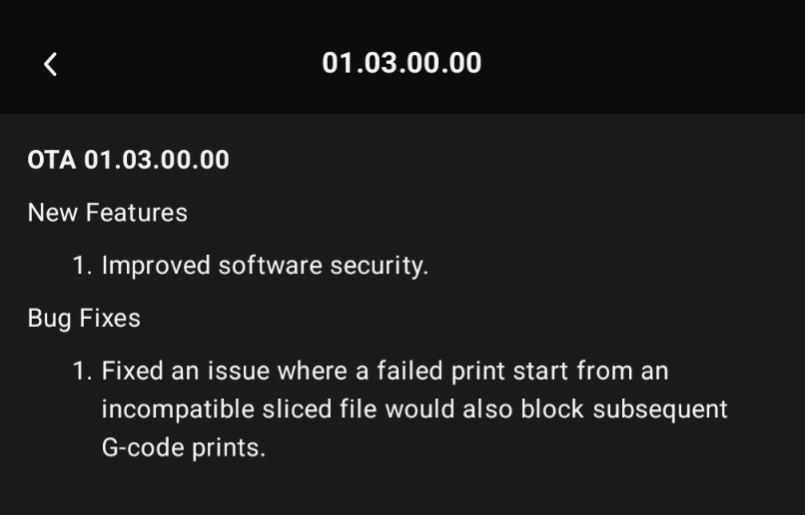
As title say, I got a new unnanounced 01.03.00.00 firmware update notification at power up this morning. Not sure what it is about, I can only think it’s the beta 01.02.50.00 public release
Confirmed. Firmware version 1.03.00.00 has arrived. There wasn’t even an actual update process—the version number simply switched instantly from the beta 1.02.50.00 to 1.03.00.00, and that was it.
 . Then it’s confirmed it’s beta 1.02.50.00 getting public

I wonder if this fixes the issue causing all the recent AP board failures.
That would be interesting, I’ve been cautious about switching mine off since reading about that issue.
I know it’s a relatively easy fix but still could be annoying
In my humble opinion, keeping a printer powered on all the time when you only print occasionally—a few times a week or even less—is a bad idea. There is nothing wrong with turning the printer off when it won’t be needed for a while. And there’s no need to worry about potential startup or loading issues; for one thing, they are easy to fix, and for another, such problems have been rare and have only affected a small number of users.
A printer equipped with an AMS2 consumes 22W in sleep mode, with all its electronics remaining powered. It stays connected to the network constantly—but why?
Of course, some people print continuously, and none of this applies to them.
By the way, a “smart plug” and a smart home system completely solve the issue of turning the printer on remotely and automatically switching it off when it’s not in use. I recommend it.
Inrush current and the themal stress from being powered on is generally more detrimental to electronics than being left in idle state for prolonged periods.
The only exception would be in areas that have very low quality electrical service; if brownouts and blackouts are common that should be mitigated with appropriate protections, but if they’re not then powering down when not in use may be a better choice.
First of all, all high-power (over 100W) modern power supply units—like the ones in our printers—feature “soft-start” systems, so there’s no need to worry about inrush currents here. It’s not like we’re dealing with a kilowatt-rated electric motor and a manual switch! :))) On the other hand, keeping the device powered on constantly (when it’s not in use) also reduces the lifespan and reliability of the electronics. Since these printers lack a dedicated “standby” power supply or circuitry to completely cut power to the electronics during sleep mode, I believe that leaving everything on all the time is actually more harmful than turning the unit on and off periodically.
Since February 2025 i have a X1C and since December 2025 the H2C.
Both are powered by their own smart plug that gets turned off when I am not printing.
The X1C with 1 AMS has an idle power draw of 10w and the H2C with 2x AMS 2 Pro and an AMS HT has and idle power draw of 33w.
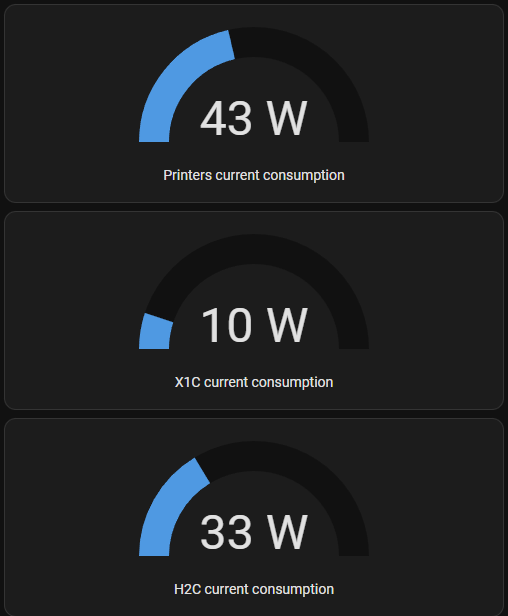
That totals to 117 euros per year doing nothing.
I have never had any issues with neither printers cutting the power with the smart plugs and turning them on when i want to print something.
Updated to this firmware. Now my status bar not working :c
Rebooted printer, turned off and on status bar in settings, now it’s working again. False alarm, minor bug, but be aware
Firmware upgrade changed my serial number and I can’t do anything now with my printer apart from calibrating it. This is so much pain now as I cannot print anything. Lan mode doesn’t work because the new serial number is completely different (starts "d503d … instead of “31b” which is on the sticker inside the machine), I cannot access Bambu Cloud Service … nothing. Tried factory reset, tried everything 
I think this is the main issue. So, has anyone updated and could give us info about it?
I am not entirely sure what you mean with “The update changed my serial number”. I think that the serial number is hardcoded into the machine. Only thing that could have changed is maybe you Local Lan Access Code.
I have done the update to 01.03.00.00 on my machine and did a full calibration afterwards. As I am always in Lan-only mode i hade to turn Lan-Only off.
Added the H2C to my account with Bambu Handy and immediately got a message that there was a new update. Updated to 01.03.00.00 and as mentioned did a full calibration as always.
After the update i removed the H2C from Bambu Handy and turned Lan-Only back on (with the same access code and checked Developer mode).
Bambu studio and Home assistant have no issue communicating with the H2C and it is happily printing its first object with the 01.03.00.00 firmware.

As I document everything on my network, just to humor you, the serial number i documented when i received the H2c with what is it after the update And to no surprise it is still the same, hardcoded, serial number.
Serial number under settings on the device screen doesn’t match the serial number on the sticker inside the machine (the one with QR code). And since the serial number is now completely different, I can’t even connect via lan only mode since the device serial number doesn’t match the H2C pattern (starting with 31b …)
I am at loss as to why you need your serial number starting with 31B to connect to your printer. When Lan-only is enabled an Access code is generated. You can generate a new number if needed.
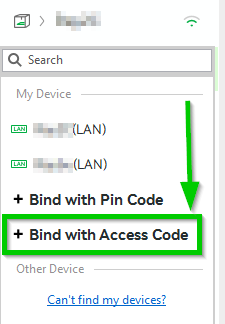
To connect to your printer with Bambu Studio or even Home assistant you need the IP address and access code.
On the Device page:

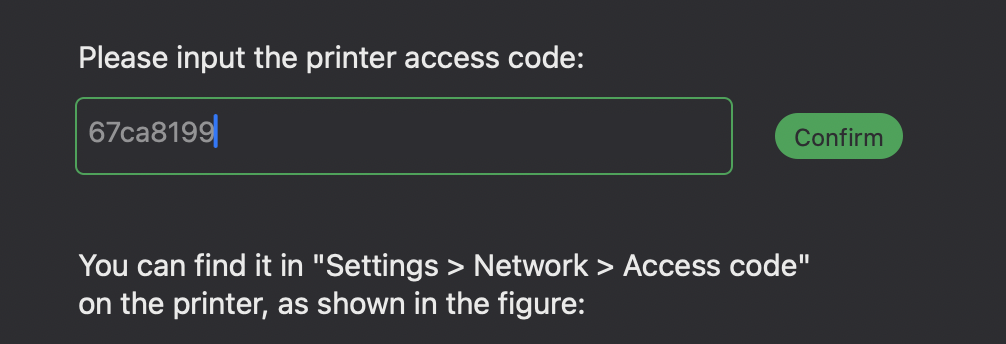

I updated to the new firmware version. No issues so far. The issue with the printer not booting up after a power cycle also looks solved “Power trip now my H2C wont boot up”. I did several power cycles, and the printer booted up successfully every time.
I would perform a factory reset and see if it does resolve it