My X2D has the aux nozzle wiper, and it prints great from both heads, so I don’t think the presence of the aux nozzle wiper is an indicator of potential issues.
Seems it is from the early revisions, yes.
You would be mad, or very rich, to get a P2S with the intention of upgrading to an X2D later. I have had no real problems with the X2D, but mainly use it for support interfaces, PETG support for PLA, and PLA support for PETG. I never found Bambu’s own support filaments to work that well. While I have used the secondary head for embedded text, I find my AMS’s to switch fast enough for limited colour changes. I use two AMS-2’s on one side of my filament switcher, and an AMS-HT on the other side. Normally, I have eight PLA’s in the AMS-2’s and a PETG in the AMS-HT. The AMS-HT is much better for drying hotter filaments such as ABS or ASA. One issue that you may have with either printer is warping on large prints. However, there are several ways of combatting that. I up the bed temperature by 10 degrees for PEI plates, but not for cool plates. I also switch off both AUX fans, and repeat that after level one. More importantly, use a stiff build plate that isn’t too thin. I found that some plates can be pulled off the print bed at the corners, if they are thin and not that magnetically attractive. I use a Cold PEI plate from Antinsky that I bought from Amazon, which is less likely to warp.
And before you buy an H2D, check the weight. Personally, I couldn’t even carry an X2D to my upstairs study myself, and an H2D is much heavier.
One good reason to WAIT is actually to give Bambu some time to actually fix and improve filament and process profiles. You can see with very simple sight that filament and process profiles are mostly made for the main extruder. And all other nozzles/extruders which as of today are 6 in total ( 2x extruders with 3 nozzles each = 6 tabs with settings … ) , get some very default or sometimes random or empty values. Which basically brake every option to just load and print. You can see this by yourself by just open bambu studio, add x2d and look at the profiles.
For example for Bambu PLA Matte flow rate for main extruder is 1.006 and for the bowden is 0.98 - same as PLA Basic. Also retraction is by machine default but it create a lot of stringing. You can imagine this is a Bambu printer and Bambu filament should be somehow matched.
When you add different process profiles and nozzle sizes you get one big, nice mess. Bambu really need to put effort into this. But as the speed the spawn new products I am not sure if this is going to happen until the model get replaced with something new.
If you need to get some working results you need to calibrate every filament type for every nozzle and every extruder. Then you go to the process settings and you may need to tweak for anything else then 0.2 mm standard. Which are hours of time.
In addition RFID filament management is nice idea but until you do not move the already used filament to the aux slot where there is no RFID reader… Then why we can not add every filament with some random number to the filament manager to track its usage. Basically this is useful feature only if you have AMS on every nozzle.
Maybe one more point when comparing P2S and X2D: there are more differences than second nozzle and heated chamber:
- 1,5mm belts - they have completely eliminated VFAs for me. On the X1C I had very prominent vertical lines in all larger walls unless I reduced print speed below 80mm/s. Never have seen them with the X2D. I don’t know if P2S is different than the X1C, but the reviews I watched mentioned a noticeable improvement from P2S to X2D.
- BLDC extruder motor - No idea if that makes a big difference, but the X2D produces the most uniform walls I have ever seen from a printer.
- additional cameras, allowing print monitoring. Some probably don’t think much of it. But I think it will evolve. When I think back of the X1C, then Lidar was almost useless at the beginning but it became better and better over time and when I sold mine, the Lidar consistently made prints better than my manual flow dynamics calibrations.
Did I forget more points?
Second that. I can carry my H2 around but only barely, and I am not a small dude. 31kg and it’s large/awkward to hold. Almost dropped it once.
I would wager the average person would probably be much safer using a dolly to move it and not everyone has access to that.
I use a Panda Station from Biqu to wheel my X2D around. You don’t want to underestimate the need to get to the back of a 3D printer, to cable it up and sort out filament jams, etc. The wheeled Panda Station makes that much easier.
I don’t know why you are linking the RFID to the nozzle, the RFID is detected in the AMS, and the filament switcher can route to either nozzle. All your comments about filament calibration seem irrelevant to me since I use the defaults together with the automatic flow calibration. That seems to work for me, with no issues such as stringing. My only problem I find is that some of the generic filament settings don’t work perfectly with my Sunlu+ 2.0 filaments, but that is easily solved by selecting Bambu settings instead. Do you actually have an X2D? My only real issue is when printing muliple objects by object rather than by layer. The trouble with that is there is no tower to prime the auxiliary nozzle, and that is not good. The auxiliary nozzle does need a tower.
And, if like me, you add a couple of AMS-2 and an AMS-HT to the top, with up to 9KG of filament, it gets even heavier.
Got them secured I hope? Couple people have reported the thing shaking their AMS units right onto the floor.
If you just want a bigger bed and the heated chamber, qidi plus 4 is a hell of a good machine for big scale abs/asa. I have a plus 5 on order so can’t say for sure but I’m hoping it slaps too. If you can’t tolerate a little jank though you might need to stick with the Bambu h2 tax. They qidi are less polished for sure but they do what they are told
Here we go  , ok do you actually have X2D? Could you please print several primitive cubes like 4cm x 3cm x 0.5cm, with your default settings and different filaments, and nozzles, so we can see how good it is working with the default profiles.
I am also wondering if you actually use any matte PLA filament? And also any PETG?
In addition let me show some issues with the profiles which you can see even if you do not own X2D:
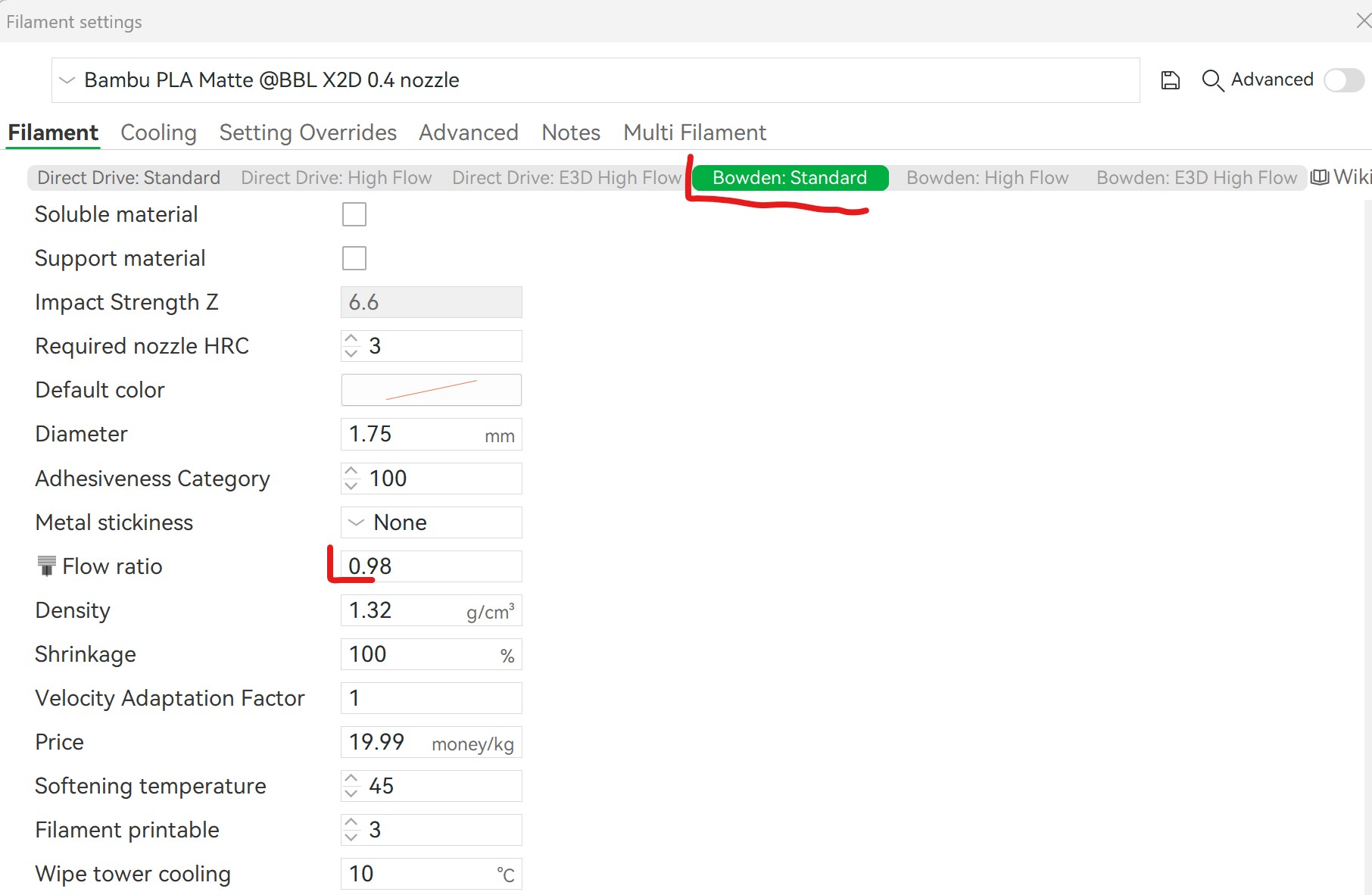
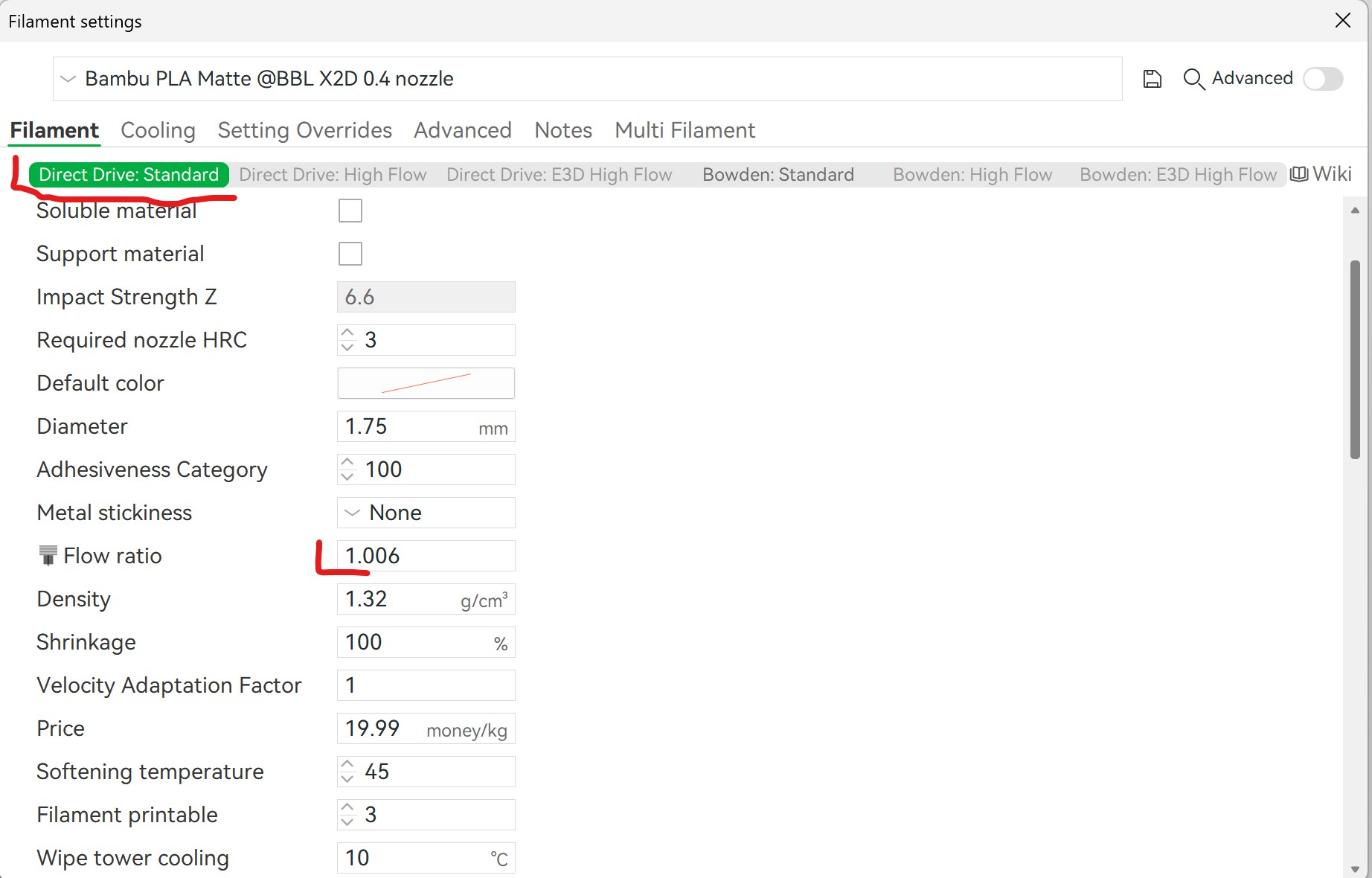
Now how come the direct extruder need 1.006 by default but Bowden need 0.98 when both use same nozzle? This does not matter if you do have X2D or not, these are just inconsistent profiles and can not be fixed with any auto setting because X2D has no auto flow RATE calibration. It has only auto flow DYNAMIC calibration. And we have topics here in the forum how it does not work well for different filaments for different printer models. But then we have you guys printing all in defaults with no issues at all and questioning if I have printer?!?!?
Please show me the quality you get with your defaults. I would like to see it. Just a few cubes, when you have some spare time.
Automatic flow DYNAMIC calibration that you do use works only for the first filament and for the first nozzle/extruder! Every next filament change during the print use either default or the manual setting. No other way around. This is why is not very good to use multi color and multi filament with both extruders just on defaults. Or maybe let me make it clearer for you it is not impossible as you can do it, and even it may work, and even it works on my “non existing X2D” but quality may not be optimal and there may be “some” issues. For which issues you maybe not care, or even you maybe do not see, but it does not mean they are not there.
Now about the RFID can you imagine that someone will not buy several AMS-es, but will use X2D as it comes as COMBO which includes only 1x AMS and no track switch? In this case if I put one Bambu roll inside the AMS and RFID reader detects it ( as you do use SUNLU you may not know this ) and adds it to the filament manager. Then tracks how much meters/grams are used. Ok but if put this same roll outside in the so called AUX slot for use with second nozzle, and use some meters/grams from it, there is no way to account them in the filament manager. So the only meaningful feature that RFID has - measuring used amount, does not work correctly anymore. Or maybe you can show me how to use it properly WITHOUT buying some more AMS-es and track switches?
I use a Panda Perch with my Panda Station to hold two AMS-2 side-by-side - totally secure. I also designed my own mount for an AMS-HT that hangs off the Panda Perch. The AMS-HT would swing and bang against the X2D if I hadn’t have designed it to clamp to the side of my own-designed riser.
BTW what revision is yours X2D?
Mine doesn’t have the extra wiper for the aux nozzle. Can I somehow read out a more specific version?
I am not aware for something more specific then that. Just looked at the box and there is nothing like revision. I can see on the cartoon box that it passed QA 2026-01-29. And I got like 5-6 months after that.
The X2D is the first printer we’ve had and overall it has been smooth sailing. I’ve been able to do two colour PETG prints using both nozzles. Used PETG as a support interface for PLA and vice versa. Done an entire PETG print using the auxiliary nozzle. Haven’t tried to print ABS through the auxiliary, but on the main nozzle it just worked. TPU95A seems to be hard enough that I can just feed it in through the back to the main nozzle. No need for a holder sitting above the printer. We also get SBS here, which is rubbery, but harder than TPU95A, and I have printed through both nozzles.
Must be the things they are printing. Ours has not moved at all.
If this is true would mean your rubber feet are different. as with the soft feet of the my X2D does not matter what you print it will jerk.