OK, I tried to take this information and see if I could cool it down.
The printer is in a room 4m x 5m which does get warm and usually sits at about 25 degrees C - but can get up into the 30s on a hot day.
So, I put the aircon on to keep the room at 20 degrees C and wedged the top cover open and left the door open.
I printed 4 plates and placed them at the very front of the build plate closest to the door. But when it printed these they were the worst so far… the ones on the left closest to the cabinet fan were actually lifting up towards the end of the print - which makes me think they were cooling too quickly and shrinking - causing the prints to lift… pictures below…
This is so frustrating as I have an order for 16 of these and so far have thrown about 20 away!
The build plate is (as far as I can tell) spotless and I usually print these in 1’s and never have a problem - so am really hoping to find the reason.
Oh, the one other thing I have noticed… the cabinet fan seems to be constantly spinning very fast - I am not in the room where the printer is, but dont remember it spinning so loudly when printing usually. When I look on the fan page it shows AUX is at 70%!!
Just looked at the print and its not great - there is a bit of filament dragged across the layer being printed and it is flicking up everytime the hotend passes over it…
Sorry if I missed key items having already been addressed in this thread. I admit to not having gone into the details already mentioned.
Key to warping prevention are
dry filament,
a clean plate (maybe even brims),
warmish print environment.
PLA likes the 30-35°C range. Do not exceed that though as, depending on the printer model, heat creep is a danger above 35°C.
You can also arrange parts a bit further away from the aux-fan.
PLA should not need anything else.
Nevertheless,
lowering speed and/or
lowering layer height are also effective in countering warping by smoothing out material cooling.
Just make sure the first 3 points are covered before playing with settings.
I have dried the filament (again) a couple of days ago as I have a Sunlu S4 drier - and with fresh silica the AMS is showing 13% humidity - so I am sure this is not the case.
The plate is clean (been cleaned every time I use it)… I cant use brims as the issue doesnt appear to be adhesion and these are decorative items and the brim will spoil the front face which is printed on the bed. The issue is scarring on the top of the print (which is the back side of the item).
Office is usually at 20-25 degrees C and the cabinet is usually closed up.
I cant move parts further from the cabinet fan as I have the whole plate filled.
I dont want to drop the print speed if I can help it as the print time is already over 22 hours for the 9 items. Layer height is at 0.08mm HQ using a 0.2mm nozzle.
Unfortunately not. In cooling mode, the printer will not actually control the chamber temp. Only in heating mode somewhere north of 40°C.
Am I right in assuming that the warping occurs only/in particular close to the aux-fan?
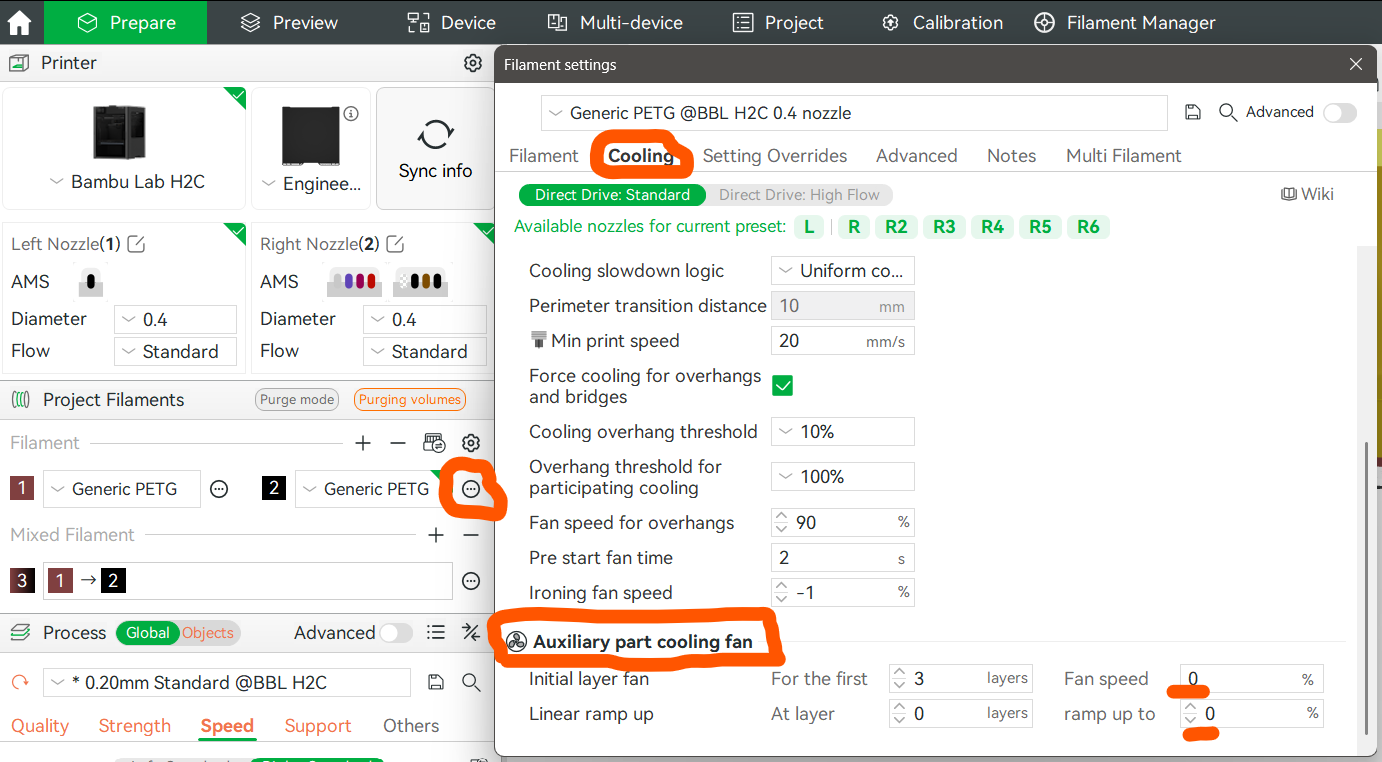
In that case, you could set the aux-fan to 0% in the filaments cooling settings.
I have found playing with cooling to open pandoras box though. So I prefer to just slow down. But for simple, flat shapes, it may be another option.
Thanks - its just annoying as if I print 1 its (always) perfect - now I am trying to print a batch I have wasted more than I can use which is so annoying.
The problem is this order is needed next week and if I slow it down the print time for the complete bed of 9 units will be north of 24 hours! So waiting a day to find its failed again is too time consuming… so I guess I will just be resigned to having to print one at a time and swap them every 3 or so hours and lose the evening period when I am asleep, or daytime when at work.
That is always a tricky decision. Stick to what is known to work and suffer through the pain or spend time doing further troubleshooting (not knowing if it’ll help at all) in the hope of finding a solution in time…
Have you tried only printing a half plate with the parts all in the middle? The pics indicate warping to occur at the edges of the plate (which can be expected). It is not a satisfactory solution but it may help to reduce the pain.
Mhm, some of those spots are a bit curious. Like that comma above the calibration arrow tip. A few edge effects can be expected though.
I assume that you are quite meticulous about plate cleaning and bed levelling so it looks like a bit of a temp drop towards the aux-fan?
A 5-10°C increase in 1st layer may help somewhat in that case, but it does not actually adress the root cause of warping.
I always clean the bed with dish soap and water (Fairy Liquid) and spend a few minutes on it and then dry with a lint free towel, so like to think its meticulously clean.
I have just fitted a brand new plate and am running a print of 4 of the plates in the hope that doing 4 at a time will help me get this order fulfilled. After they have finished I may try the test print again to see if its better on the new bed!
Bed Levelling… I did manually tram the bed a few times being in the mindset of my (now) retired Creality printer… but when I mentioned it on here I was quickly shot down and told to leave the bed alone as the printer will look after this itself… so I must confess (anticipating another chastising) that I never touch the bed levelling?!?!?
I only observed that the 1st layer test seemed to be a bit worse on one side. A bed tilted beyond the ABL abilities would be a possible but very remote explanation. It’d fail much more spectacularly.
I just fear that the part dimensions and thermal interactions will force you to do these parts in half batch sizes or at slower speeds. Sometimes, physics just impose some limits.
Ive just checked the progress on the 4 I am printing and the temperature in the cab is noticeably quite warm, so I have opened the door and opened the lid and turned the air con on. The fans were running very noisy.
I noticed that the fans are called part, aux and chamber… I am guessing the part fan is the one on the hot end front cover, the chamber is the one on the left hand side of the cabinet on the inside… where is the aux one?
I was going to turn the chamber fan on and Bambu Studio warned me it could degrade the print quality changing the fans during print… so I left it as off!
The part fan is indeed in the print head. It cools the freshly deposited filament. Running at 100%
The chamber fan is in the back, venting air through the filter out of the chamber (leading to fresh air entering through the poop chute and the gaps in the front door if all is closed). Running at 0%
The auxiliary fan provides extra air flow across the build plate at the height of the nozzle. If you look at the camera used to take the pic above you’ll see a large fan, funnel and blade nozzle on the adjacent inner printer wall: That is the Auxiliary-fan, providing extra cooling. Running at 70%
Addendum: With my X1, I try to have the chamber between 30 and 35°C just by cranking open the top and maybe opening the door little. But then, I am in a temperate climate. Just avoid the aircon flow hitting the printer. That may make warping worse.
scarring appearing on the top surfaces (again) - so I have just closed the cab door & lid and turned off the aircon to try and warm the chamber up again
Really dont know what has turned what used to be an easy print into something which is costing a fortune. I have managed to make 8 successful prints and wasted 22 so far!


 &
&