One feature I’m really missing is colouring the models even if it is just for visualization and the colors can not be exported into bambu studio.
I create lot of parametric models with a small gap in some parts(0.05mm) to make the trick of having a flat surface when slicing but at the same time being able to colour them with the bucket option.
The problem is that this small gap is almost invisible in the viewer, so I need to add an option for a “preview mode/print mode”.
The problem is that some users don’t read the params and end asking how to set the surface flat.
In my last model I have even added a extruded text when preview mode is activated just to warn the users.
When I heard “parametric model maker” I was very excited
I love using grasshopper for parametric 3d design (It’s within Rhino 3d)
OK not quite that smooth - but yay cool feature - thanks
Maybe one day - I’ll keep my fingers crossed because I have no idea how a Grasshopper like programming interface for 3d design could be integrated
Some features that could be added (if not already requested )
Ability to include slicer parameters somehow so the print profile can be customised.
Ability to reference .scad files - e.g. for custom scad modules - so that you don’t need to inline all the code.
Ability to provide files that can be imported (import()) - e.g. stl that is needed in the generated model.
I have used the file upload function recently added to allow users to upload a file - this is very cool but there doesn’t seem to be a way to provide files from the designer that can be included as part of the base.
I feel like I’m trying to anticipate the users reaction to the print times for my models. I’m removing features, color or scaling things down trying to get it under what I think would be an acceptable time to print a group of features.
Here’s a (probably) far into the future request. It would be nice to be able to provide a slider to the user to scale the model based on the print time. If they want something relatively quick, they could set it to get some decent results in a few hours but if they have the time, they could crank it up to 24 hours. After they select the time, you could show what they would get (or lose) based on the amount of time they selected. My OpenScad/BambuStudio code could look at the time and adjust the model and slicer settings to take advantage or remove parts of the model or the quality of the results. For some models, there are lots of things I could potentially do but most users won’t accept how long it would take to print and this would let you appeal to a broader set of users.
I’ve encountered an issue with the Parametric Model Maker while working on one of my latest models, and I’m hoping to get some insights into what might be causing it.
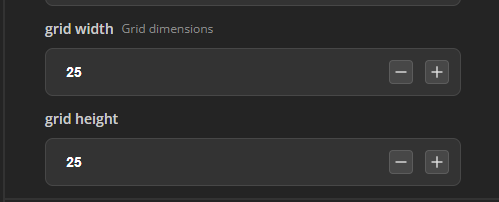
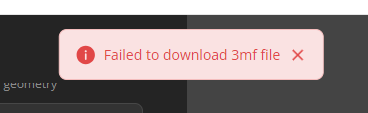
With the model linked below, adjusting the grid width and height to anything beyond 24x24 results in an error stating that the 3MF file failed to download. Based on my understanding, a 28x28 stud size should fit comfortably on the A1/P1/X1 build plate. The tool generates the 24x24 grid model quickly, but 25x25 fails almost immediately.
Could you provide more details or guidance on resolving this issue? Specifically, I’d like to understand if there’s a limitation or another factor at play that’s preventing larger grids from processing correctly.
Right now, MakerWorld’s Parametric Model Maker supports multicolor .3mf export for color() blocks, but uploaded .svg files (svg_file = "default.svg") still lose all their colors when OpenSCAD’s import() reads them—flattening multi-color logos, flags, and crests into a single monochrome silhouette.
Inspired by the open-source colorscad project (by jschobben on GitHub, which pioneered automated color()-to-.3mf/.amf export for OpenSCAD), I built and tested the missing input half of the pipeline—an open-source Multicolor SVG Import Engine (MIT License)—that enables a complete SVG → OpenSCAD → Multicolor 3MF workflow.
What This Adds to MakerWorld Parametric Model Maker
1. Native C++ import() Upgrade (src/io/import_svg.cc)
Adds three backwards-compatible parameters to OpenSCAD’s import():
// Extrude each SVG color automatically with zero overlapping volumes:
color("#E11D48")
linear_extrude(height = 0.6)
    import("default.svg", color = "#E11D48", color_tolerance = 12.0, auto_cutout = true);
color: Filters SVG shapes by fill, inline style="fill:...", CSS classes, or hex/RGB values.
color_tolerance: Groups near-identical shades in web SVGs.
auto_cutout: Runs an element-by-element Painter’s Algorithm boolean subtraction (ClipperLib::ctDifference) so upper SVG colors cut cleanly out of lower colors (0.00 mm² overlap, zero Z-fighting in Bambu Studio).
2. Two Print Modes for Every MakerWorld User
MCS / AMS Same-Layer Mode: Extrudes all detected SVG colors to the exact same layer height (flush inlay or raised co-planar) for AMS / CFS / MMU printers.
Color Embossed / Manual Swap (M600) Mode: Steps each detected color to a different Z-height so single-extruder users can swap filaments cleanly by layer.
3. Drop-In Library (multicolor_svg.scad) & Browser Studio
multicolor_svg.scad: A lightweight MIT-licensed library that could be bundled alongside BOSL2 in MakerLab.
Client-Side Web Studio: Converts any raw .svg (including <linearGradient>, elliptical arcs, and <g transform>) directly into a multicolor .3mf or color-addressed .svg + .scad in the browser.
Requesting the C++ Patch & Source Code
Because the forum restricts file uploads and external links, I’m keeping the full package ready to share directly:
For the MakerWorld / Bambu Lab Engineering Team or any community developer who wants to test or merge the C++ patch (openscad_multicolor_svg.patch), multicolor_svg.scad library, and test suite, please reply to this thread or send me a direct message (DM) on the forum and I will gladly share the complete MIT-licensed patch and source files with you right away!
 )