I have the same problem with X1C during printing ABS. First 1,5-2h of printing looks fine but then it starts skipping steps on X/Y motors. Printer is brand new, it has come just last Friday. Chamber temps reach max 41/42 Celsius. Filament profile is slightly modified Bambu Lab ABS profile. Firmware is newest version 01.08.00.00. I have checked belt tension and clean rods but it doesn’t seem to be the problem. Filament is dry, model is fine because it works on another printer.
If somebody has any idea what is going on please tell me.
Gentlemen, I think the only thing that will help me is a complaint, because I’ve really asked a lot of people and still no one knows. Everyone just has an argument that I should dry the filament. Which of course I did. So I really don’t know anymore. I just want to ask you, how can I add G29.1 to the g-code profile? Thank you!
The G29.1 value edit does not fix this issue.
If you do want to confirm, you can edit the g-code by clicking the edit box next to your selected nozzle in the slicer- there is a tab for machine g-code. if you scroll through that you will find the g29.1 z+{0.00} to edit.
im having a similar issue as this, but after getting tech support help, they suggested i change the toolhead board and lidar sensor to the new v9, this did not help at all and now the printer is making much worse sounds in x/y. i did change my nozzle initially which helped, but now i am suspecting something with the stepper drivers not being sufficiently cooled by the fan. possibly the fan has failed, or it is just not doing its job very well. i will try removing the back cover and putting a fan to blow on the control board, and see if that resolves the intermittent issue. keep in mind for intermittent issues like this, it is probably related to temperature or a bad cable. i could not find any loose ocnnections or bad cables so i assume thermal issue.
I sent my bambulab x1c for a claim and now I’m waiting. He told me that the most common problem is always some kind of cold junction on one of the boards. so I’m curious. I will let you know within three weeks
hey guys, i was having this issue as well and just realized the fan to the side of the control board, that is supposed to be blowing air over the stepper driver heatsink, it does not work at all!! Bambu used very cheap fans for this area so please remove your rear panel, and take a look to verify your fan is actually spinning. it should turn on when you start a print. My guess is the print starts out fine but then especially with high temp materials, the chamber heats up, stepper driver malfunctions, and we get these odd errors. I have taken a spare nozzle fan and attached it to this area and will try a print like this to see if it can finish successfully.
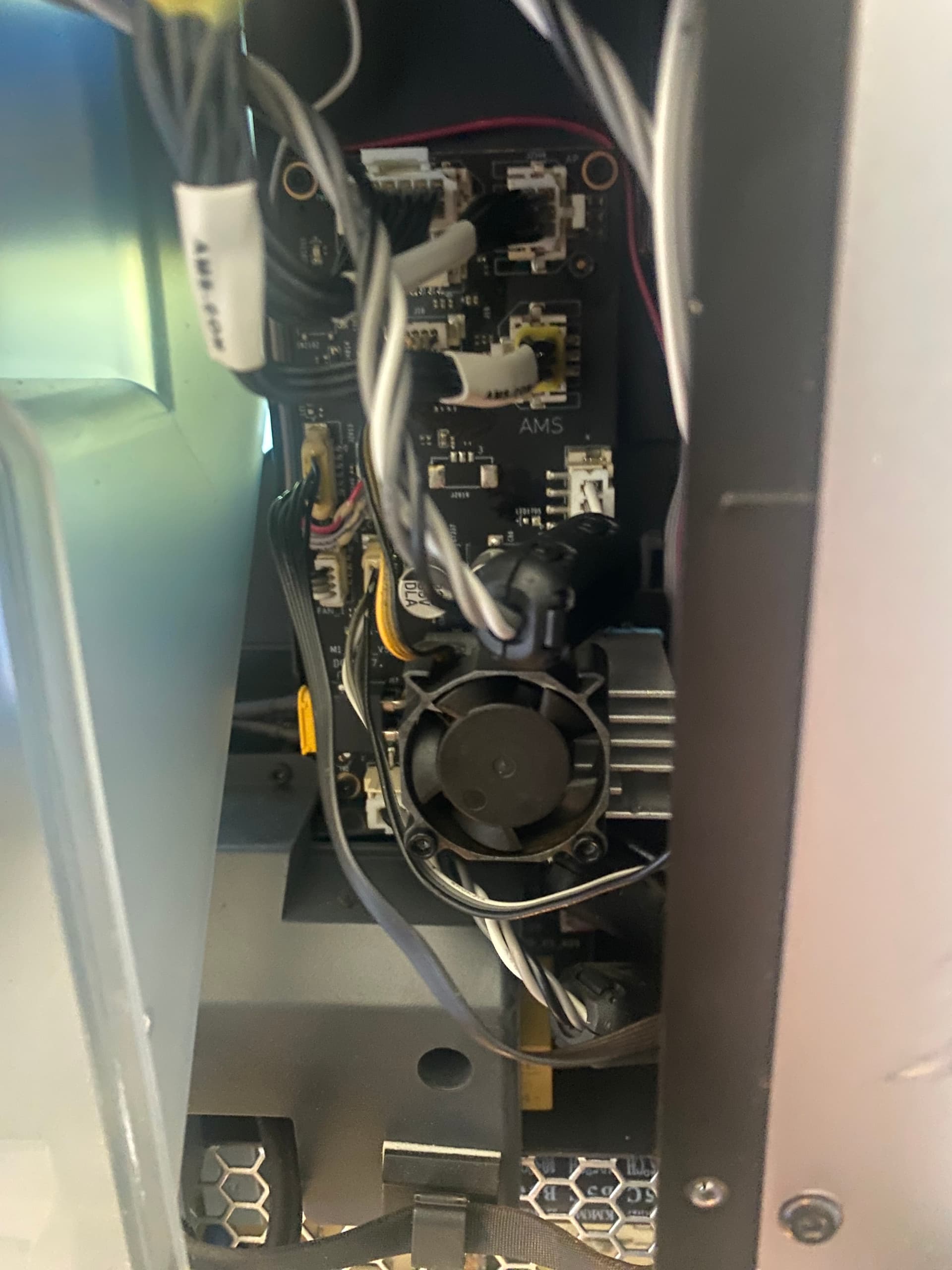
submit a ticket, get a noctua fan and print a mount for it. Either will do. You can also just purchase the fan off the store if youi decide to not submit a ticket.
Are you assuming the fan is supposed to run continuously?
How did you confirm this?
I am having the exact same issue. I was able to print high temperature filament up until last week. Only had the printer for just over a month and now this. Submitted a ticket a few days ago and still waiting for a fix.
I am curious to see if any results came from adding/replacing the fan.
I can’t think of how based on what I know about stepper drives.
I think I mentioned it here already, but replacing the carbon rods resolved my issue with higher temps.
Were you having the same issues as described above?
Yep.
After alot of trial and error, someone posted they had found a direct correlation to the chamber temp and the “crashes”/ spaghetti failures/ XY step loss. I investigated this, and found it to be identical for mine. Any prints that ran long enough for the chamber to exceed about 42c, would fail. If a print stayed under 42C, it would typically succeed, but starting it again with a warm chamber would cause it to fail.
My carbon rods had a few “tight” spots. Hard to tell with the belts on, if you can tell at all. When I replaced the rods, the new one was butter smooth- and my “old” one had resistance/ tight spots in a few places.
Going on 2 weeks I think now, printing ASA and ABS without issues.
Update…after countless hours of troubleshooting I’ve narrowed it down to Filament settings. I was using the default Bambu profile settings that matched the filament that I was using. I noticed when printing high temperature filaments that the print would start out great and then as it progressed the filament would bleed into the next layer wall due to the high chamber temperature and the filament not cooling fast enough based on where the nozzle was placing the filament. Based on the observation I copied the default filament setting but turned on the auxiliary fan to assist with cooling the filament during the print cycle. Since that change I’ve been able to successful print with high temperature filaments.
Hi, any news about the performance with the new rods After more hours? We’ve got a brand new X1E and as soon as we tried printing ABS with the heated Chamber (55°C) i got a massive failure after few layers (X axis completely Stuck)
For the other users: I can confirm that the Chamber temperature seems to be the issue. Its worring that they sell the X1E (same mechanics as the X1C, so same issues) with the Active Chamber heating and then it’s unusable.
I opened a ticket, hoping for a solution.
Carbon fiber should be quite stable under heat ( at least up to ~60° C !) but i am not aure about which kind of bushing are they using.
Do you know anything about?
As far as I know the old Ones were made by brass and the newer ones by teflon or some sort of self lubrificant polymer ( something similar to iglidur by igus ).
Not sure if a replacement could really solve the issue.
In the picture: a simple flow calibration test printed in ABS Will fail on a X1E with the heated Chamber activated (tested >50 ° C) !
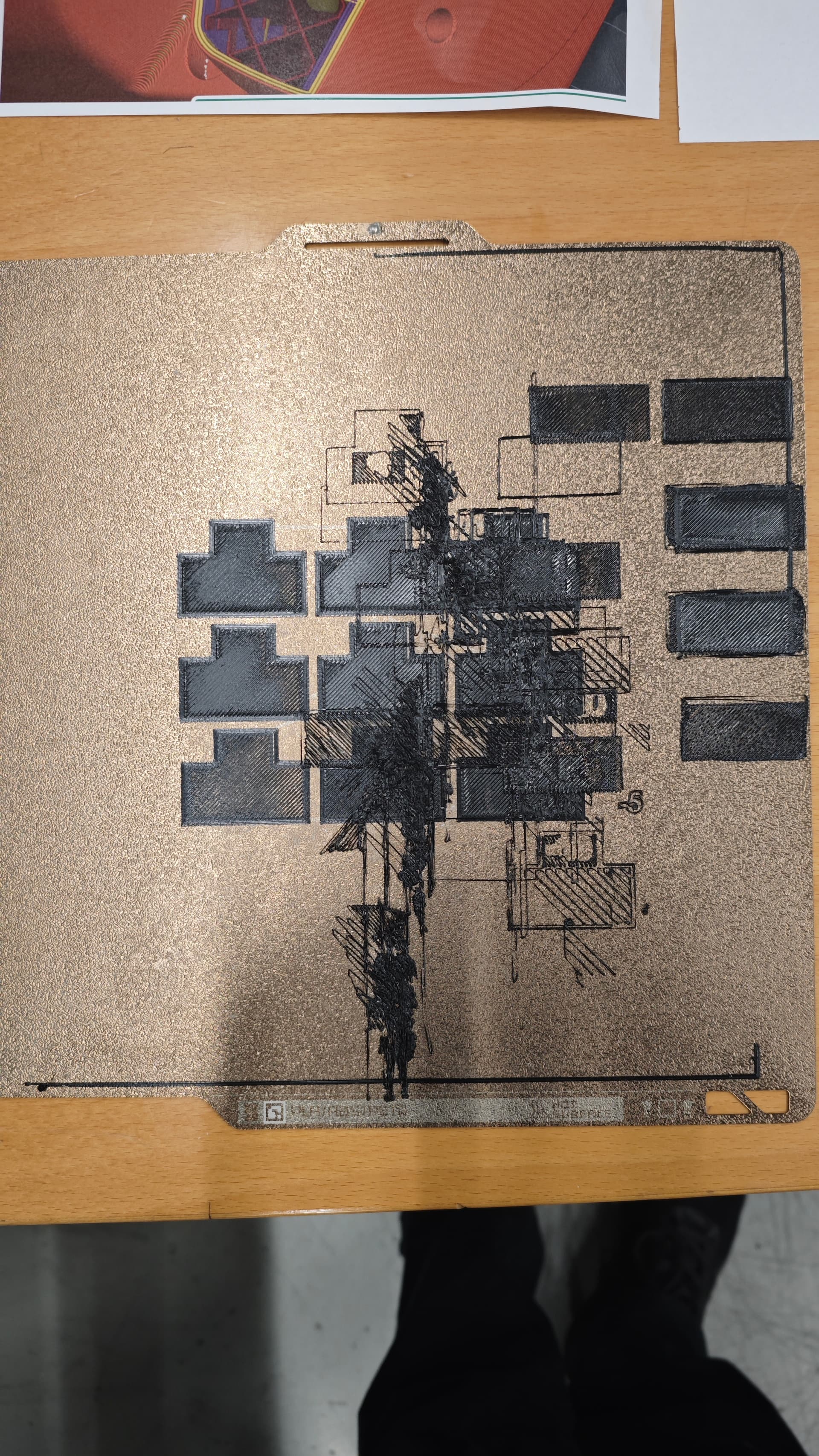
My printer has worked flawlessly since I installed the new rods, changing them resolved the issues I was having for sure.
If you can confirm chamber temp causes print fails- like it sounds you have, I would strongly suggest atleast some disassembly to investigate the rods for resistance/tight spots.
Yes. i have been experiencing the same issue since i first got my printer. was able to print 1 smaller part in PC without issue. Decided to print a larger component in PC, then ran into this issue. I thought it might have just been the head hitting some PC and causing it to skip and didn’t think too much more of it. 3 months later, i am trying to print ABS, of which i witnessed it just jam on a perfect straight piece in the middle of the part. no lifting or jagged bits, was a flawless print until it jammed, and then just started going stupid. I have logged a ticket with Bambu; but my suspicions are the same, either the following i think are the issues:
Stepper motors getting to hot and causing skipped steps (least likely)
Stepper drivers getting too hot and causing skipped steps
XY gantry experiencing thermal expansion and causing the gantry to lock, causing skipped steps and then causing big issues when the printer unbinds (more likely).
what i have done so far to remedy the issue
leadscrew re-lube
Carbon Rod cleaning
put speed into 50% silent mode
cleaned the bed with IPA
done model with no supports
dried filament in Polymaker Polydryer for recommended 6 hrs, then running filament from the dryer whilst it’s on
I’ll keep you all posted on how i go.
How is your debugging goes?
Did you figure out which one is the root cause?
I had exactly the same issue and tried various things but not very helping. How is your debugging goes?
Did you figure out which one is the root cause?
It ended up being an inconsistent X Gantry. The carbon rods weren’t a consistent diameter. I could feel it bind up with it removed from the system. Bambu sent me a replacement gantry and have printed 36hrs straight with no issues
Same issue here. Been printing ASA just fine but was having issues with warping. Decided to heat soak the chamber for a bit before printing. Print was going great until it suffered massive step loss. Chamber temp was up past 50C. XY motors were reading about 75 and 80C for left and right respectively.