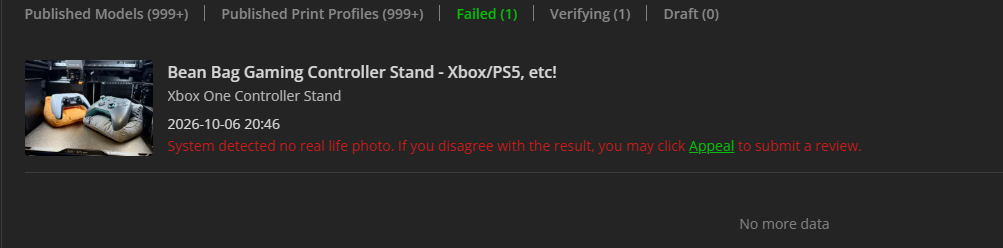
First I’d like to say that I love the fact that we are now forced to add a real life image set as a requirement to each model upload. The amount of garbage AI image cover models has been getting out of hand.
WIth that said though… this is like the 3rd time in a week where I can’t load a model without going through an appeal process because their “system” didn’t detect a real life image. Are you kidding me? Why? Because I didn’t take a s****ty photo and took a second to turn on an additional light for some contrast to show off the model ? There’s gotta be a better way…
@RetroSharky had a good theory the other day - if the device you’re taking the picture with has AI enhancement happening, the AI detection could be seeing that?
that’s a good theory.. but I would expect for it to happen with all the images I upload then.. i use the same phone and upload process every time and the 15 or so models that were uploaded just before this particular one got kicked back worked without issues..
Either way, the appeal was approved rather quickly so I’m not as fired up about it, was just really annoying to get dinged for something ridiculous like this by “the system”
It just happened to me as well. I took pictures with my DSLR, but the model waited 7 days for approval. Then the entire upload got buried, and 20+ hours of Rhino work were totally wasted.
MW’s advice was to only upload images taken with a camera, plus the video (exactly what I did).
Disheartening, to say the least. I submitted it to the Halloween contest, but after so many days it obviously got pushed so far down that nobody will ever see it.
That implies AI detection can actually detect AI. It’s as good at detecting it as it is making the images in the first place - which is to say it isn’t.
A lot of false positives are a natural consequence of AI being used to detect AI, and a lot of the markers are “it looks good, gotta be fake”.
I like this feature, too! But what I find really annoying: If I edit an older model of me, like because I change something in the description, MW still wants me to upload at least 3 real life pictures from this model, although it has been uploaded before these rules were made. I would bother, but if the model is older I often do not have any further pictures. So do you really want me to print it again and take different picures just for being able to change something in the description? This seems nor really fair.
yea the backwards compatibility with existing models seems like a pretty big miss… There were a couple that I wanted to go back to to edit the descriptions on.. not even change the profile, and wasn’t able to without loading a new set of real life photos. I have somewhere north of 1,300 models test printed and loaded.. i’m certainly not reprinting ones I want to update.. a couple of them I just downloaded my existing images and used those in the real life photos upload and it worked out ok.
It’s important to distinguish between AI-generated images and images that have simply been enhanced using AI-based filters. These are two completely different paths.
I know this quite well because I’ve been involved in several studies on the subject and have also spent some time specializing in how such detection systems work, as well as how to get around them. But back to the topic and specifically AI filters:
The reason enhancement AI filters can often be detected is that, whether it’s Photoshop or an iPhone, they all tend to leave a kind of fingerprint behind. An AI detection system doesn’t necessarily have to analyze the actual content of the image. In many cases, it only needs to determine whether that fingerprint is present. That’s why it is often easier to identify images that have been enhanced with AI filters than images that were generated entirely by AI. AI image generators frequently try to avoid leaving an obvious fingerprint in the first place.
Software like Photoshop or the iPhone’s image processing tools, on the other hand, generally have no reason to hide their involvement and therefore embed these fingerprints. The downside is that, without specific knowledge, removing such fingerprints can be difficult. As for how that works, that’s not something I’ll be sharing here.
So the theory is more than reasonable, as it has been demonstrated multiple times before.
That said, I’m specifically referring to images that have been processed using AI-based enhancement filters from applications such as Photoshop or those built into well-known smartphone brands. As some people here have already pointed out, there are also quite a few false positives, because the system is programmed to produce a false positive rather than a false negative.
It’s also important to note that this is not the only possible explanation. However, it can certainly be one of the factors that contributes to an image being identified as AI-enhanced.
Based on that, there are ways to bypass MakerWorld’s AI filter detection by removing anything that even remotely resembles such a fingerprint. The content of the image doesn’t matter initially. To be more precise, it is related to a specific pixel pattern or matrix.
That said, I won’t be sharing those details here. If this information were widely available, it could potentially be used to make almost any image appear as a genuine, unaltered photo and slip past AI detection systems.
Anyone who is interested in the technical details can certainly do their own research, as there is plenty of information available online. For that reason, I’d prefer to keep the discussion focused on how these detection systems work rather than on methods for circumventing them.
And yet, very real photos are being falsely detected as AI on a regular basis. I had more than one person run my own photography through them and insist they have proof that the photos are fake, despite being completely unedited JPGs straight out of my camera. My R5ii is definitely not applying AI processing.
You have to put that another way: Your camera captures the image in RAW format and converts it to JPEG using the built-in JPEG algorithm. A sensor always captures images in RAW.
By the way, this also applies to mobile phones - even though they usually convert them to JPEG right away without asking - but that’s just a side note.
You just specify whether you want the camera to convert the images to JPEG right away.
The question now is more about why MakerWorld’s AI thinks the R5ii JPEG algorithm is AI. In fact, image enhancers are also used with the R5ii when saving in JPEG, just not AI. See the user manual for the R5ii.
One way to check this would be to shoot in RAW, turn off all image enhancements, and then try again.
Of course, MakerWorld shouldn’t set off a false alarm here, but see the first comment: false positive programming.
Just 10 minutes later, and as an addition to my previous comment: one possible explanation is that some AI image generators spam fake metadata tags from well-known camera manufacturers to make an image appear more legitimate. If you’ve embedded similar tags in your image, the AI might associate them with AI-generated content, simply because many people who try to pass off AI images as real photos use metadata tricks.
Even though this approach is often not very successful, it is still a popular tactic among AI fraudsters. Many of them try to fool detection systems by embedding misleading metadata, so anything that resembles those patterns can sometimes trigger false positives.
AI scammers like to embed tags in images; Canon, Nikon, etc. - no need to list them all.
Totalmente de acuerdo con tu opinión, yo hago fotos muy simples y veo por ahi cada foto de espectáculo y la verdad que no soy fotógrafo soy nefasto, pero también me ha pasado tener que apelar por fotos reales no realísimas.
This has been a problem in some form for as long as I’ve been here. They set the position in the new files lists by when the model is submitted - not when it’s approved. So anything that slows that final approval pushes models down the new models list while nobody can see it.
The position should be set at approval and not submission.
I have the same problem.
Even if makerworld is 90% AI generated images, even if all mobile phones use AI for camera, If I list something and use photos taken with my old 2012 Canon 6D, guess what?
This dumb makerworld system reject my photos because cannot find real life images…
It;s just stupid… duno who but for sure makerworld system or the one who make it.
I wanted to add some filaments to the Bill of Materials (BOM) of my existing models. But to do that, I now have to upload three real-life photos.
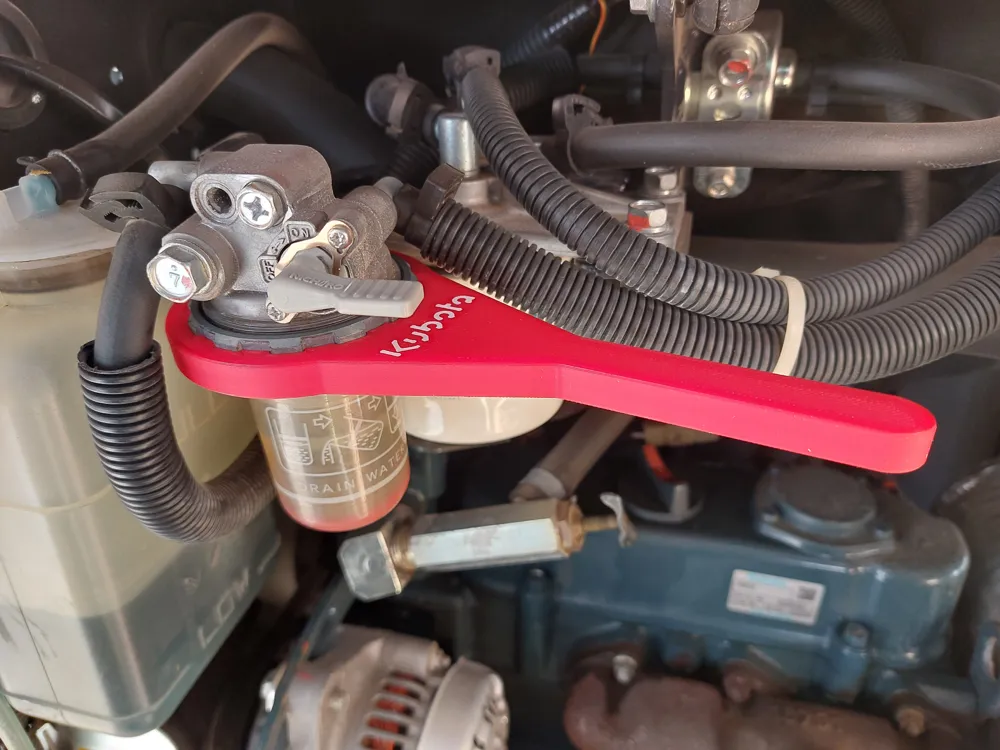
For example, I designed a wrench for loosening the diesel fuel water separator on my excavator. I uploaded one photo showing the wrench in use, which is perfectly sufficient and completely self-explanatory. But just to add some filaments to the BOM, I now have to upload two more photos.
Well, the rules are clear – at least three real-life photos are required.
So I guess I’ll take my wrench and shoot 100 photos of it:
“Wrench and me”, “Wrench with a flower”, “Wrench with a beetle”, “Wrench with an excavator”, “Wrench on a trip”, “Wrench hanging out with other wrenches”…
Let’s turn this into a contest! #RealLifePhotosContest
The winner will be the user who uploads the most real-life photos of a single model!
I hope the MakerWorld team realizes just how absurd this requirement is, especially when simply editing existing models that were published long before these rules were introduced.
Btw, AI suggest name for this photo series as a “100 Shades of Wrench”