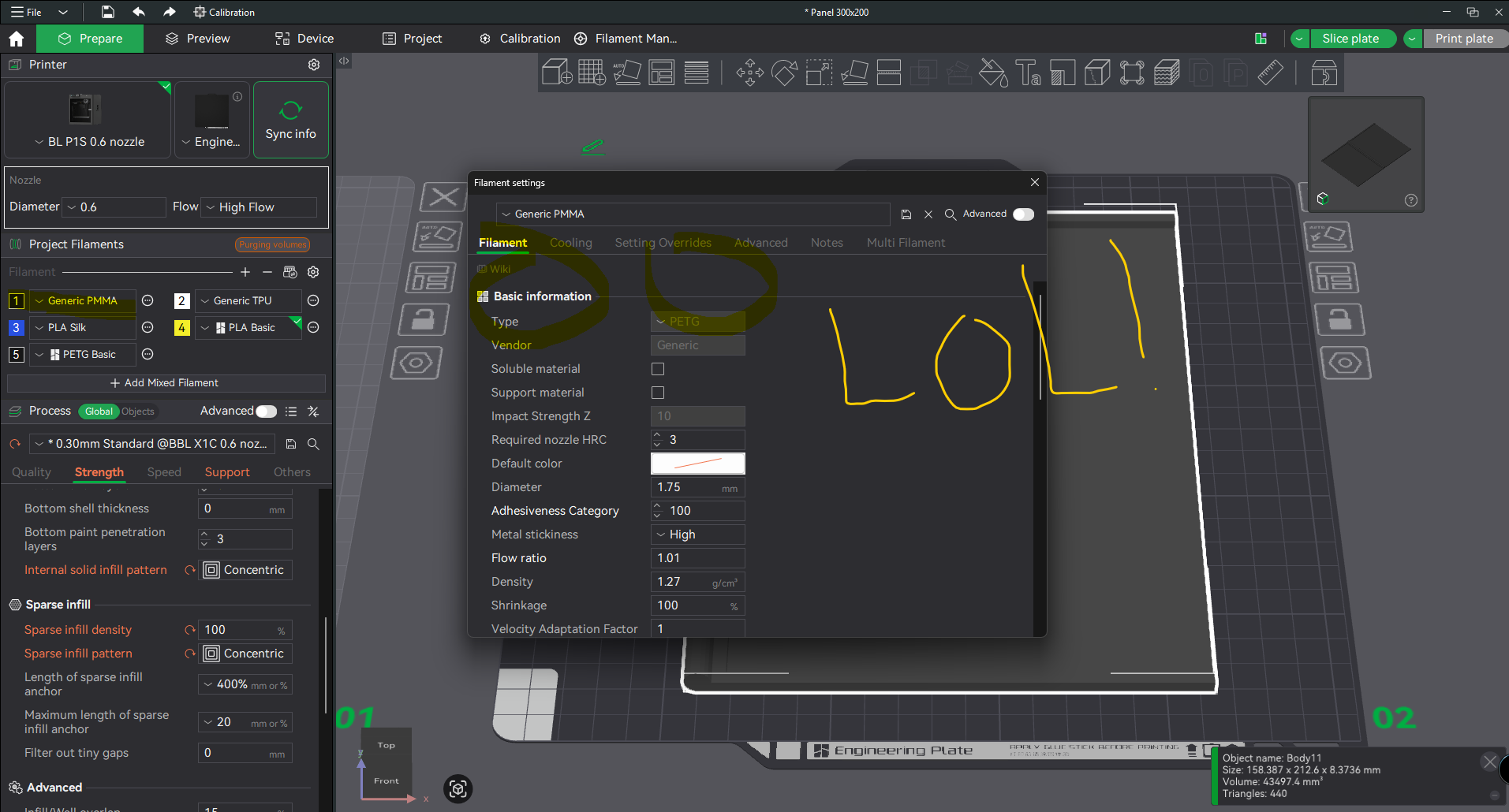
To High Flow or not High Flow! Yes but only with BL filament profiles!

Hi All,

Did you noticed that if u want to set separate settings for Regular and high flow you have to build your profiles based on Bambu Labs filaments!

All the others filaments do not have the right to use regular/high flow settings maybe because they are not wordy of it :stuck_out_tongue: or am i missing something?

BL filament based profile:

Generic filament based profile:

Thanks

Mariana

I can’t confirm that as long as you also select an “HF” or “High Speed” profile.

In your example, you didn’t select an HF/High Speed profile. It makes sense, after all - why shouldn’t a non-HF profile have that option?

  • Whether it’s generic or Bambu isn’t the deciding factor; both offer this option, as long it’s “HF” or “High Speed”.

Here are two generic profiles, prepared in the slicer by bambu - one HF and one High Speed - both of which have these options:

Because non-HF filament can’t keep up with the flow, and Bambu just wants to prevent you from choosing the wrong one - which is what you did in your example?

Hi Retro Sharky,

Glad u point that out! I see u have 3 profiles one of witch i need (E3D High Flow) to separate from the High Flow ones.

Now i see! U have the P2S and those profiles are printer dependent. Im P1S user! As soon as i installed the p2s those profiles show up but ONLY for the P2S!

Thanks for the help.

Mari

Hi again Mariana,

After our last exchange, I looked into that situation some more. At least part of the issue definitely seem to be the Generic profiles for at least some printers, like the P1S. For others, like H2 and P2S, the generic profiles do reflect the different nozzle types.

I thought a workaround would be to go create a custom filament profile in the “Custom Filaments” setup window (Set filaments to use → Custom Filaments) based on a generic profile, but that doesn’t work either (the resulting profile still doesn’t have the nozzle flow choices).

I’m sure the P1S generic profiles could be fixed… but it may be simpler to just use the BL profiles as a base instead. Or try to get the P2S profiles to work for P1S. If you resort to editing JSON files manually, the important parameter that defines which printers and nozzle sizes a profile is compatible with is named, logically, compatible_printers.

Cheers,
-Max

PS. I see from your edit you figured that out already. :+1:

Hi Max glad to ear from you again,

Yes I did and i also did find a curious thing. Even editing the Json files u cant put the same type of profiles of the P2S on the P1S, but as a famous sneakers brand says “Impossible is nothing!”

I just don’t get the why. The only difference i see from the p2s for the p1s is the fast nozels change and maybe more area to melt plastic in the hotend. Off course the heated AMS. (Thing that i find useless)

But i might have a business idea I’m going to propose to BL if they are up to it. I will let u know if they even care of what i have to say. I had to go for another printer to high speed print the panels u saw on the other tread. Klipper printers are is still the most tweakable for high speed prints, although U must know what u are doing or u risk to damage boards, extruders, gantry’s etc etc.

All the best

Mari

To me, the most funny part is, that the logic which filament types should be printable with a HF nozzle is screwed. In my experience, standard filaments benefit the most from a HF nozzle, while HF filaments can be printed reasonably fast even on a standard nozzle. And why should BambuStudio prohibit printing any filament with a HF nozzle? You can also print slowly with a HF nozzle. And you can setup very high max flow in a profile for a standard nozzle if you like to. Restricting useable nozzles really doesn’t serve any purpose here.

Hi Alex,

They don’t “prohibit”. They just make it difficult to put the dialing’s in! U can use the config by filament for regular and high speed if u just use the filament BL profiles make a copy and then tweak like you want, check my printscreen.

Cheers,

Mari

Yes I understood that, maybe prohibit was a bit to extreme. But it is still strange why they don’t offer the different nozzle tabs for every filament, no matter the origin.

Looks to me like “just” an oversight. The P1S generic profiles simply haven’t been updated to account for nozzle flow differences, or even exist in many cases. And no mention/support for the E3D nozzle variants at all.

Deep dive:

If one looks at the available filament presets (in user config folder or just the app distribution/source), there are only 2 “Generic” profiles with “P1S” in the name – Generic PETG HF and Generic PC. There are some more with “X1C” in the name, but which list P1S in the list of compatible_printers property of the file.

With P1S printer and 0.4 nozzle as the project machine, selecting any of those filaments (with specific P1S/X1C profiles) to edit will show the regular/HF flow selectors up top.

However selecting a Generic type for which there’s no specific P1S-compatible profile will revert to the observed behavior of (apparently) only having one setting for all flows. In such cases the slicer defaults to using the Generic _____ @base.json profiles as the starting point for all filament settings.

Notably, there are no P1S-specific profiles for any PLA type besides “Generic PLA High Speed” (for X1C, with P1S listed as compatible).

Looking into the profile contents, we can observe that the ones which have P1S-specific configs (and present regular/HF choice) all have the configuration directive:

    "include": [
        "fdm_filament_template_direct_dual"
    ],

Whereas the @base profiles do not.

As one might guess, this includes the contents of the specified file (plus “.json” extension) as if it were part of the profile with the “include” directive. The included file is just more filament settings which are shared by several profiles, and in this case “dual” refers to flow types (not number of extruders), and sets the profile up for multiple flow types, specifically the filament_extruder_variant property in there:

    "filament_extruder_variant": [
        "Direct Drive Standard",
        "Direct Drive High Flow"
    ],

If we look at any of the “Bambu” filaments, there’s a P1S-compatible profile for all of them (either directly with “P1S” in the name or listed as compatible in “X1C” profiles).

Then there’s the E3D nozzle… if there’s one available for the P1S then it seems to be a neglected child. I don’t see it in the “Flow” choices for that printer, and none of the BL filament profiles list that as a choice for P1S, although they do for P2S.

For reference, if we look at any of the “P2S” profiles, we’ll see they

    "include": [
        "fdm_filament_template_direct_dual_e3d"
    ],

And the contents of the included file have

    "filament_extruder_variant": [
        "Direct Drive Standard",
        "Direct Drive High Flow",
        "Direct Drive E3D High Flow"
    ],

Some of this info becomes somewhat practical if one is willing to edit/create profile config files manually. Syntax and care are important, but ultimately they’re just text files – make backups and such. Unfortunately we have to restart Studio for it to pick up any manual changes/edits.

I wouldn’t “force” the E3D choice onto a P1S filament profile manually since that’s not an option in project settings when using P1S (the slicer will likely never use those extra properties anyway). Although the really adventurous could look into the “machine” config profiles’ printer_extruder_variant property… :wink: Doing a side-by-side compare of P1S and P2S machine configs can be interesting, in any case.

Cheers,
-Max

Wow, thank you for that in-depth analysis! You probably are spot on. And I think we can forgive BambuLab for not carrying over highflow nozzles 100% into 3rd party profiles for an old printer.

And the fix of using BambuLab profiles as a base for your custom profiles also isn’t a big issue. I have done that from day one because I didn’t see any advantage of using the generic profiles.

P1S Old Printer…im offended. ;).

The P1S is still the most sell printer from BL and the p2s for what i’ve read as some strange “Issues”. Nevertheless @MaxThreeD Wow to the 2xpower for that deep dive into the profiles. But as someone already point out in other treads half the performance of the printers are profile related, just like all the others.

For what is worth I’m still fond of the P1S, it is a robust printer printer and the Queen of print farms all around the world.

All the best,

Mari