Ok what is Silent Mode? Is this similar to Ludacris speed 
Is that in the SW settings or at machine?
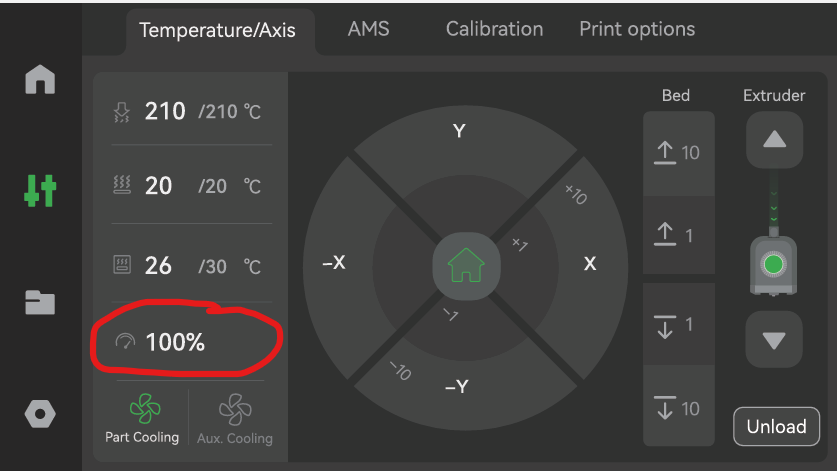
What does this do - automatically slow down everything providing a benefit to allowing TPU85A to flow better?
Ok what is Silent Mode? Is this similar to Ludacris speed
Is that in the SW settings or at machine?
What does this do - automatically slow down everything providing a benefit to allowing TPU85A to flow better?
I did all of this. I think my issue is with speeds and temps.
sorry, I’ve mixed up left and right. Right nozzle for TPU (with the high flow kit) and left nozzle for PETG.
Yes, Bambulab Studio and factory preset for TPU.
So I never saw him print TPU85A. We discussed the different fixtures we print for production. He setup the TPU85A the way it is recommended by Bambu setup - external spool fed into tool 2. We never discussed gcode settings. When he left and I tried printing his file I got an error - gcode was corrupt. Even his backups were corrupt - so sadly I don’t know what else he changed for settings. I did manage to TM him and asked what he did - he said no changes were made.
He managed to print maybe 10-15 parts before I came onto the job. So somehow he managed to pull it off. I did everyhting he did - even bought the HF TPU nozzles.
I think somewhere between Silent Mode suggested (which I suppose slows everything down) or making specific changes in gcode for temp and speeds will hopefully solve my problem.
So you set this prior to print. No changes to speeds or temps within gcode?
Your display looks different than mine. I’m using H2D and on 1.03. If you are a different system - why does displays look different from one machine to the other? I get some machines have different capabilities/settings.
I would just load it in bambu slicer with 85a preset selected, then set the printer to silent(50% speed) on the printer screen.
Make sure its very dry since the other guy had stringing problems.
After this, upload a picture of the print
No, I agree - thanks for the advice. I did see this mentioned online - but sometimes the nomenclature is off - and I have trouble finding exactly where to input the stuff I find on the nets.
So Max Volumetric Flow by editing the material within Bambu slicer - change this here correct? Any changes to temps - someone stated when they changes max temp to 250 (from 200) they got better results - I’m also aware to high temps can cause other issues.
Any chnages to speeds within the slicer settings? And if yes please type out the correct name of setting - there are sooooo many settings.
This is to anyone who is reading or responded:
Why is this so hard. I thought Bambu would have the settings nailed down. And yet when I see issues with ABS most respond with Bambu settings are crude - do this turn off that - etc.. When I setup TPU at the machine it tells me to feed the TPU from an external spool and into head 2 - then it warns you again and send you to their online web setup - that says something entirely different. And yet says nothing about changing any other speeds or settings.
Yes myself - Bambu Slicer
Max volumetric speed or flow? In the Edit Material section for TPU High Slow it is written as Max volumetric speed and it’s 4.8mm3/s. so go to 2.4 mm3/s?
Bambus TPU settings are not that bad in my experience, and I print a lot of it, but what people rarely read is the accociated wiki.
You seldom see someone set up a low friction way to get the filament into the machine before having issues, often just thinking “its probably good enough”.
Especially for 85A its a bit more involved than just throwing it on the external spool holder.
85a is at the very limit of what Bambu says is possible. You need all variables to be perfect. Least drag possible, cold pull, very dry filament, slow speeds(try 2mm3/s). If all else fails, try 90a or add the tpu assist feeder.
The a1 series is probably better for this. I know you dont want to hear that.
So I read this and this entirely about setup and that’s all.
I read more specific setup recommendations from TPU suppliers. I think physical setup is important but I half expected some other recommendations. Even maybe providing a setup file that can be imported into Bambu Slicer would be helpful.
So this is what I found on the Nets. Again I think it’s temps and speeds that are my issues. Just selecting TPU85A and going with standard settings that Bambu reocmmends I think causes issues. For those that just set and forget and got TPU85A to print - I think it’s a miracle
So I’m going to ask the question - HOW DO YOU SET FAN SPEEDS? People have told me to maybe turn off fan speeds - even later on in print - and yet I can’t find that in the Slicer - is this performed at the Machine? How do I put in a fan curve - like full speed at start - 1/2 speed middle and off at end?
Here is what I found:
TPU 85A Slicer Settings Guide
TPU 85A is a very soft, flexible filament (Shore 85A) that requires slow speeds, careful temperature control, and often direct drive extrusion for best results.
Recommended Slicer Settings
Nozzle Temperature
Bed Temperature
Print Speed
Acceleration
Infill & Walls
Cooling
Retraction
Layer Height
Hardware & Preparation Tips
Common Uses
Summary: For TPU 85A, aim for ~220 °C nozzle, 40 °C bed, very slow speeds (50–25 mm/s), no retraction, and a 0.4 mm nozzle with direct drive. Adjust based on your printer’s melt zone length and environmental conditions.
85A is not rocket science either, yes, you need to take things into considerations, but with the proper feeding (in essence a TPU assist module), you can go a bit softer than that.
Saw a post from someone running close to 60A in his P2S using the module, thats probably a stretch for most (pun intended), but it shows that with the proper setup and tuning 85A is not the limit.
For TPU in the softer ranges most of the hurdles are physical, not settings per se. The stock profile is a fine starting point.
That AI summary also contain so many dated refereces that I would take it with a grain/bucket of salt. (As is generally the case when it comes to AI and 3D printing, a fast evolving field with widespread information that is either outdated or popular misconseptions)
I hear you. I was the first person to trick the h series into printing 85a. I was the first to print tpu in both nozzles too.
I bet its wet filament expanding in the nozzle and running slightly too fast.
 &
