how do you handle non-bambu filament from the ams?
Sadly, in the actual version, it’s not possible because these got no RFID chip, which is important.
Hi, I like your app very much and works perfectly with ams 2 pro but with ams lite it keeps resetting my spools in spoolman with ams lite if I switch it out. Is there a way to just turn that future off so it does nothing when pulling in info from ams lite?
That’s a good idea. I will implement this when I’ve got some time to work on it.
Since November I’ve got some other private projects which need my full attention. Since then I’ve got no time to work on this project.
I will try my best to get some time and also add this feature to the project
That will be awesome thanks you. 

Update: 1.3.0 is almost here, and I could use some testers
It’s been a while since I last posted here, and a lot has happened in the meantime. Version 1.3.0 is not out yet, but it’s close: the dev builds are public and the last big piece, a completely new way of tracking what a print consumes, is finished and running.
If you want to try it before the release, the dev image is:
ghcr.io/rdiger-36/bambulab-ams-spoolman-filamentstatus:dev
The new G-code mode
Until now the service booked the remaining filament from what the AMS reports. That number is an estimate: the printer counts how often the RFID tag passes the reader, so it drifts, and it only exists for spools that have a tag at all.
1.3.0 downloads the sliced file from the printer instead and books what the print actually used, purge and prime tower included. If a print is cancelled, only the part that was really printed is booked, worked out from the layers each filament was used on.
The part I’m happiest about: third party filament finally works. Prusament, Sunlu, Elegoo, whatever you like, and spools on the external holder too. Since those carry no RFID tag, you assign them once in the web UI, and the assignment picker does what it can to make that quick, suggesting the spools that match the slot by material and colour and warning you if the material doesn’t fit.
The old behaviour hasn’t gone anywhere. Turn on Legacy mode in the settings and it works exactly like the earlier versions.
The new settings tab
You no longer need environment variables to configure the container. Start it with your volume and port, then set everything up in the browser:
- add and edit your printers
- point it at your Spoolman instance
- restart the container, download your logs as an archive, plain or anonymised
- toggle every option, Legacy mode, “use the AMS slot as the location in Spoolman”, and the rest
Environment variables still work, they’re just deprecated. Nothing has to change for an existing setup.
Privacy
The project has been open source and free since day one, and that isn’t changing. Everything runs on your own machine. It talks to your printer over the LAN and to your Spoolman, and to nothing else. No account, no cloud, no telemetry, nothing calling home. It also doesn’t care how your printer is bound: cloud, LAN only and developer mode all work, since it only ever talks to it locally.
Where I could use help
This is really why I’m posting. 1.3.0 is on its 7th dev build and nearly done, but the only hardware I own is a P2S with two AMS 2 Pro and a spool on the external holder. Everything else is tested in theory. So if you have any of this, I’d be grateful for a report:
- X1 or P1 series
- A1 or A1 mini with an AMS Standard or 2 Pro
- AMS HT
- AMS Lite (read only in legacy mode, and I’d like to know how well that holds up in practice)
- more than one printer on the same instance
Anything helps, and it doesn’t have to be a problem. “Ran fine for a week” tells me just as much as a bug report. If something does go wrong, the settings page has a “Download diagnostics” button that collects the logs and your configuration in one file, with an option to anonymise addresses and serial numbers first.
Disclaimer
I’m a hobby developer and I started this project on my own. For the 1.3.0 rebuild I worked with an AI coding assistant. I know that isn’t everyone’s cup of tea, and I respect that. For me it’s a tool: I read and understand every line that goes in, and I still write and debug plenty of it myself, because that’s the part I enjoy. It just means work that would have taken me a year or two next to a job took weeks instead.
Thanks to everyone who has tested, reported and suggested things so far. A good part of what’s in 1.3.0 came out of exactly those conversations.
Not bad.
I had some problems first to install it together with Spoolman on my RPi5 using portainer, but seems all good now.
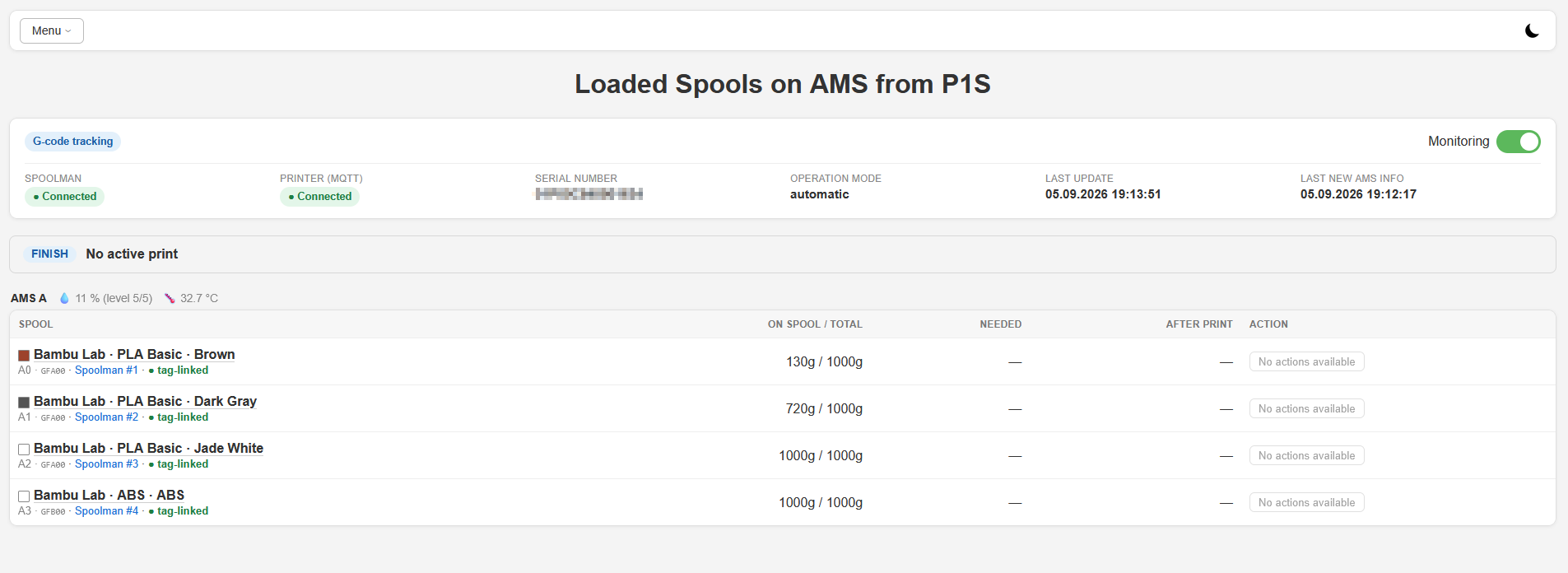
The only thing, every now and then my external spool assignment with a small TPU spool disappears and after some time it shows up again:

But in Spoolman it looks all good.


Thanks for creating this bridge to Spoolman.
Thank you for testing it, I appreciate it.
Would you please open an issue on GitHub?
It would be awesome if we could work together on fixing this bug.
What problems do you have to get it ready to work?
Maybe I could be more precise in my documentation.
I will open an issue on Github.
For the installation, the two (bambulab-ams-spoolman-filamentstatus and spoolman) didn’t want to talk to each other. I could pin spoolman from the console of bambulab-ams, but it said it couldn’t connect.
It is solved now, I think it had to do with me messing up with the ports when I started the containers from Portainer.