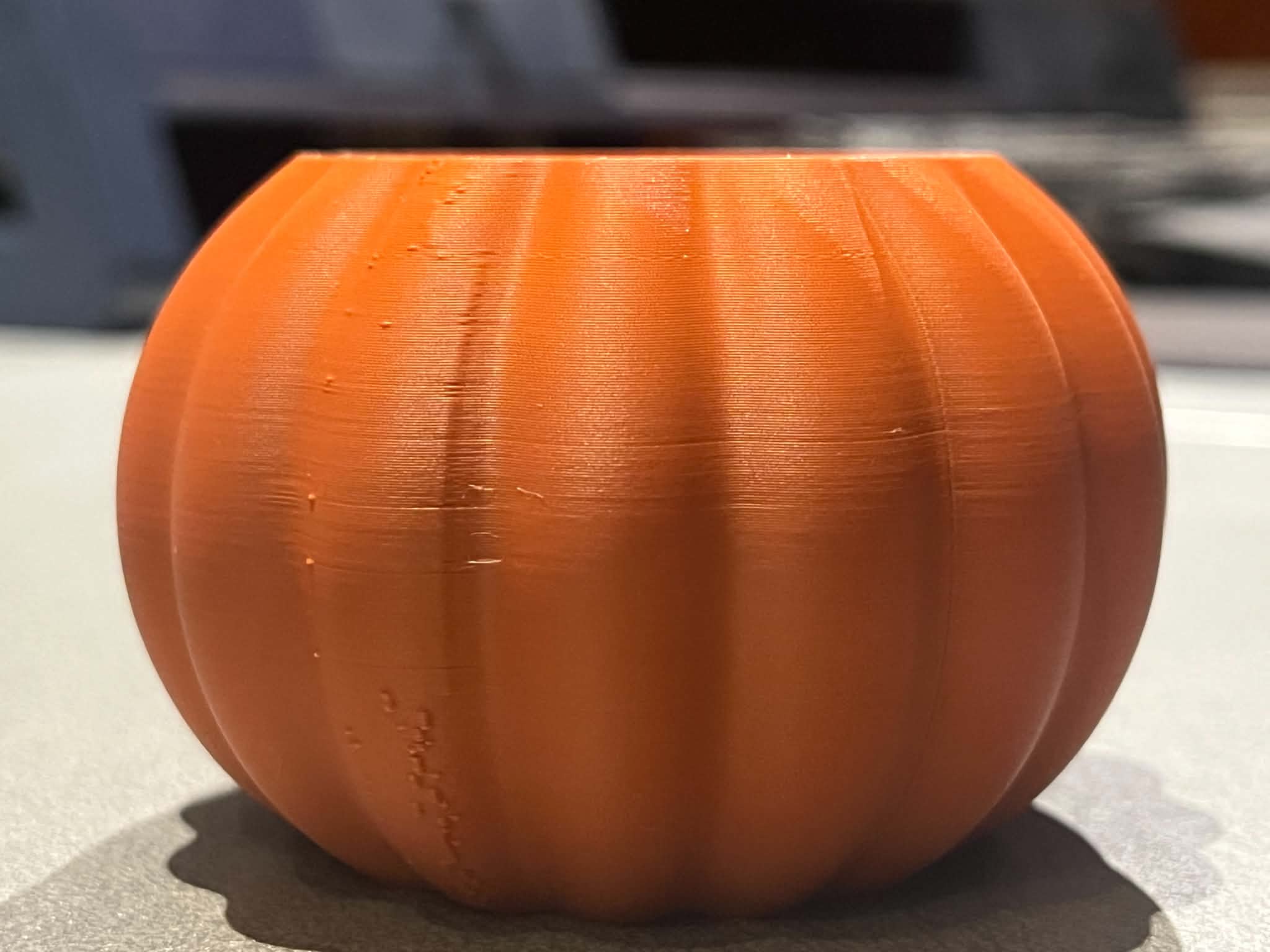
I have these zits occurring at the outer wall of my PLA print. They are a bit away from the seam (which is just an aligned vertical curve), and are all scattered around a general curve going upwards. Every print they occur at the same area. I simply cannot find a way to explain them, as the filament is also sufficiently dried. I tried this one thing I found where I modified the G-code to close the power loss recovery setting, but this did unfortunately help.
To me that looks like water in your filament. Might not be moisture but bet it is. I also bet if you listen close you could hear little pops and sizzles but maybe not.
Zits get caused by water vaporizing in the extruder and pushing out extra plastic. There’s not much else that can cause those kinds of pressure variations that I can think of.
If you pop your filament spool in a ziplock bag with a hygrometer (no desiccant) and seal it, in 30-45 minutes you can read the “humidity value” of the filament which can put a number to whatever moisture content your filament has. Bet it’s above 30 if you try it.
If it is, Bambu has a good wiki page on filament drying.
Also, if you are basing the filament being dry as being fresh from the shipping bag, filament can be anywhere from fairly dry to way too wet to print fresh from the factory bag.
Bambu PLA matte. I also have it near the exact same area using a different spool/color of Bambu PLA matte for the same model. In total now I did three prints of this model with two filaments and the zits are always near the same area. Dried using the Polymaker drying recommended settings for PLA, though I most often do not even dry my PLA in never have issues since I store them and vacuum sealed bags with dessicant.
Recently had something very similar with Bambu PLA Galaxy though on a different model…
Can try and dry more but I why would it always be near the exact same location if it were wet filament? Apart from this area, I do not see other flaws.
I see almost no path crosses near this area in the slicer.
The maker of the model unfortunately does not allow to share the digital files.
Since you’ve seen similar defects in the same region with two spools, a controlled comparison seems more useful than changing several settings together. First, try the timelapse-off suggestion while keeping everything else unchanged. If the bumps remain, rotate the model on the plate and compare where they appear relative to both the model and the printer. That won’t prove a cause, but it may help narrow the next test. You don’t need to redistribute the licensed model: screenshots of the affected layers, travel paths, and relevant settings could still help. What Studio version, layer height, and seam settings were used for these prints?