Look at this post. @RetroSharky explained the one you need to get if you want the free one.
That is quite recent knowledge, judging from the desktop icons you are sharing.
Definitely also a lot of simulation 
Have you ever touched “Synchronous Modeling” and/or used “Convergent Modeling”?
Curious for the Catia counterparts.
Lol, Yeah. The licenses have not been active for a few years. But I can still open my old files with them if I disconnect from the internet.
I have never had to. Sadly, I have never had any excuse to use those tools.I prefer to not work with imported geometry.
For me, there is only one recommendation: the hard way — Blender.
Even though I use commercial software, I still rely on Blender very often, because in certain areas — especially mapping — it is simply extremely strong.
The chance of making it at BambuLab or by 3D models only is probably about the same as an influencer earning more than pocket money: roughly may 0.01% just to get a bit more than pocked money.
Whether that really matters, I don’t know — and I don’t need to know.
Personally, I am glad to work exclusively with commercially usable software.
I have always followed this approach. From the very beginning, I worked with Blender, so all data remains safe, reusable, and fully cleared for commercial use — there is no discussion about this.
As for 360°, I can’t really judge. I was trained on Inventor directly through Autodesk, and that background still shapes how I work.
That said, I sometimes have the feeling that once something goes online, it is no longer truly private. It may become public — but honestly, I don’t really care, because I retain the commercial rights to the CAD output anyway 
Then you must have downloaded the wrong version. Take a look at the picture — there’s a large red arrow!
There is a free personal version which lacks some features that professionals need, but which can perform all the basic functions required of modern CAD software. Disadvantages: You can only work on ten projects at a time, although you can save more.
You downloaded the professional version, which you can only try out for 30 days and then have to pay for.
That’s why it’s important to choose the right version, as mentioned in the post and clearly visible in the picture. I really can’t describe it any better than with a picture.
I agree when it comes to figures. Bambu Studio, for example, always creates flat surfaces when cutting, while Blender can create any shape. Blender is almost unavoidable when creating 3D figures, as only Blender can create proper joints, i.e., joints that can be used to cut and glue the figure together.
There is also a tool or add-on for Blender that I use all the time to automatically correct common errors. I now find it essential for 3D printing. It saves a lot of working time. Especially if the 3D model has gaps or there is any junk inside the model that should not be printed.
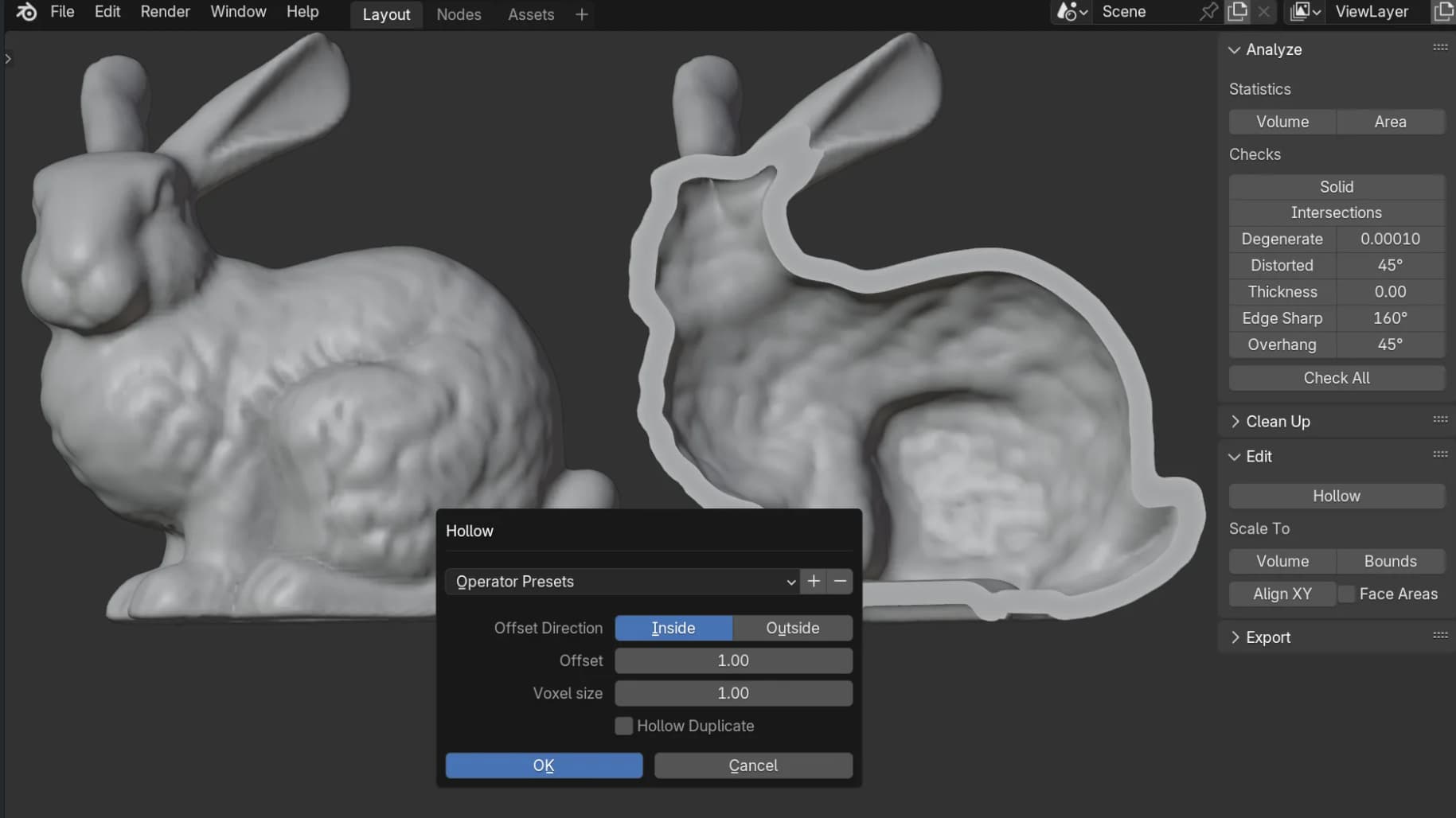
Analyze
- Calculate mesh volume and surface area.
- Check for bad geometry and fix it with Make Manifold.
Edit
- Create consistent thickness for complex shapes with Hollow tool.
- Rotate model by aligning selected faces to the print bed.
- Scaling tools to fit your model to specific boundaries or volume.
I use the free version of shapr3d on my ipad and it works very well
I like OpenSCAD. As it’s Opensource, I can be sure I’ll still be able to use my files in twenty years. Not so with Autodesk …
Just so people won’t be scared away- one doesn’t need to write scripts in order to use Fusion, even though one can. The interface is graphical. One can become quite good at it and accomplish a lot, including using parameters, all through the user interface.
One can only have a max of 10 editable projects at the same time. But I have never found this to be a problem. Each design is in its own project. After I finish a design, I would make the project read-only.
For a team that has to work on multiple designs by multiple users at the same time, this may be a limitation. But then a work team should not use the personal license.
That’s exactly how I do it! I now have lots of projects and I’ve never had a problem with this approach. I think getting professional software for free with this restriction is a good compromise, as it only really affects large companies.
We can even earn money with it, which I think is great. Sure, up to a certain limit. “A hobbyist user must generate less than $1,000 USD in annual revenue, using Autodesk Fusion for home-based, non-commercial design, manufacturing, and fabrication projects.”
That’s what I would like to see from Solidworks. There is a kind of free version, but it’s extremely complicated. It doesn’t run on your own PC, but entirely in a web browser in the cloud. You can’t access the data nor projects at all. If they then think you’re not worthy, i.e., not a potential customer, then you won’t get it extended. You’re basically forced into meetings / phone calls with there agents, otherwise it won’t be extended.
And, before anyone misunderstands me, this is not about obtaining professional software for free, but rather about recommendations for teachers, beginners and education in general. Of course, this also applies to companies that want to change their workflow.
Fusion is great but gives me serious bad corporate vibes. Always online, cloud-leashed, Autodesk constantly buying up and consuming any competition for sale, limiting features, etc. I’m learning it but not internalizing it.
I know people scoff at openscad, but it’s awesome if you have a programming background. You do have to massage it quite a bit to get fillets/chamfers which is my only complaint. IDK who minkowski is but he’s the bane of my chamfer’s existence.
Guess I’ll throw my hat in the ring for FreeCAD, which is a free open source option. Not as refined as Fusion360, OnShape, or other commercial software, but it’s definitely a viable option since version 1.0 was released. I sometimes switch to Fusion360 since it’s so popular, but I usually end up back with FreeCAD. FreeCAD definitely has a much larger learning curve, but it’s not something you’ll ever have to worry about licensing, artificial limitations, or having to deal with cloud shenanigans.
There’s a bunch of tutorials out there on Youtube for Fusion360, so it’s probably the easiest to learn. But if you are interested FreeCAD, I’d recommend this Youtube channel for some great tutorials: https://www.youtube.com/@MangoJellySolutions
Blender if you are doing organic artistic models, Onshape free, Freecad or Fusion 360 personal for parametric stuff.
I second this.
If not that I started with FUsion360 years ago and stuck with it, I rather ditch win11 and jumpship to fedora or some other flavour.
All cloud-based stuffs are just BS, whereas greedy big corps want take control over you and squeeze more data from you.
If you start fresh, I suggest to go with SolidWorks.
For now, I run fusion by pressing: [Win] + [F] + [U] + [Enter]. That is how I feel about fusion, a big F U.
Autodesk’s Fusion uses the same underlying 3D modeling engine that AutoCAD uses, with AutoCAD being the premier CAD program. There are those who insist that organic shapes can’t be created in Fusion but that is not true. The Forms section in Fusion allows one to create any shape one desires. It takes practice to do it well, but it can be done and becomes intuitive over time. It has the advantage that one can have straight up CAD modeling and free-form modeling seamlessly integrated into one model. One can even use Fusion’s joints to create poseable characters.
While most meshes use triangular faces, Autodesk uses four cornered faces which complicates conversions from one type to another.
It should also be pointed out that with each update, Fusion has been moving in a direction that aligns with Bambu Studio. For instance, one can create a model with parameters in Fusion which will allow end users to select parameters and print models via MakerWorld’s Parametric Model Maker.
Minkowski is the guy who developed the mathematical framework that Einstein used to develop his relativity theories. Where space and time are malleable.
Although these are valid arguments, some people are forgetting that the question was specifically about free software. I think some people are losing sight of that. Unfortunately, this software is not suitable for beginners. It’s more appropriate for a later stage, once you have enough money.
The only way I know to get SolidWorks for free for a year is through a university course or training programme - and even then, it’s only for one year. You can hardly call that free when you’re not working during that time. You also can’t earn any money using the software / student license.
Otherwise, the smallest version costs 3.480 € a year. => Edit: CincinnatiDesigns pointed out to me that another version was probably meant, but this was not clear from the initial comment; see the following comments.
No one that is recommending SolidWorks is recommending the commercial versions.
The maker version is 48 USD.
The student version is 60 USD but comes with certification vouchers that equal a 240 dollar value.
They have sales every other month that drop the price by 50 percent.
It was $10 for black friday.
SW Maker allows you to earn up to $2000 per year.
Perhaps this should be mentioned in the first place, as it is not apparent from the comment I quoted. I think different topics have been mixed up here, or people have been talking past each other. My comment referred to this one user only. Of course, the argument remains: it’s not free.
Edit: I added this to my previous comment to avoid any confusion. Thank you for pointing this out. Of course, I don’t want there to be any.
Counterpoint, though - Autodesk added MeshMixer functionality to Fusion this summer and has been adding other features over the last few years that I’ve been using it.
Not sure if all of MeshMixer’s functionality was added but the stuff I was using was. You can now add textures to meshes and combine/edit meshes all in Fusion. MeshMixer was dying and it’s good to still have (at least some of) that functionality.
I can confirm that I no longer need to use Meshmixer; I now do everything in Fusion. Being able to mix mesh and CAD is actually quite handy. For example: Create a figure in Blender, import it to Fusion, and then use Fusion for the matching base. The advantage of this is that you can create the base in CAD and customise it extremely quickly (e.g. adding lettering or logos). I always found Meshmixer strange, stuck between Blender and Fusion.
If anyone wants to mix CAD and mesh, this is the perfect solution.