as there were server issues at Bambulab yesterday and I was unfortunately unable to start a print job, I wanted to switch to LAN mode.
LAN mode works too, but unfortunately it’s anything but reliable.
Bambu Studio keeps losing its connection to the printer. Out of every 10 print jobs sent, 2–3 work without any problems.
It can’t be down to my Wi-Fi connection to the printer, as I’ve never had any connection problems with the printer apart from yesterday (Bambulab server issues).
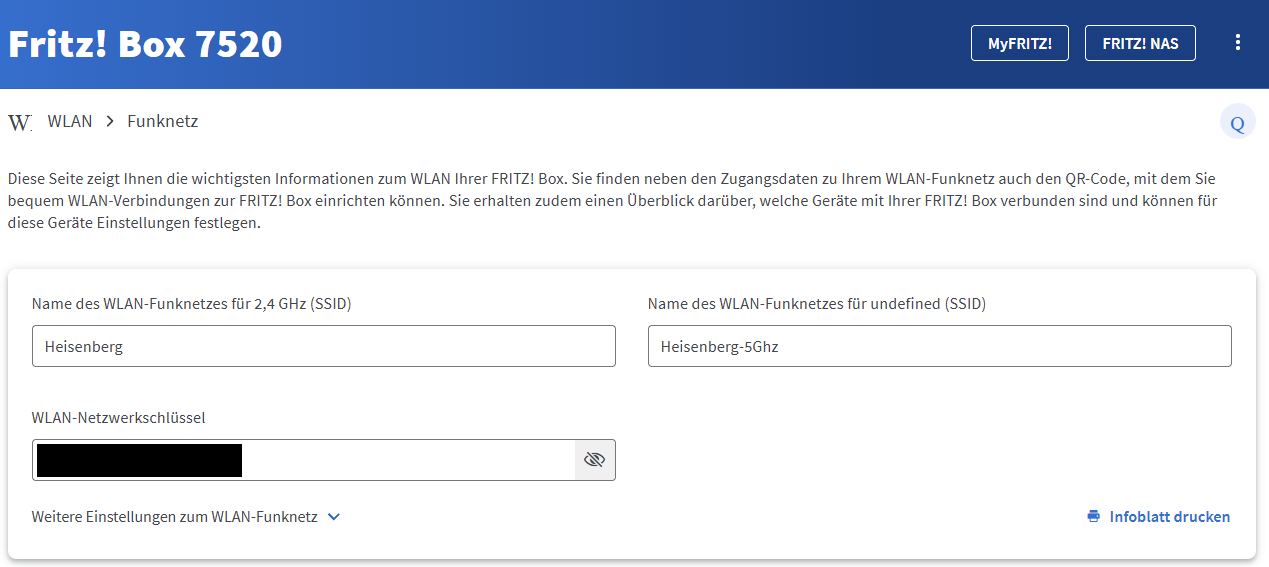
If the two networks have the same name, the printer has an annoying tendency to try to connect to the 5.0 GHz band, despite being unable to do so, even with a static IP. Alternatively, the FritzBox may mistakenly attempt to switch the printer to the 5.0 GHz band.
Owners of other printers that don’t support 5.0 GHz experience this problem too.
On top of that, the printer often has problems with static IP addresses for some reason. It is much more elegant to have the Fritzbox assign a new IP address each time, but make sure to assign the correct SSID.
It’s also possible that you accidentally entered an IP address - including the port - that another device often uses to communicate or, unfortunately, remember. None of these are good solutions; use SSID instead.
Advantage: This will also resolve other connection issues with other hardware and properly separate the networks.
Of course, there may be other issues as well, but I think this is a good starting point, and then you can let us know what your feedback.
I wanted to print a large file today and tried 10 times using LAN mode. It didn’t work even once.
I then disabled LAN mode and it worked on the first attempt.
The printer was connected to the same Wi-Fi network on both occasions. That rules out a problem with the Wi-Fi, as far as I’m concerned. I think it’s more likely to be a software issue.