I’m trying to do a TPU and PETG mutli material print. As TPU cannot be placed into the AWS, i need to change the spool manually. Adding a filament change on a layer will change the filament parameters but does not invoke a filament change.
Just pausing the print may be fine for just a manual color change, but i change from TPU to PETG and therefore need to have different filament settings.
Is there a way to add a custom gcode “on filament/color change” like in Prusa Slicer (e.g. M600)?
I got the new firmware today for my X1C, now the manual spool can also be loaded “half automated”. The only thing which is missing from my opinion: Being able to select one filament from AWS and one from manual spool in the slicer…
I have installed Bambu Studio Beta 1.6.2.4 and the new printer firmware 01.05.01.00 wich adds the load/unload feature for the external spool (non AMS). This is a nice feature, but a multi matierial print doesn’t benefit from.
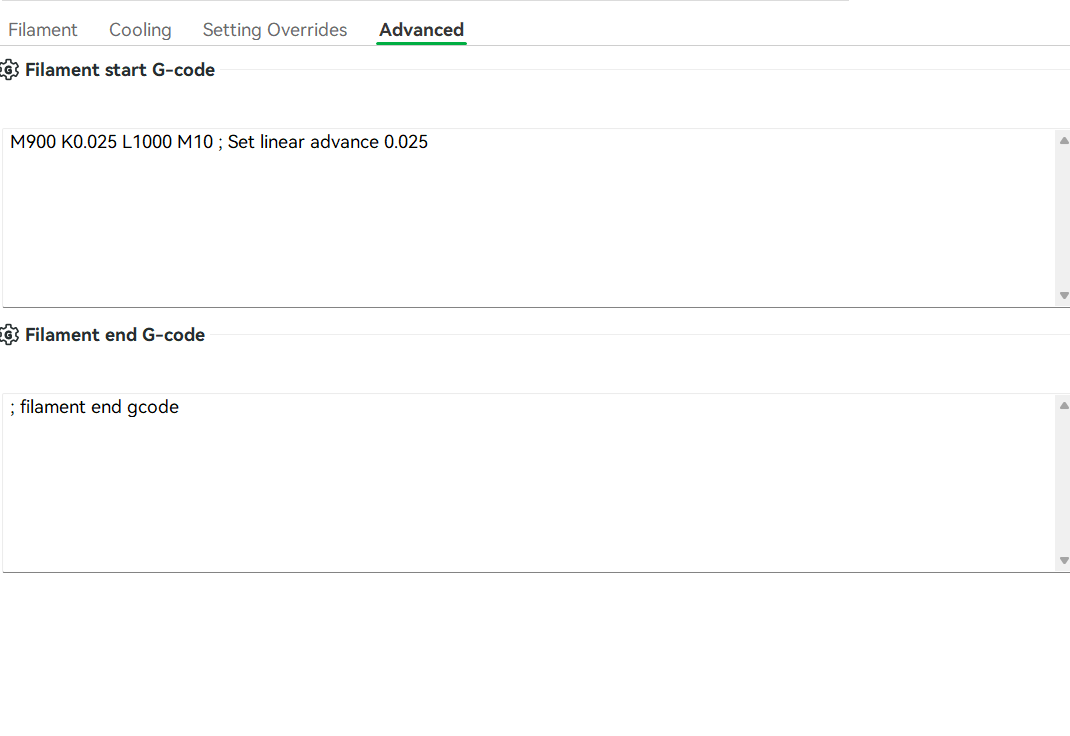
As a “workaround” I have added a M400 U1 to the filament’s end g-code and this forced the printer to pause after first filament. Unloading the filament was possible over the Bambu Studio GUI but there is no “Load” (grayed out). Therefore the print just continues without purging the old filament out beforehand.
Any thoughts on how to do a filament (ohter material) change without AMS??
EDIT: I think you can do about everything after the T g-code from the link I pointed to you, this include, purging, wiping, shaking, you just have to be carefull to set the hotdend at the right position just after your M400 and before statng all the fancy g-code usinh G1 Xnnn Ynnn
In the filament setting i added a pause (M400 U1) > dont safe it to the filament preset
Remove the old filament and load the new one manually. Dont move the axis, because the positioning is relative!
Continue the print
I was hoping there is an easier way to do without AMS, maybe Bambu is implementing this in later versions.
BTW, the problem with the wipe tower is (same in prusa slicer): The printer returns to the point on the part where it‘s left off instead travel to the wipe tower directly after pausing. Specially with TPU this leaves some blobs on the print.
It went quiet well with this procedure. I hope, that in the future it would be possible to benefit from the material change process also without AMS. Or even better: If AMS and manual could be mixed. I mean, the only difference is, that the filament need to be pushed into the PTFE tube manually, the rest of the process is the same.
I have printed an iPhone Case with transparent PETG at the bottom and TPU at the top. There are many more possibilities using PETG/TPU combinations.
Your issue is indeed quite tricky and it seems like you’d benefit from a solution that allows multiple Automatic Material Swapper (AMS) inputs.
It can connect multiple AMS units and manage their inputs, which would allow you to load both TPU and PETG into one AMS other from direct drive from spool and the Hub would handle the swapping during the print.
I haven’t personally tried this, so I can’t give you a first-hand account of how well this would work. Is there anyone on this forum who has experience using an AMS Hub in this way? Your insights would be greatly appreciated.