1st Post! 
Say I want to print four test cubes, each with a different color, is there a way to have the slicer print one at a time thereby not having to change filament each layer?
thanks,
1st Post!
Say I want to print four test cubes, each with a different color, is there a way to have the slicer print one at a time thereby not having to change filament each layer?
thanks,
Here.
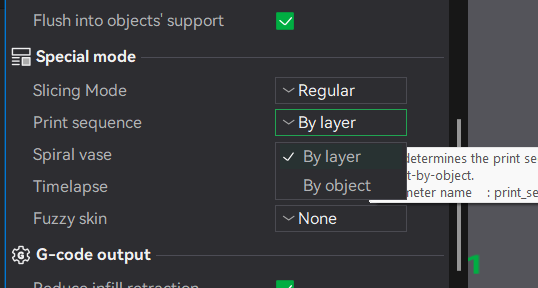
Telling the slicer to print the objects in separate colours means that the slicer will “ringfence” an area around each object to prevent the printhead crashing into the completed parts when it starts to lay down the first layers of the later objects.
But this ringfencing is very conservative, and leaves a LOT of empty (wasted) space on the build plate.
For example, I can get about 80 of one component on the build plate - but if I want to print sets of that component in 3 different colours then straight away I’m down to printing three sets of just 10 components, and they have to be carefully arranged to avoid things like the first layer calibration lines. But the components themselves are quite small, and not very high; there is no risk of the printhead contacting them even with a much smaller reserved area.
Is there a way to change this ringfencing?