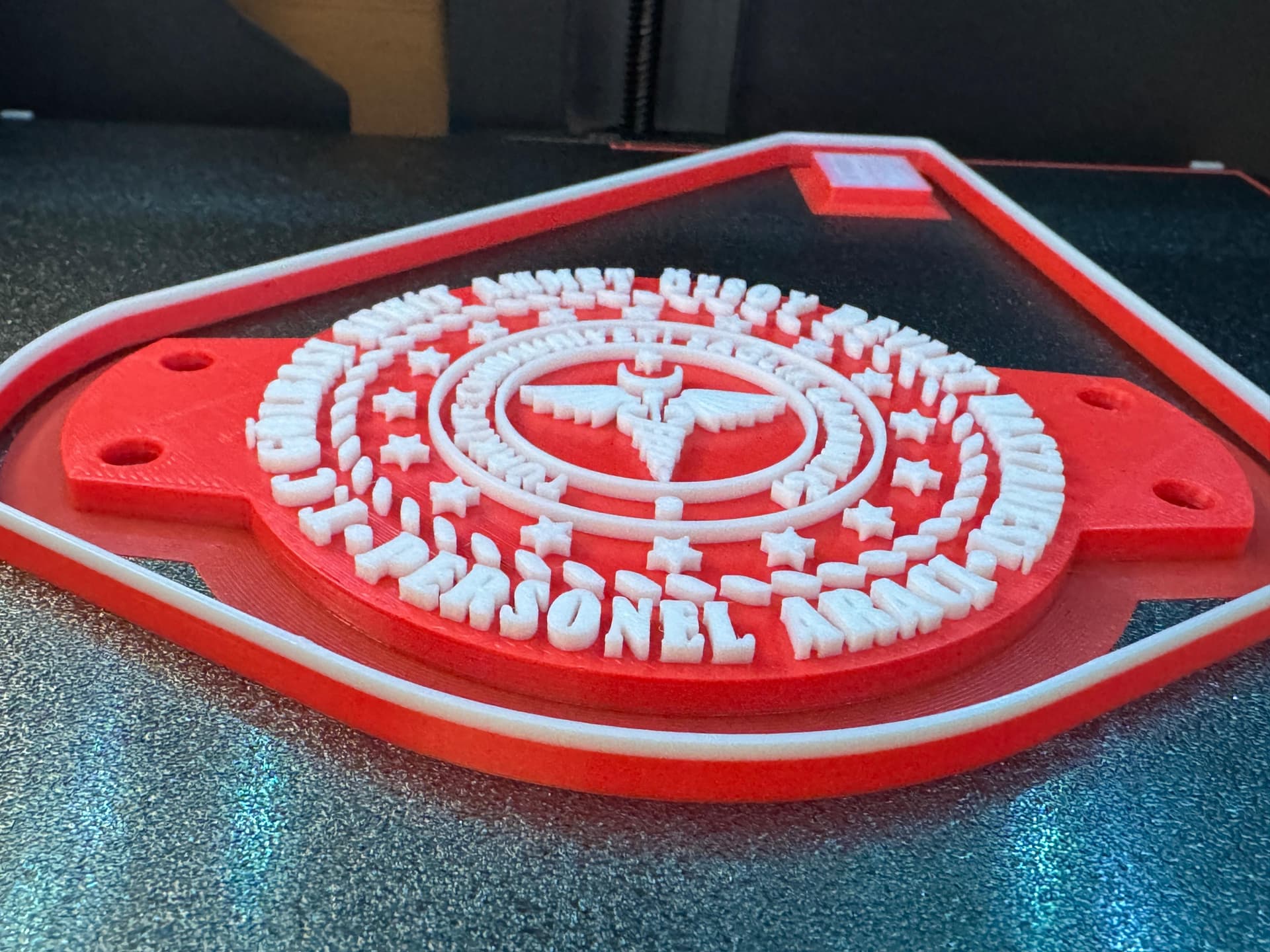
Hello, I am using Bambu Lab X1C and when printing with Bambu Lab ASA filament it separated from the printing plate. I use a textured PEI plate and cleaned it very well with dishwashing detergent before printing. I set the nozzle temperature to 270 degrees and the bed temperature to 100 degrees. I closed the Upper and Lower Glasses. I added a 6 mm skirt on the edges of the model. By the way, my room temperature is 30 degrees and humidity is 40%. What are your printing suggestions for ASA? Thank you very much.


1 Like
It should print fine on Bambu ASA settings. (Your model isn’t solid infill is it?)
Your pic- it doesnt appear warped to me, is the part actually warped, or just dislodged?
Did you preheat the chamber at all?
With the brim, 0 “object - brim gap” will also help.
1 Like
It was 30 minutes before the end of the raid and he started to leave the plate.
No, I didn’t heat it up, dude
2 Likes
Hello my friend, I applied the settings as you mentioned and printed again, but as the printing ended, the model separated from the printing plate in the same place. Therefore, in the part separated from the printing plate, since the nozzle touches that part, there is abrasion there and the writings result in a very bad print. Is there any way to solve this? This way I cannot sell the product to my customers and I will lose them. I have printed many prints with ABS before but I have never encountered this problem.

@alitopuz did you dry your filament? I’m asking as I’ve just bought BBL ASA and I’m dreading your results.
is your print lifting in the same area? as it looks like it, could it be that the Aux part cooling fan is on?
I have an unknow ABS which I inherited with a printer, this filament is quite old as I’ve had it at least 4 years.
I calibrated it and has been always in the AMS since, this filament prints perfectly with the following settings.
Flow ratio 0.9025
Density 1.04
Prints best at 250 but as I haven’t printed ASA yet can’t comment.
Cooling (Min 10, layer time 30), (Max 20, Layer time 3) fan always on, Aux off.
I’ll be drying my ASA overnight for tomorrow ready to to start pulling my hair out… 
I’m no expert on BBL but I’ve been learning since way back in 2016 when I started with the CTC wooden framed printer… 
1 Like
Have you tried glue on the plate…??
Yeah, man, I dried out my filament. At the same time all the fans are off and yes it always leaves the table in the same place. As for the fans, as a default setting, all fans are turned off before the BLB ASA Filament starts printing and after a certain printing, the part fan turns on at its default rate of 10%. Even if I disable it, it turns back on at 10%.
1 Like
I needed to print a part in ASA on my X1C and used thick walls for strength. It curled just a little but the part was still fine for its intended use.
But I was looking up ASA stuff since I need to print a bunch of clips using it. It seems to like to warp and curl if walls are thick and/or lots of infill and is why heat in the chamber helps.
If you can thin the walls any or cut infill since it looks decorative, maybe that could also help.
1 Like
Since I am using textured PEI Plate, I think I don’t need glue. That’s why I didn’t prefer it. I am making the 3rd print now, if ı fail again, I will try glue, my friend.
Some have mentioned using glue with textured PEI. They use the liquid glues or use stick and heat to liquify the stick and spread it out. I’ve just seen it mentioned but haven’t done it myself. No idea how much it helps but some do use it.
Thickness 4mm filling density 20% wall thickness 3 I think I should reduce them. Thanks to your experience and knowledge, one day I will be able to get much cleaner and successful prints. Thank you.
I print ABS/ASA a lot. I also use the bambulab default profiles. I dont change anything.
I dry my filament till it stops losing weight.
I also found that the most reliable print was on the high temp build plate. Yes, i know bambulab has discontinued the high temp/engineering plate. I still have one sticker left that is high temperature.
I use no glues of any kind. Or hair spray. I don’t even let it the chamber temperature heat soak for 30 minutes. 
One thing! If it doesn’t stick the first time. I wash the plate again. I hardly ever use hot water but on the second time i let the hot water run on the plate for five minutes before using soap and those green scouring pads. This usually fixes my problem.
2 Likes
Hehe, I wish I was knowledgeable and experienced.  I’m just leveraging one print. I was disappointed in ASA after that but printed some delicate parts with ASA a week ago and was really impressed with the print quality. I think it’s just finding what works.
Don’t forget top and bottom layers too, though. I believe those can also help cause lifting/curling if too many but you want good finishes too. Good luck!
1 Like
I raised the printing table to 110 degrees and waited for the room temperature to increase for 20 minutes. I also added 40mm as skirth height and 2 wall thicknesses as skirt loops around the model and now I have come to the end of the print and I have not yet encountered a separation problem from the table. Only before all this, I washed the textured pei plate with dishwashing detergent using a soft sponge under warm water for at least 3-4 minutes.I’m not sure which one of these solved my problem, but I need to print dozens more of this print and next time I’ll remove the skirts from the print and try again. Maybe I didn’t clean the textured plate very well before.
3 Likes
I raised the printing table to 110 degrees and waited for the room temperature to increase for 20 minutes. I also added 40mm as skirth height and 2 wall thicknesses as skirt loops around the model and now I have come to the end of the print and I have not yet encountered a separation problem from the table. Only before all this, I washed the textured pei plate with dishwashing detergent using a soft sponge under warm water for at least 3-4 minutes.I’m not sure which one of these solved my problem, but I need to print dozens more of this print and next time I’ll remove the skirts from the print and try again. Maybe I didn’t clean the textured plate very well before.
4 Likes
Glad you got it sorted. The problem with changing more than one thing at a time is that you don’t know what solved the problem.
4 Likes
Thank you so much for comment. I will try to find out which one solves my problem the second time I print and I will share the results here.
3 Likes