If you have spare induction nozzles, try to assign one to printing TPU only. When mixing on and off TPU with other material in same nozzle, it could clog and require a cold pull to fix. Assigning one of the nozzle to TPU only solves that.
Edit: I used to do that on the H2D and do that as well on the H2C even removing it from the rack when I’m done to make sure the logic does not try to use it for something else… You can still verify before clicking send and re-assign but better safe than sorry. I guess I should also remove all other nozzles when printing with that TPU nozzle but I do not. I’m not 100% sure the firmware will not attempt to use the TPU nozzle (or other nozzles that was used for other filaments) without a warning, I should run some tests like printing PA on one, ABS on another and subsequently launch a 7 color print PLA to see what happens…
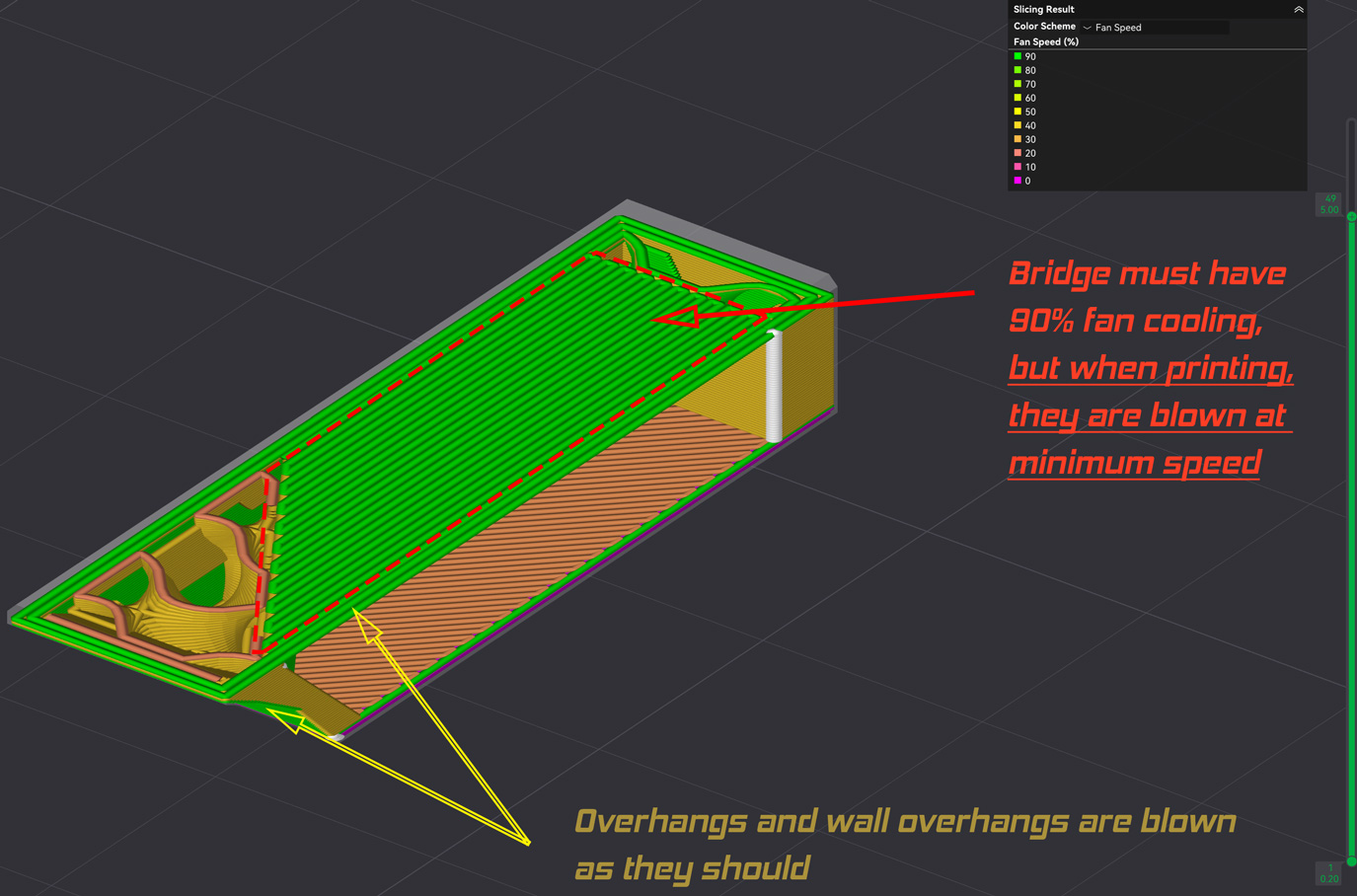
Problem: Part fan pre-start logic leaves fan speed at minimum on bridges in certain conditions. Firmware Version: 01.07.02.00 Printer: Bambu Lab A1 Steps to reproduce:
Open attached SimpleTestObj.3mf in Bambu Studio
Use PETG plastic for high temperatures or lower nozzle temperature, but leave fan pre-start time at 2 seconds (1 second will also have such behavior). Also you can use for it default Bambu PETG or PETG-HF profiles (with fan pre-start time =2s.)
Slice, select “Fan Speed” display and notice that bridge must be printed with high speed (in generated g-code). See my screenshot with annotations. Pls give me permission to attach files and images to send screenshot and print file (new users can’t do this)!
Print and observe the print process, test object is small so it will take about 5 minutes to print
Notice that it will turn cooling to max (set in Fan Speed for Overhangs) only in ovehang, overhang wall, but not the bridge itself.
(Optional) Set Pre start fan time to 0 and observe result – fan will force cooling on bridge as it should. But no fan pre start, will cause worse cooling on short overhangs.
* This is very important especially for printing transparent PETG, where good layer bonding and high-quality overhangs are essential.
Log file: No such option, don’t have SD card reader. Other information:
I tested it on different filament profiles and so far have only found a dependency with fan pre-start time. It seems that sometimes (not always, but depending on the commands sequence) it glitches and cuts off the airflow in critical areas. Apparently, there is some kind of command overlap between fan pre-start and stop (slow down) that leads to incorrect operation. Pls give me permission to attach files and images to send screenshot and print file (new users can’t do this)!
Problem: Cutting the TPU on each layer during multi-material printing
Firmware Version: 01.01.05.00
Printer: Bambu Lab H2C
Steps to reproduce: TPU in the right extruder, PLA in the left. The model is printed from TPU, with PLA support. Each time when the extruder switches from right to left and from left to right, the filament in the right extruder is cut. This behavior only occurs if there is TPU in the right extruder; this does not occur with other filaments. This slows down the printing and produces a lot of noise from the cutter levers switching.
Other information: I created a PLA profile with all the TPU parameters, and the unnecessary filament cuts stopped. The model was printed successfully without any issues. I used TPU85A and PLA Basic.
Problem: Auxiliary Extruder Filament profile Retraction setting is not set Firmware Version: 01.01.00.00 Printer: Bambu Lab X2D Steps to reproduce:
select only one filament and set a retraction value.
place this filalment on auxiliary extruder ( in grouping )
Slice
Edit filament and change retraction value ( and save or press “X” on the windows or whatever ) : bambu studio will not even revert to not sliced , the print slice stays there as nothing happened.
check Gcode with different values ( diff for example ) the file will be identical.
Log file: NA Other information:
Haven’t tried if this behaviour is the same on primary nozzle.
Problem: Printer UI behaves strange and stuck in case of two sequential load action Firmware Version: 01.08.00.00 Printer: Bambu Lab A1 Mini Steps to reproduce:
Unload old filament
Edit filament type
Load filament and confirm succesfull load
Load filament one more time
Load UI will appear and actually printer will try to start load process but UI stuck with no indication what happening and not exit to home screen.
Another case:
Start printing with pause(to manually change filament)
On pause unload old and load new filament
UI will not indicate the progress
There will be no available option to stop load process UI to resume printing
Log file: NA Other information: Firmware seems buggy same scenarios worked ok before upgrade.
Problem: Printer forgets changes to nozzle type in multiple ways
Firmware Version: 01.08.00.00
Printer: Bambu Lab A1 Combo
Steps to reproduce:
RESULTS IN CATASTROPHIC Golf ball sized globing
Printer screen / firmware seems sluggish to to save
I had used the 0.2mm nozzle successfully but then switched back to the stock 0.4mm stainless steel nozzle and I did change that each time in the firmware menu, accessed directly from the printer. The printer did not save that change and upon my first print caused globing at the nozzle since it had the stock 0.4mm nozzle in but was printing as if it was told to print with a 0.2mm nozzle instead. Two additional test prints of a PLA Benchy failed again until I noticed the printer hadn’t saved my change to the nozzle type and was set back to a 0.2mm stainless steel nozzle instead of the stock nozzle that was already in it. I read I should make the firmware change again and power down the printer. Upon coming back up again, it seemed to have the right nozzle and began printing again for weeks.
RESULTS IN CATASTROPHIC Golf ball sized globing
A1 Printer did the same thing about losing nozzle type because it was powered OFF
I noticed when powering off the A1 printer with its own built-in power switch, IT DOES NOT RETAIN YOUR NOZZLE TYPE. The printer always reverts to the stock 0.4mm stainless steel nozzle in the firmware, despite it having been changed at the time. I noticed my actual nozzle at the time was the 0.4mm hardened steel and the printer did not remember that change. It reverted back to the stock 0.4mm stainless steel instead and then caused globing.
Problem: Fuzzy skin causes toolhead to freeze
Firmware Version: 01.03.00.00
Printer: H2D
Steps to reproduce:
Print an object with fuzzy skin distance = 0.01, thickness = 0.02 with standard speed/accel settings. Observe the toolhead sometimes freezes, causing blobs to form on the surface.
Load firmware version 01.02.00.00 and print the same file again. Observe that the problem is gone.
I assume this is due to gcode buffering. The notable part is that this did not happen with previous firmware versions, so this was introduced with 01.03.
Problem. Skip object does not skip nozzle changes and wipe actions on resume.
Firmware 1.01.05.00 Feb 11 release
Printer: H2C
Steps to reproduce:
multi object job in print by object mode with PLA support in left with AMS HT, PETG in right AMS2 No purge tower
Spaghetti failure in object 3, accept skip object resolution
Select object to skip
Resume
Main screen switches switches back to print progress tracking. “Cleaning Nozzle” switching back and forth between right and left, purging and wiping while incrementing layer count through the skipped object layers.
Was creating multiple prototypes with different object orientations for strength testing, not all objects needed support. Objects 1 and 2 had no support, objects 3 and 4 PLA support on left, PETG on right. Should have printed objects 3 and 4 alone in “By Layer” to limit nozzle switching, but was running overnight so who cares?
Same issue here with firmware 01.08.00 on the A1 mini except the UI FREEZES at every unload and load screen during a print. Basically manual filament change is bugged now. I’ve cancelled every print, and restarted the printer each time. The printer loads the UI screen as normal and is functional after restart. After a print begins and it reaches the point of changing filaments, it pauses with the command in the Bambu Studio software (PC version) at the end of one color. I press the “Unload” button on the printer UI and it appears but then freezes.
I’ve tried using other ways to pause the printer to see if it’s due to the pause command from Bambu Studio, and inserted “M400 U1” in the Change Filament G-Code, but it does the same thing. It does pause and when I select “unload” in the printer, the unload screen appears and freezes there. I also tried inserted a full g-code in the Change filament gcode setting where it unloads the filament and then pauses. The printer did unload the filament with this gcode. Then I pressed “load” on the printer UI to load the new color, the load screen appeared but froze on the first step.
In the Bambu Studio software the unload and load buttons give an error that these are not available during a print. The play/pause button does work, but unfortunately this isn’t helpful since the filament has not been swapped successfully.
This is a major firmware problem and unusable for prints with more than one color. I’ve reverted to version 01.07 until further notice.
Problem: Manual Flow Dynamic Calibration cannot finish and toolhead stay still after draw the debug line at corner Firmware Version: 01.02.00.00 Printer: Bambu Lab H2C Steps to reproduce:
Startup the printer
Bambu Studio → Calibration → Flow Dynamics → Manual Calibration
Start the manual calibration
Printer after vibration calibration and toolhead go to right bottom corner of build plate and finish draw the debug line and then stay still, nothing happen next.
Problem: X & Y movements noisy since firmware update Firmware Version: 01.02.00.00 Printer: Bambu Lab H2C Steps to reproduce:
Print anything. First layer X & Y movements going towards the back of the machine and/or to the right are very noisy. It’s like a motor harmonic. No friction sounds (bearing, belt, etc…)
I have run the full suite of machine calibrations as well as Vision calibration and it doesn’t get better or get worse. Machine is well maintained.
Problem: AMS 2 Pro “shuts down” and “reboots” when performing drying cycle at 34 degrees Firmware Version: 01.02.00.00 (Latest Version) Printer: Bambu Lab P2S Steps to reproduce:
Start drying cycle while printer is idle
AMS 2 Pro clicks to initiate drying cycle
fans engage
after a minute or two, fans slightly increase RPMs once approaching 34 degrees
AMS 2 Pro clicks again, all lights blink as if I just cut the power, then turned it back on
Drying cycle does not continue. Machine and AMS 2 Pro remains idle until another input is received.
Other information:
I have downgraded the firmware and updated the firmware multiple times now, and the AMS 2 Pro still will not dry on the newest firmware. Whenever I turn on the drying function, it runs briefly, until it gets to about 34 degrees, then it will shut down the drying process, and trigger a “Reboot” of the AMS 2 Pro. During this attempt at drying, i am NOT printing any project and the machine is sitting idle, yet the AMS 2 Pro will not continue drying.
The only way the drying function will work properly is on the lower firmware, which does not allow for drying while printing.
Problem: Filament track switch unable to re-calibrate output mapping Firmware Version: 01.02.00.00 Printer: Bambu Lab H2C Steps to reproduce:
Calibrate filament track switch on first time connection/factory reset (via the AMS auto setup)
Output to nozzle mapping is saved by printer
Swap the output ptfe tubes so the mapping is reversed
Run AMS setup again
Filament is only pushed to the input of the track switch, no output mapping is detected.
After the setup, trying to load the filament to a nozzle will result in AMS pushing the filament non stop because the filament is directed to the wrong nozzle