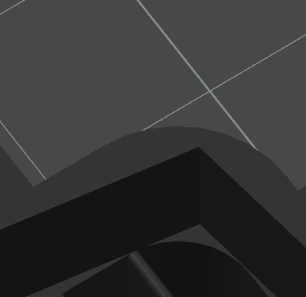
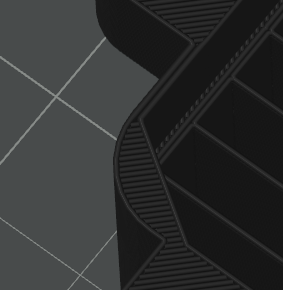
I have done a model which I import to Bambu Studio. The model has curved corners with a radious of 4mm and a thickness of 1mm. There are no naked edges and no manifold edges on export. I.e. it is a good solid model. But it seems Bambu Studio cannot handle the curved thin edges? I enclosed two screen shots of what the corners in the model looks like in Bambu Studio and a screen shot of what it should look like as modeled.
I have have had models distorted before in Bambu Studio but on all those occations I had open edges and got errors in Bambu Studio. This has never occured on a solid model before.
Have anyone of you guys come across this as well? Is there a way to handle this types of issues?
I am using classic. I have never used arachne before. I did try and prepare the model with arachne but unfortunately no change. With that said, I left all parameters on default.
But is this not an error in how Bambu Studio reads the model on import? The errors in the model are there from import before I have started doing anything.
Post the 3mf, its incredibly likely that the object is not manifold. This is usually a CAD export or definition problem. The slicer usually screams about manifold too.
Thanks, please find a file attached below where the errors are visible.
EDIT: Please note that it is the innermost curvature that is 4mm. All curves on the outside of that has a bigger diameter. The attached file is a sample file I did where I tried to do the walls thicker by 0.5mm. So the model attched has 1.5mm + 1.5mm wall thickness. Even so, the issue is identical as in the original file.
Before exporting I did a check to see if all edges were okay, and they were. No manifold or other edge errors. But there can still be edge errors when opening the file in Bambu studio? I should mention that I am using .STL format when exporting the file. I have no experience in exporting in other formats.
I added a file with the error in the original message above.
EDIT: What should I look for if persuing CAD export or definition problems?
Thanks, that did the trick! I exported as .STP and that seems to have created the model without the corner curv errors.I will try and print it now and se how it turns out, Many thanks! Really appreciated!