Im trying to calibrate my recently bought filament, and i’m wondering is there any way to expand this line to see what’s after those “…”
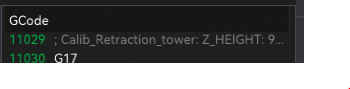
Im trying to calibrate my recently bought filament, and i’m wondering is there any way to expand this line to see what’s after those “…”
Hi Seba, welcome.
Unfortunately there is not, with the built-in viewer. The simplest alternative is to File → Export → Export G-Code and then open the saved file in any plain-text editor. Like Notepad (on Windows) or something better. Some (free) editors also have syntax highlighting for g-code files (eg. Notepad++ with a syntax plugin, which is pretty light-weight on resource usage). There’s also some powerful online tools… this one is pretty neat: CutViewer (I have no relation to them, just found it now, in fact.).
Cheers,
-Max