Hi Bambu Studio Gurus,
I am quite new to this so I am feeling my way forward making misstakes as I go and learning from them. I am using an H2D with a 0.4mm nozzle and for the moment I am only using Bambu Labs PLA Matte for consistency (black, white and grey). I am trying to keep the moisture below 25% by regularly dehumidify using the AMS Pro II and AMS HT built in feature for doing just that.
I am using Bambu Studio 2.8.2.61
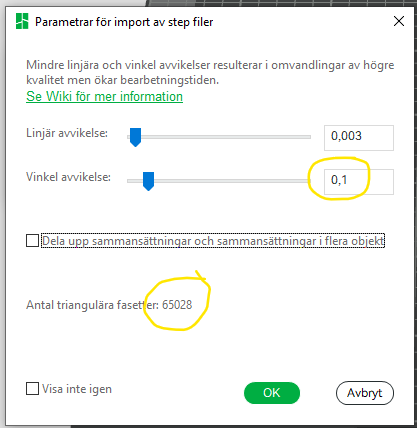
I am doing som models that are supposed to fit together with a thigh fit which means I am using as small tolerances as I can (<0.1mm). I had som issues with that and got the suggestion in another question I posted to review the parameters of the STEP file on import to Bambu Studio. I did that and found something which I thought was interesting.
Reducing the angle deflection initially resulted in a larger number of triangles, which I expected. But then, below a cretain value, reducing the angle deflection started to also reduce the number of triangles. Is that a bug? Or is there something I am not getting here? Please see import parameters below.
All thoughts are always appreciated.
Cheers
- The default import values of the SETP file into Bambu Studio
2. Reduced angle deflection resulted in a larger number of triangles
- Reducing the angle deflection below 0.1 started to give a reduced number of triangles
4. Reducing the angle deflection even further resulted in even more reduced number of triangles.
There is little that can be determined w/out having the affected model to review.
However I doubt this is a “bug.” The main issue is understanding what those parameters do, and how they interact with each other and the model. This is not really trivial and the result is highly model-dependent (which is why many tessellation option dialogs include some simplified presets like “low, medium, high” that can auto-adjust settings based on model complexity). What’s sorely missing on a practical level in the Studio STEP import process is a preview of what you’ll be getting with various settings (mesh wireframe view).
Studio (and most/all other slicers) use the Open CASCADE Technology (OCCT) library for meshing operations (conversion from STEP). There’s a rather terse description and visualization of the 2 main parameters (linear and angular deflections) in the documentation.
I wasn’t able to find a simple visualizer app for testing how these basic parameters affect meshing in OCCT. I can’t help think there must be one or a dozen out there, but…  Might be a fun project.
In the meantime, CNC Kitchen’s meshStep is an excellent resource. Both in terms of tool for generating meshes (with preview!), and a nice reference to some other available tools and general discussion on the GitHub repo page. It’s not the same as the meshing system used in Studio, very intentionally, but still the visualization can be educational if nothing else.
Getting further from the topic, and don’t mean to ignite any debate here, but I found this Reddit post actually quite spot-on regarding some differences/gotchas with mesh conversion (and I think this is the first time I’ve ever linked to a Reddit post, FWIW).
Cheers,
-Max
Thank you @MaxThreeD for taking the time to elaborate on the subject and share your vast knowledge. It is very much appreciated.
Initially I asked chatGPT about formats and it suggested .stl. So I started out using STL a few month ago and STL worked fine. I then hit a snag with one model. A snag I that exporting as STP sorted and the model printed fine. I was of course also smittened by the alledged precision of STP so I continued to use STP which has worked very well.
The numbers above are from a scaled down test on a modell. Today I did the full model and using STP on export (with the numbers above) the model got 1,9 million facets with a file size of 25MB and an estimated 7,5h print time.
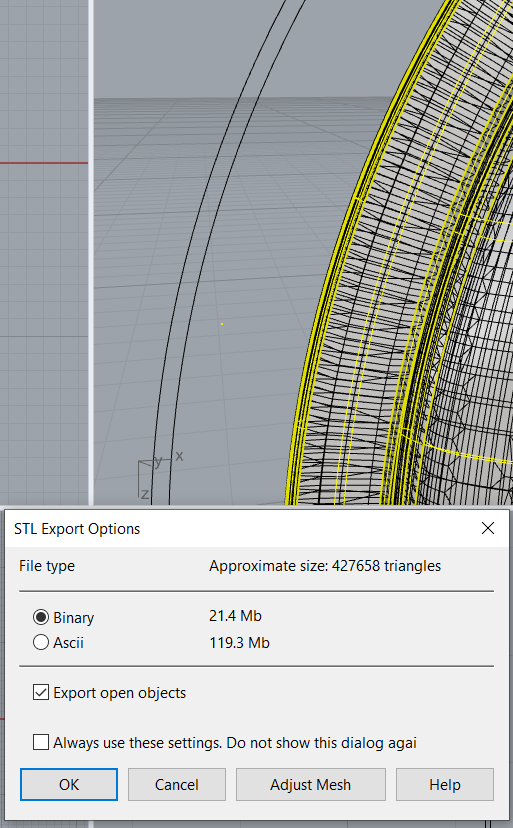
Having read the STL vs STP comparison you kindly linked to, I also did an export from Rhino 7 in STL format (please see screen shot below). I noticed that the number of facets with the standard parameter values I used with one exception (I have virtually no clue what they mean, yet) turned out to be roughly one fifth of the STP file. Although the file size is still 21MB. I also noticed that there actually is a preview function for the STL export in Rhino 7.
Based on your eminent thoughts and reflections on the subject I’ll do some tests with both file types and see if I can find any noticeable differences.
Again, many thanks for your thoughts and reflections.
Cheers,
You’re very welcome! Writing answers/ideas is a great way to solidify or improve one’s own knowledge, so thanks for the opportunity. 
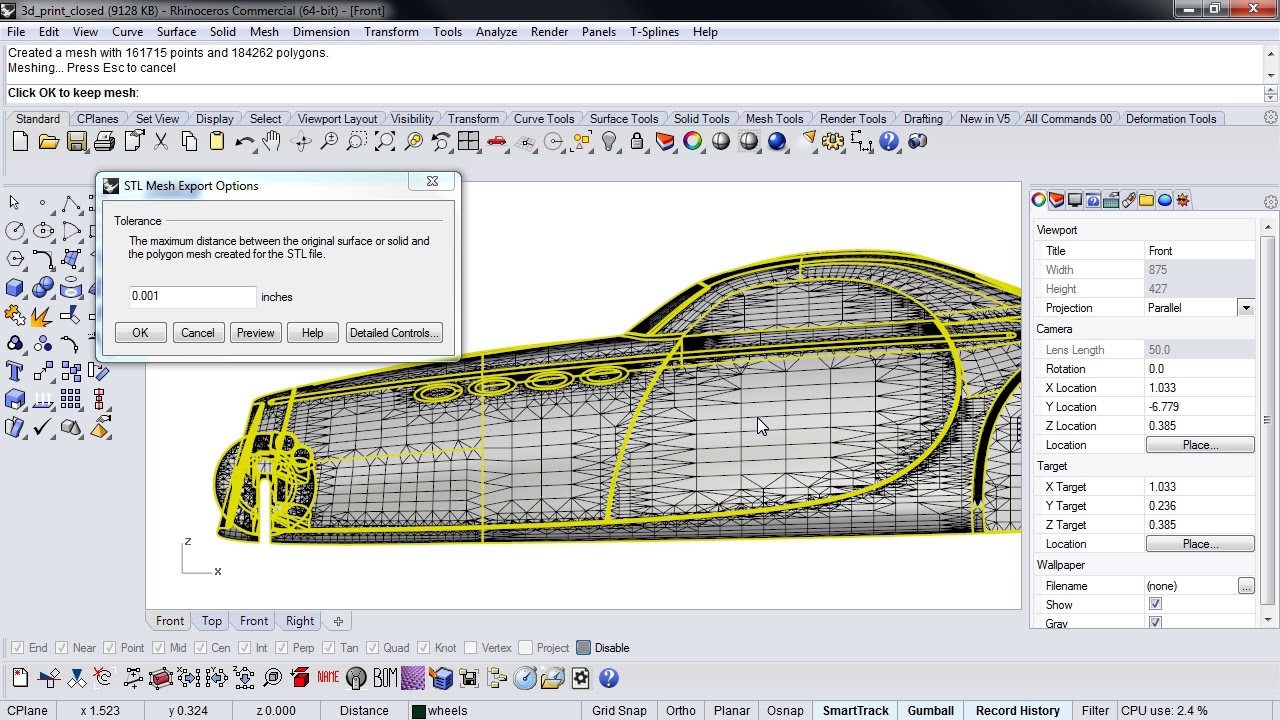
I did a quick search about mesh creation/export in Rhino and turns out there are quite a few settings that can be tweaked (in “detailed controls”) and a full screen preview… assuming this video is (still) correct (as I mentioned earlier, not really familiar with Rhino myself). Also when I saw “export open objects” that raised a red flag, which indeed is also mentioned in the video.
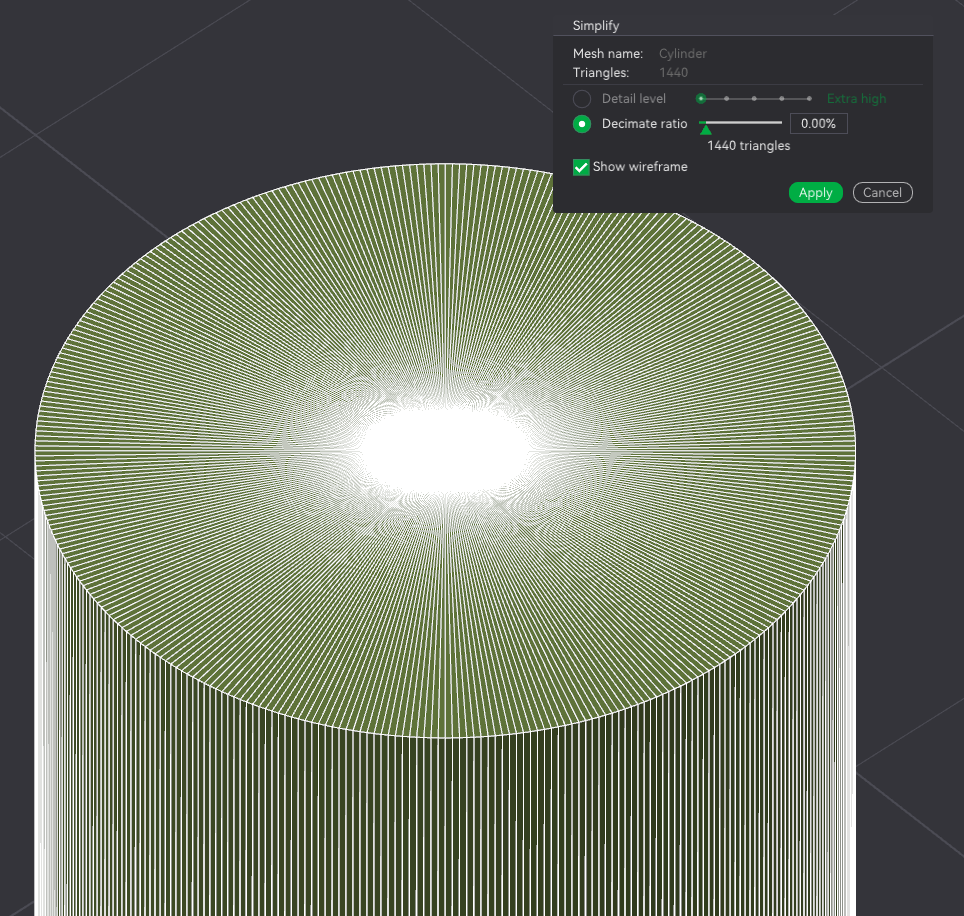
As for file size… if you’re comparing STP with STL size then it’s “apples to oranges” (not a valid comparison) because the formats (how the data is stored) are very different. The triangle/facet count of the resulting meshes is probably a better comparison point (and ideally the count from the same software, so we’re sure they’re counting the same thing). One could export an STL from Studio to bring back into Rhino, for example, or use the “simplify model” tool to compare 2 meshes within Studio (see below).
Also for comparison, visual inspection of the mesh, and that reminded me that there’s a “hidden” wireframe view in Studio “Prepare” view:
Select an object → r-click → Simplify Model, enable the wireframe option and (to see the original un-simplified mesh) set the “Decimate ratio” to 0%
(I thought there was some other way to see a wireframe view, but now I can’t find it.)
Cheers,
-Max
Ah! Thanks Max! That was really interesting. I use version 7 of Rhino (8 looks like the latest). And as it turns out, this bit of functionality is still identical to what ever version that was 7 years ago  So, excellent!
When I exported the stl file yesterday I used the default settings except that I took the tolerance down from 0.001 to 0.0001 (Maximum distance edge to surface). I now realize that wasn’t nessecary. When I uploaded the stl file in Studio yesterday it turned out to have a few faults. But when I now adjusted the parameters in a better way according to the recomendations in the video you refrenced, ta da, no more faults in the files. At the moment I have another print going so I cannot test it yet, but I look forward to do so. File size now jumped to 84MB and triangles to 1,6 millions ish. Probably overkill, but it is a very nice model 

Coming back to the “is it a bug” part, since that bit didn’t get answered. I ran the same kind of sweep on a few test shapes with Open CASCADE, the library Studio uses to mesh STEP files (a newer version than the one Studio bundles). I kept linear deflection at the default 0.003 and lowered the angle step by step. The count never went down. It also barely moved until the angle got below about 0.1, because at 0.003 the linear limit is already the tighter one. Below 0.1 it climbs steeply: a 30 × 20 × 10 mm box with 2 mm rounds went from about 7,500 triangles at 0.5 to about 820,000 at 0.01.
So the drop you saw probably comes from something in your model. One thing that can cause it: the number in that dialog only counts faces that actually got meshed. If some faces fail at extreme settings, the total goes down, and those faces may be missing from the import. If you see it again, check the imported model for errors.
On the tight fits, the import settings aren’t where your 0.1 mm goes. Linear deflection limits how far the mesh can sit from the true surface. At the default 0.003 mm, meshing alone makes a hole at most about 0.006 mm small, and the printer moves holes and pegs by far more than that. So the defaults are fine, and the 1.9 million triangles mostly make slicing slower.
For a fit under 0.1 mm, print a small test piece with a few hole or peg sizes 0.05 mm apart, see which one fits, then adjust the CAD or use the X-Y hole compensation setting.