Building VesselMaker — an advanced vase & planter generator (feedback welcome!)

Hi everyone!


We’re building VesselMaker (vesselmaker.app), an online tool for designing vases, planters, bowls, etc… — profile and cross-section editors, displacement mapping for realistic material textures (clay, wood, scratched surfaces), stackable modifiers you can combine like Photoshop layers (bend, twist, and a others like Voronoi modifier coming soon), plus AI-rendered scene previews to visualize the piece before printing or to create marketing images for you creations.

We know MakerWorld already has Make My Vase in MakerLab — we’re aiming for a more advanced, actively evolving take on the same space, for people who want finer control over their professional designs.

Still in closed beta (a few bugs to iron out, more features on the way). The waitlist is at vesselmaker.app — you’ll get notified when we open up, plus we will send some invite codes before opening the beta to the public.

Before we go further, we’d love your input:

  • What feature would you most want us to prioritize next?

  • What are you usually designing these for — home decor, gifts, plant pots, something else?

  • What’s the most frustrating part of designing something like this in other tools (CAD, Blender, Make My Vase, etc.)?

Drop your thoughts below — really looking forward to shaping this with your feedback!

Hey all!
Just a quick update: In the next few days we will start sending some early access invite codes to people who joined the waitlist and opted-in to receive invite codes and occasional updates about the tool! If you want to have a chance to receive an early access invite code, be sure you joined the waitlist and opted-in at https://vesselmaker.app/

Also: we need people with a low/mid-range PC to try VesselMaker and let us know how it run on a low-mid range hardware. If you have a PC with an integrated video card (no dedicated or powerful cpus) let us know via private message, write your PC specs and we would be happy to send you an early access invite code.

Thank you!

This looks really promising. I just joined the waitlist for early access and can’t wait to test it out.

I’m curious how it compares to Make My Vase. From your perspective, what can VesselMaker do that Make My Vase currently can’t, and who do you think will benefit most from the extra features?

Thank you! Do you have a low/mid-range PC with an integrated GPU? If so, I can send you an early invite to try VesselMaker — it would be helpful for us to understand how it runs on lower-end hardware. Let me know via PM the email you used to join the waitlist if you’re interested.

That said, we really appreciated Make My Vase and used it a lot in the past to make and publish some vases on our MakerWorld profile, but we felt it was missing advanced features that prevented us from making more advanced designs. For that reason we switched to Fusion 360: it offers a lot of freedom, but it has a steeper learning curve, and is also slower and less intuitive for making advanced vase designs. That’s where the idea came from: building a tool ourselves (I’m a software developer as my main job) that allows for more advanced vase/vessel designs than Make My Vase, without the complexity and steep learning curve of a generic CAD/modelling software like Fusion 360. The goal: making advanced designs faster — initially just for us, then we decided to offer it to the public, and here we are.

What VesselMaker already offers that Make My Vase doesn’t:

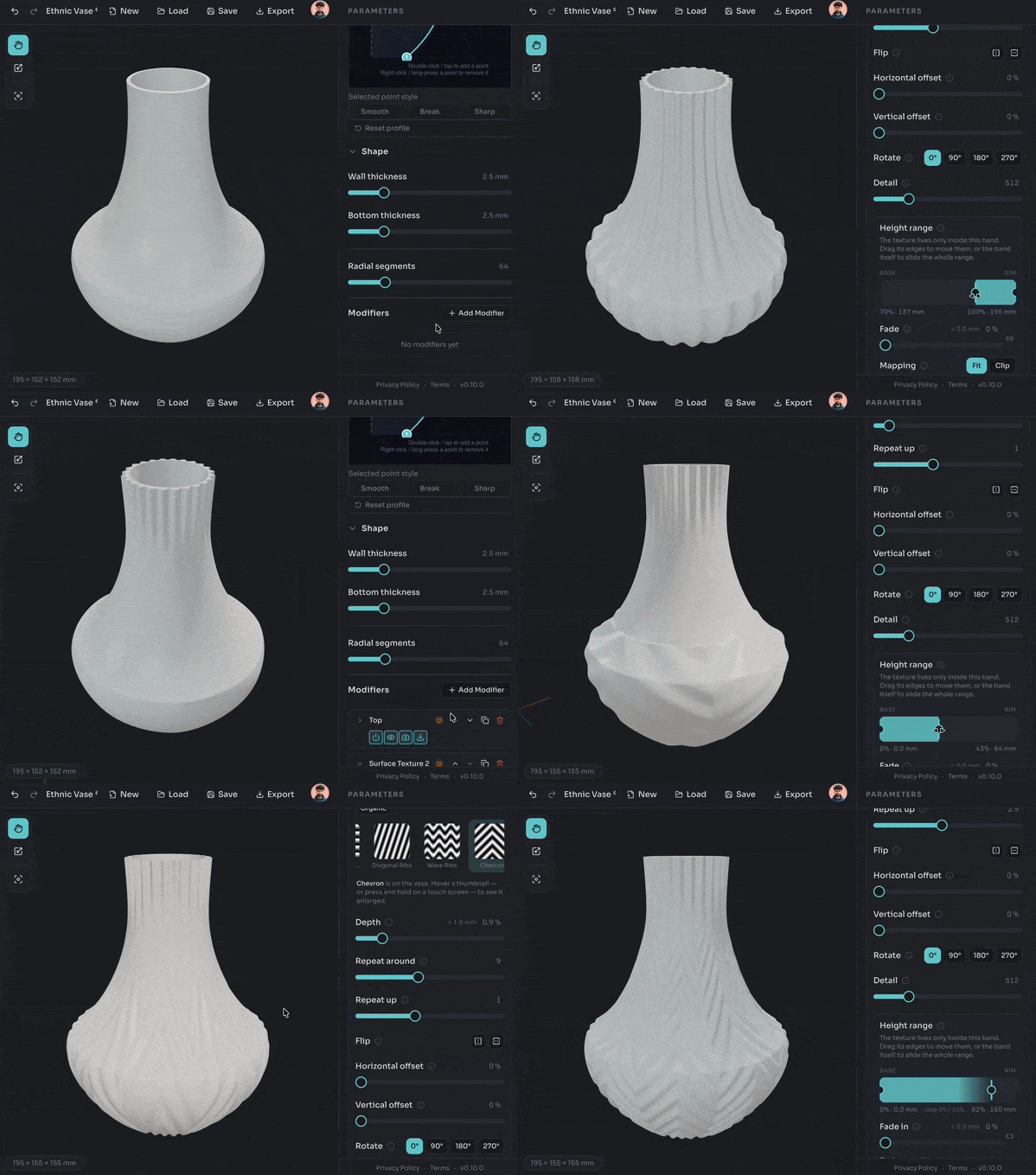
  • Displacement Maps: this was the first feature I implemented, because I missed it both in Make My Vase and in CAD software like Fusion 360 — the ability to give a modeled design a realistic surface texture like clay, scratched surfaces, and more. It works like this: you select or upload a custom displacement map (a seamless grayscale texture representing the surface “bumps”), and it’s applied to the vase in real time. You can then tweak the intensity, quality, and a few other parameters. Check out our latest vases on our MakerWorld profile for examples of vases with realistic 3D surfaces (made with VesselMaker).


  • Stackable Modifiers: Displacement Maps and other effects are added through Stackable Modifiers, similar to Photoshop layers — you model a vase, then add effects like the displacement map above, and/or others like bending, taper, and more to come (we have plenty of ideas we want to implement). You can stack them on top of each other, and even apply multiple instances of the same effect — for example, combining two different displacement maps for a more advanced surface that blends both, then bending the whole model by 20 degrees, and so on — all without any complex modeling experience, just effects and sliders/parameters to tweak, like Make My Vase but far more advanced.

  • AI Rendering: this is another feature we’re really excited about. Have you ever seen those beautiful, realistic renderings in MakerWorld listings? You can make those with VesselMaker. Once you’ve modeled your vase, you just describe the scene you want it rendered in (for example, “this vase placed on a shelf in a minimal, modern living room, with a few white books nearby”), and it renders that scene with your exact modeled vase using generative AI (an API key is required) — ready to use as a marketing image, or just to see how it would look in a specific environment or color scheme. Again, check our MakerWorld profile: the renderings you see there were made with VesselMaker.
    (Please note: we don’t want people to rely only on renderings to showcase their creations — this is meant as an addition to real printed photos, to add extra visual value to their listing.)

As I said, we have plenty more ideas we’d like to implement to further improve it and make it one of the most advanced Vase/Vessels creator tool — it all depends on how much success the tool has, and whether we’re able to cover the costs of our work. For that reason, we’ll be offering it as a freemium SaaS: a lot of features will be free to use, with more advanced ones requiring a paid plan.

Sorry, I don’t own a low-end PC, so I can’t help with testing. But it definitely looks interesting, and I’ll be keeping an eye on the project. Best of luck with the development! :+1:

Ok np! I’ve sent you an early access invitation code btw, if you want still try it. Check your PMs! :slight_smile:

Quick update for everyone following this thread — we’ve started rolling out early access to people on the waitlist, and wanted to share where things stand + show the tool actually working.

We’re opening access in daily batches right now — so if you join the waitlist today, you could be in within days rather than waiting for a full public launch.

Here’s a quick showcase of what you can do right now with VesselMaker:

Realistic Surface Reliefs with the Surface Texture Modifier

Apply realistic surface relief using the Surface Texture modifier, using either built-in height maps or your own uploads. You can stack multiple relief effects to apply different textures across different regions of the vase, even overlapping them, and control the fading transition between reliefs:

Surface Texture 1

SurfaceTexture3-Overlapped

Surface Textures 2 - side by side

AI Rendering

Generate an AI-rendered scene around your exact model, straight from a text description — use it to preview how your vase would look in different settings, or to create marketing visuals for your online listings:

AI Rendering

Stacking Modifiers Like Photoshop Layers

Combine, reorder, and apply multiple instances. Available modifiers: Surface Texture, Twirl, Bend, Taper, with more on the way:

Twirl and Bend modifiers


Advanced Profile and Cross-Section Editor

Edit the vertical section of your vase by moving, adding, or removing points on its profile, then use the Cross-Section editor to shape the horizontal section using various modes (Freeform, N-fold symmetry, Squircle, Waves, Polygonal):

Profile Editor

Cross Section Editor


PBR Material Editor

Edit materials with realistic PBR (physically based rendering) — glossy, matte, metallic, and more. Choose from the built-in library or create and save your own, then reuse them across all your projects:

PBR Materials

VesselMaker is still in closed beta — a few bugs left to squash, and a couple of feature requests from early testers already in the pipeline — but it’s already a lot of fun to play with, and your feedback genuinely shapes what we build next. Plenty more ideas on the roadmap!

Join the Waitlist

Waitlist is at vesselmaker.app if you want in.

Thanks again to everyone who’s engaged with this thread so far — which of these would you use most on your own projects?

Price?

The tool will be free to use, only the export of models which uses premium features (like the surface texture modifier, bend, etc…) will require a premium subscription. We’ve not decided the pricing yet.

Thanks for clarifying the pricing model! Keeping the core generator free with premium exports for advanced features (textures, bends) sounds like a great balance.

A quick thought: maybe offer a “secret” early-bird discount or free trial credits to active forum testers during the beta? A pay-per-export option alongside subscriptions would also be awesome for occasional users.

Thank you for the suggestions! It could be a good idea, i take note of it and evaluate it :slight_smile: .