Anyone trying this?
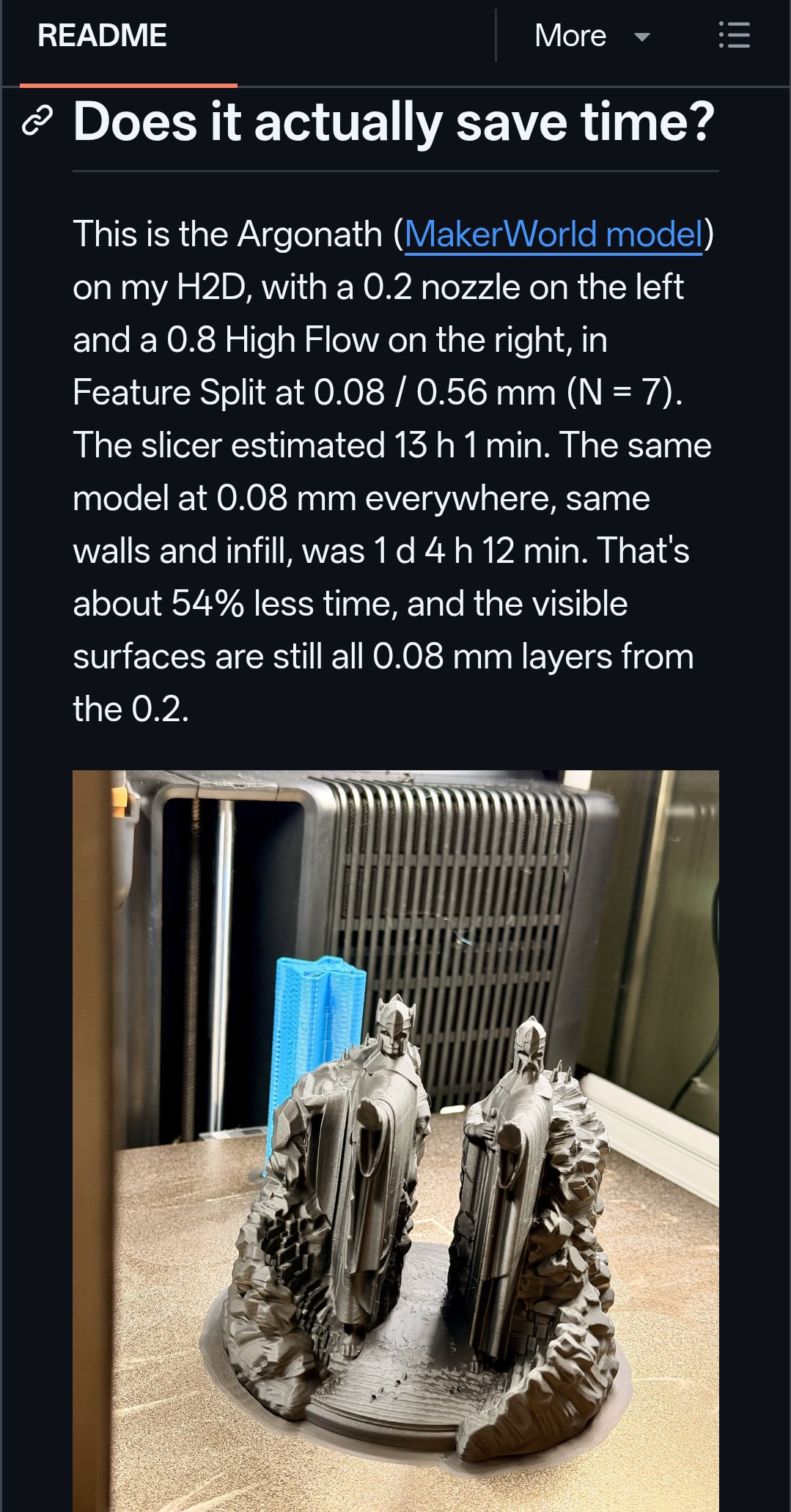
I tried to make it work with BambuConnect but on macOS it does not recognize the print slice file (works fine with Orca). I will try to print direct from USB and see how that goes.
Ive tested it and it work for some things but not others. It works for large object with 0.2 exterior and 0.8/0.6/0.4 infill. It also works for 0.2mm text on a large nozzle model. Unfortunately it does not work for multi-color models like business cards or clock faces etc. It was designed with dual color/material in mind.
That is seriously impressive
I haven’t tried it yet, but I’m getting ready to try it for writing text from a 0.2mm nozzle on top of a 0.4mm nozzle printed model, with my first attempt on a flat and level top surface on the 0.4mm model to provide the simplest, most uniform platform for the raised text and avoid any possibility of nozzle-to-print collision. From what I’ve read, I need to
- comment out the automatic nozzle detection in the start g-code,
;M1002 gcode_claim_action : 72 ; Hotend Type Detection
;T1001
;M972 S14 P0 T5000 ; nozzle type detection
and
2. use the H2D console to manually disable the firmware automatic flow calibration since it can’t be trusted for this scenario. . Instead, use manually configured k-values. Then
3. slice my file file using cadence slicer.
Finally,
4. Cloud upload is not possible, but if I upload the sliced file from a usb, then I should still be able to monitor print progress using Bambu Handy and in theory do remote skips if the need were to arise. I guess. Not really sure.
5. Or, if #4 is a fail, go with Developer Mode enabled and LAN-only to upload from Cadence. Not sure whether it can camera monitor the print, or whether I have to use Bambu Studio for the remote viewing. I guess I’ll find out when I get that far. Plainly, Bambu Handy is not available in this mode, and so obviously no Handy skipping control either. Maybe skipping control from the console though? That would make sense.
Regardless, if push comes to shove, I’m willing to trade-off skipping control if it turns out that sacrifice is needed in order to gain the multi-diameter capability. I’ve been waiting over a year and a half to get it, so no matter what I won’t be complaining. I’m grateful that user persistence alone has gotten us even this far. Hats off to the Cadence developer.
[Maybe snapmaker will hire him.  : ]
Sound correct?
Interesting project. Bambu Labs should take this developer into consideration  .
This slicer seems promising for the first serious steps towards multi-size nozzle printing.
Good news: After sitting as an open pull request for 121 days on the OrcaSlicer github, on October 8 this month SoftFever personally approved OrcaSlicer PR #14125, “H2D X2D Multi Nozzle Size Printing Support" and merged it into Orcaslicer main. OrcaSlicer 2.4.2 stable does not contain it, but 2.5.0-dev nightly does, and you can already download it at this >>>link<<< and run it without having to compile your own custom crafted fork. Reportedly not only has 0.2mm been tested with 0.4mm, but also 0.4mm with 0.6mm, and even 0.4mm with 0.8mm. Far out! 
Hi all! I am the developer of Cadence Slicer! Glad to see some traction here in here and really appreciate all of the testers!
for anyone who hasn’t tested yet, please do and please let me know what I can fix! I am a one man team, with a very busy “real job” that’s been especially busy the past week or two, but I am aiming to push some big updates in the next lil bit that will make setup a lot easier. I also plan to rebaseline off of the latest Orca main release which includes a community PR that allows for mixed nozzles to print, albeit not at their own unique layer height yet- which is what Cadence is optimized for.
I am trying to work with the Orca devs to split up my work into manageable chunks, and am hopeful that once I finish rebaselining off of the latest Orca build it will be easier to merge. I am also in contact with Bambu directly with hopes to procure a dev H2C which will allow me to expand capabilities for true multi color and mixed nozzle optimization. I’ve got the code in a good place but really would like a machine I can test it all on before releasing publicly. If any here have a H2C and are comfortable doing some beta testing, please reach out here, on GitHub, or on Reddit (u/hmitchr).
For now please keep testing and let me know if there are any particularly painful things I need to fix asap!
I am definitely going to dig into this, but this week, my time is limited.
I did a quick test, with some painted colors, but I noticed that the entire layer where the small nozzle color is printed, also the other color is printed with the same layer height, but with a different tool.
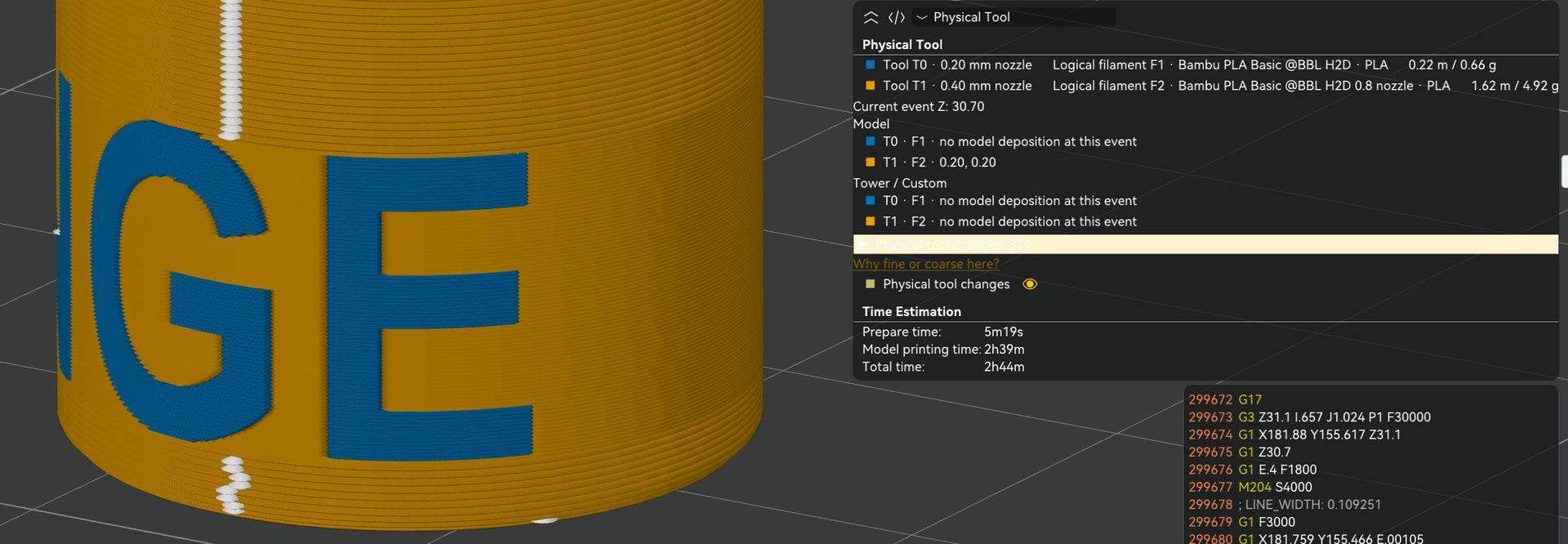
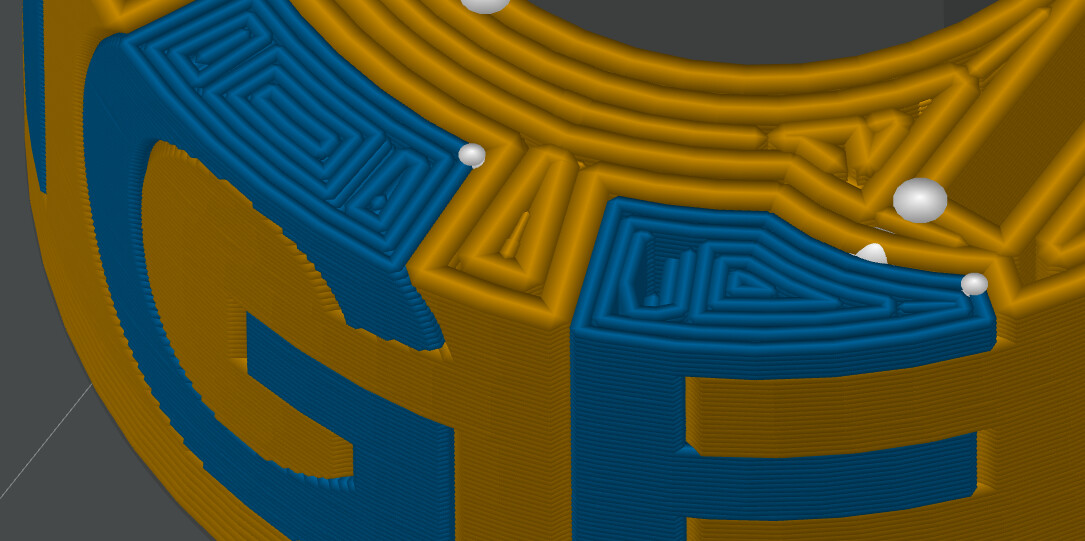
I am using a 0.2mm and 0.4mm nozzle, but I expected the 0.4mm nozzle to keep the 0.2mm layer height.
This is done in V1.1.1
Am I doing something wrong here?
Still discovering the capabilities and the UI so, it might be me.
Attached the .3mf
Adapter Lilly Penfill 2 Medtrum Nano Syringe V2.3mf (368.3 KB)
I know the choice here is a bit weird, but just some quick experiment.
Thanks for your work on this. I can’t promise help with testing, but do appreciate what you are doing.
I’m guessing that when some bigshot youtuber finally breaks the news, people will wake up and pay attention then. I think people got excited when Bambulab CEO told CNC Kitchen a year and a half ago that Bambulab was working on it. But then no progress was ever reported and nothing was released. As time went buy, it looked like a case of big hat, no cattle. So I’m guessing most people just gave up and stopped checking. Ironic, but reversible if they see Cadence Slicer on youtube.
h2s好用吗,想购买一个送朋友做生日礼物,不知道适不适合
I am in contact with Stefan at CNC kitchen already, sounds like he will be testing out Cadence shortly!
Thanks for this! Will dig into it tomorrow, but actually discovered a painting related bug today that sounds similar and put a ton of work into actually allowing for full multi color printing (aka however many AMS worth of materials are connected to a fine nozzle) this weekend. Hope to push an update mid week or towards the end of the week that will solve all of this, so sorry for the hassle for now!
The new update will allow all walls and surfaces of a part to be printed in whatever color they are painted, while keeping the infill printed on coarse nozzle just the one color assigned. The bug I found today was applying the painted material to the infill behind the walls, which stopped the coarse nozzle from printing it.
Don’t be sorry for the hassle!
I am grateful to see somebody (in this case you in your private time) is spending time on something that large companies with a much larger budget, don’t seem to be able to do or just not spending enough effort on it.
As mentioned earlier, this week I have limited time, but soon want to be testing this.
Even a partial (limited) solution, is already much more than what is currently available.
Keep up the good work! And thanks for your time and support!
Hi
Thanks for this slicer and push the multi-head printer getting more capability.
I’m a H2C user and tried this last week.
I found a wierd behavior when the printing near to end.
I tried two different models with same slicer settings.
they gets same result.
the printer would stop in the last few layers showing “filament changing” and do nothing.
and I need to cancel the printing job diretctly.
What I tried was 0.2+0.4 nozzles with layer height =0.8mm
Also, there is another thing is strnage to me, maybe you can give me a comment.
when I set 0.2 nozzle with height =0.08 , 0.4 nozzle with 0.24 height, it’s no problem for slicing.
However, if I set 0.2 nozzle with 0.06 height and 0.4 nozzle with 0.24 height. It would show warning.
Here are my recent tests for reference.
Quick update for yall!
Paint fixes. The painting bug I mentioned is actually two bugs. Paint was indeed soaking into the infill behind the walls, but an error with my time check (where the slicer tells you if it actually makes sense to print with different nozzle sizes) was sending all the infill to the fine nozzle on painted prints. I have fixes for both and I’m testing them now. The plan is still to get a small update out later this week.
Moving Cadence onto the latest Orca. I’ve started a rebase onto Orca 2.5, the version that has the multi nozzle size PR @NeverDie mentioned. For clarity, this PR only allows different line widths from each nozzle and not unique layer heights from the different nozzles that Cadence supports. Cadence should work exactly the same after the rebase, and it should be a lot easier to get my layer height work merged into Orca once it’s done. This will probably take a solid week or two of work, though I’m heading out on vacation from my day job in a few days and will have lots of free time so might be able to bang it out sooner, though I won’t be able to do test prints myself so some testers would be appreciated here as well potentially! (it’s normal to bring my laptop to the beach, right??)
H2C and other printers. Next after the rebase is letting you set a different nozzle size on each hotend. That opens the door to the H2C and printers like the Snapmaker U1. If you have an H2C and want to help test, let me know as it would be much appreciated! @Allen762 I saw your post and it’s on the list to look into!
A note on multicolor. Purging on a fine nozzle (0.2 in this case) is very slow, so on printers limited to two nozzles, multicolor with Feature Split is often slower than just splitting the colors across both same sized nozzles. On the H2C or U1, each color can sit in its own hotend, so there’s no purge on a color change. That should make mixed nozzles with multicolor make a lot more sense there, and let the coarse nozzle printing infill actually save time.
Thanks again to everyone testing. Keep the bug reports coming!
@NeverDie Sorry for the slow reply! You’re overthinking it a bit!. Just put the H2D in LAN Only mode with Developer Mode on and send the print directly from Cadence, and you won’t need to change the start G-code or the calibration settings. If you still want to keep an eye on prints without Bambu Handy, Bambuddy works great for that. LAN only mode with Bambuddy is my exact setup I run permanently for what it’s worth, with well over 200hrs on the setup.
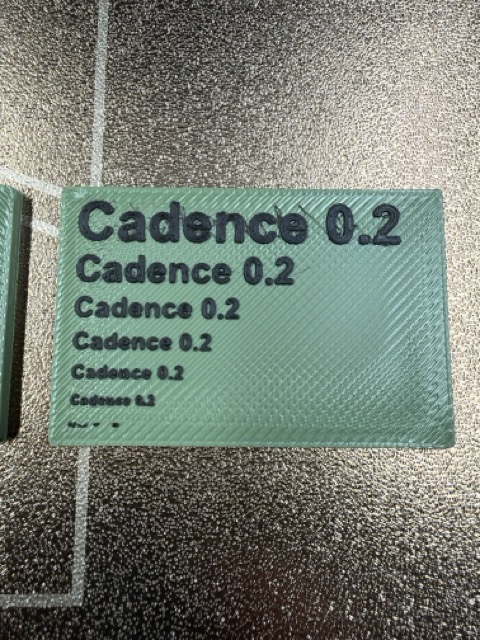
Raised text on a flat top is a great first test. The photo below is one of mine from testing exactly this. Black text on a 0.2 over a base printed with a 0.6, using Body Split. Raised about 0.4 mm, bold text stayed crisp down to about 1.5 mm tall, which is about as small as a 0.2 can go. Regular weight needs a bit bigger, around 2 to 2.5 mm. Ignore the stringing on the largest text line that was a bug I’ve since squashed. Obviously some fonts will be different, though likely best to stay close to font stroke width at or just slightly below 0.2mm
Flush text is trickier, since the big nozzle can’t fill the small gaps inside and between letters. I’m working on that now too as part of the H2C capability expansion. The cleanest fix is loading the base color on the fine nozzle too so it can fill those spots, but that adds purging, so it’ll cost some time at least on my H2D with just two nozzles. As mentioned above this makes more sense on H2C, though it does also require a second matching rolling of filament as the coarse nozzle uses.
I think with the Vortek’s AMS based solution you should be able to use the same filament roll with multiple nozzle sizes. This is I think one of the big advantages over other multi nozzle solutions like INDX etc.