; I have loaded PETG HF into my AMS Pro2 attached to my P1S. Bambu studio sees the correct filament in the correct position, however when I come to print the icon is “greyed out”. I cannot send to the printer. I changed the position of the PETG hf roll and again the software and printer detected the correct filament in the correct position… but again after slicing the model the tab of the correct filament is not highlighted and you cannot “send”. Can you help please
When asking for help, please provide as much information as possible about your inquiry.
This will help everyone to better understand your problem, and provide you with the best solution.
Detailed description of the problem
Printer model used
Slicer settings used
Type of filament used
Photos that clearly show the problem
.3mf file (if the file can be shared)
Any potentially useful information that is related to the problem
Ok I will try this …… having sliced the model and then go to print the ams shows all 4 loaded filaments coirrectly but I cannot click on the PETG HF button but the other 3 buttons function as normal
If find it much easier to keep your filament sync’d on the prepare tab so that when you go to slice and print, it automatically chooses the correct filament for you without manually having to change it at the print step.
)
I do this and as I’m said previously all the correct filament show when i slice… it is when i go to print the sliced ok model that the PETG hf filament is greyed out
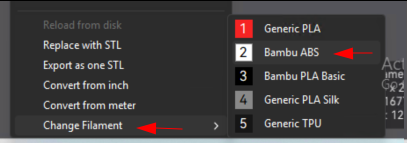
On the “Prepare” tab right click your model and browse to “Change filament”. Select your PETG filament as the filament type. Now when you got slice and print, it’ll either have it already selected or you should at least be able to select your PETG HF filament that’s loaded.
If you have PETG listed as a Filament option under Project Filaments, the simplest way is to right click on your model and choose change filament and select PETG, then re-slice
So am I correct in thinking… that if you print a previous model say pla basic, and then you choose to print in PETG hf you than have to change the filament selection through the procedure Randomkhaos ,mentioned??
That’s correct. When you are on the prepare tab, you are also selecting what filament type (pla, petg, abs, etc.) that you want to print with. So if you previously printed with PLA and you want to switch to a different material, you have to select that BEFORE slicing.