Can't assign filament to nozzle after BambuStudio update

Hey,
I’ve got a weird issue.
Whenever I try to assign a filament to a nozzle I get a grouping error.
I’ve printed at least 24 hours pet-cf in the right nozzle, as it is loaded external to the right nozzle.
After the bambustudio update yesterday I cant assign pet-cf to a nozzle manually. It always gets automatically assigned to the left nozzle and when I try to change that - grouping error filament cannot be printed with right nozzle.

But I know it CAN ACTUALLY be printed, because I did so…for hours…
I know I could fiddle around and somehow feed it to the left nozzle, but I dont really want to rebuild my setup as everything has its order!

I tried to print hips as support…but that will only go to the left nozzle aswell…

Anyone here with the same problems?

It seems that there has always been this limitation for the high flow nozzle now its for both. thanks for nothing bambu…

This is due to the extreme brittleness of the filament just like PPA and PPS. The left hot end PTFE tube has a more gentle curve to prevent the filament snapping inside during print head movements.

thank you. Just strange that they introduce it after letting me print 500g right… still they could warn me but still let me do it my way :stuck_out_tongue:
Bambu has a cool system but sometimes they just block stuff even tho it has a relatively small error margin idk weird stuff.

1 Like

Im pretty sure the PET-CF limitation to the left hot end was there from day one on the chart. Maybe they forgot to limit it in slicer until now.

You can use Support for PA/PET in the right hot end for supports.
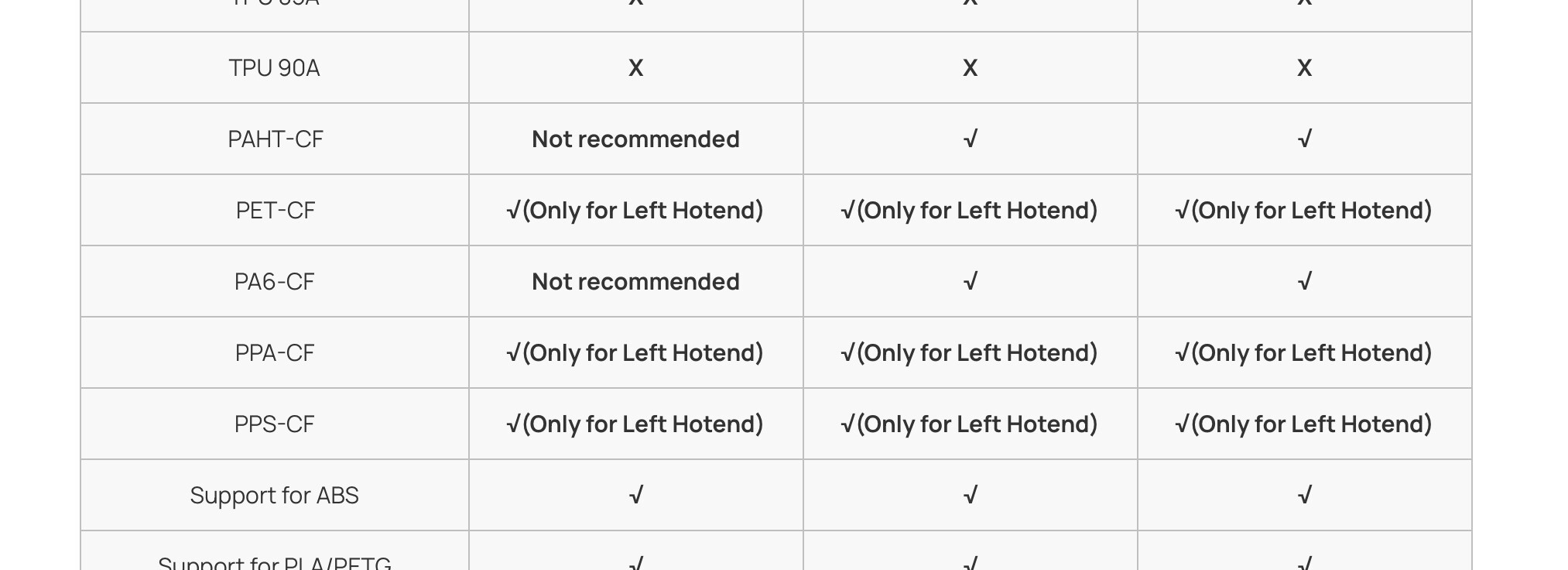
Sounds like Bambu is, I wouldn’t say, dumbing it down, but making it so that you can only do what they say it should do.

My thought, that chart states what material can go through which nozzle, but they let the software allow it to work in either. They then get complaints of clogging and breakage because users don’t RTFM and just do it their way, IE the wrong way according to the manual, so now the software prevents you from doing it the wrong way.

1 Like

jeah. so I did as they told me. I put the fragile filament in the left nozzle…in the MOVING nozzle. I wanted to do my 11 hour print. I used hips in the right nozzle as support.
Somewhere around 6 hours in the filament broke in the left nozzle while switching nozzles. completely blocking its movement and thus ruining the print.

being cocky as I am, I got my most brittle filament out - 3dxtech pc-cf - that one breaks when you look at it the wrong way.
I put it in the right nozzle and pulled a straight 18h print with it. Filling most of the printbed.
It didnt break, it didnt ruin the print. and even if…i wouldnt have to take apart the whole unit…

all I can do is BEG - BAMBU PLEASE LET ME DO IT MY WAY.

2 Likes

Why the h would they want to use a MOVING head for brittle filament? it should always go through the fixed head. That makes as much sense as pantyhose on a gorilla.

1 Like

not according to bambu lab…and i saw what they mean, the right nozzle ptfe tube is getting heavily bend. but still using it in the moving nozzle is silly aswell…

1 Like

The thing is, the left nozzle pushes the filament back towards the AMS when it retracts. The PTFE tube at the top is fixed in place. The tight bend on the right nozzle is just at the top of the head and moves very little when traversing. I can see it being an issue if it flexed a lot, but I am not seeing that on mine.

1 Like

Did you use support in that print?

Because one additional reason for filament to break is when it sits idle in the PTFE tube while the other nozzle is printing.

yeah, exactly the reason why I bought this printer. The support of high temp filament with soluble filament, without trying out how to set purge volumes for stopping layer contamination xD
I love a good supported part :smiley: