I’ve been tearing my hair out trying to write a code block that will move an angular servo to a specific angle at a specific speed. I need it so I can trigger the movement after a delay to avoid moving parts clashing.
This is what I’ve been working with, based on the documentation, picking my friends brains (who know a bit of python) and even stooping so low as to use ChatGPT (sad face).
import time
import machine
from bbl.servos import ServosController

servos = ServosController()

servos.set_angle_stepping(2, 90, 10)

def proc(t):
    servos.timing_proc()
tim = machine.Timer(0)
tim.init(period.10, mode=Timer.PERIODIC, callback.proc)

while servos.servos_info_map[0]["step_en"]:
    time.sleep(0.05)

tim.deinit()
I know I’m doing something stupid, I just can’t figure out what so would massively appreciate any help
I’m sorry, I’m really ignorant of python (or programming in general, very much a late 90s script kiddy). I don’t really understand what you’re telling me or how I could apply it.
The message I was trying to convey is that the velocity control is already there in the original MicroPython CyberBrick code stack.
You need step_en for the servo output to be set to True and then you should be able to control servo velocity with vel key. The code will slow down the velocity from max to a lower value while it drives to the new set point of the angular servo.
I genuinely might be misunderstanding you, but I’m pretty sure I’m aware that vel is already there in the stack.
I’m calling servos.set_angle_stepping(idx, angle, vel) and defining idx (1), angle (180), and vel (20%).
However the issue I think I’m running into is that servos.timing_proc() isn’t getting called meaning that step_en and the current step aren’t being updated for the servo. Without that (I think) nothing will happen.
I think I need a timer that does a callback to timing_proc() to incrementally update things, but I can’t seem to get that to work.
What you’ve linked to looks like the source for the call I’m trying to make.
I just can’t figure out what’s wrong and why step_en never seems to go true or why timing_proc() doesn’t seem to update anything.
As someone who doesn’t know python and can’t program for toffee, I don’t know what my code block is supposed to look like.
I’m not trying to do fully custom code, I’m trying to build a small code block within the Cyberbrick App to do a specific thing. I’m not sure why mimicking the main program entry is the right way to go about things?
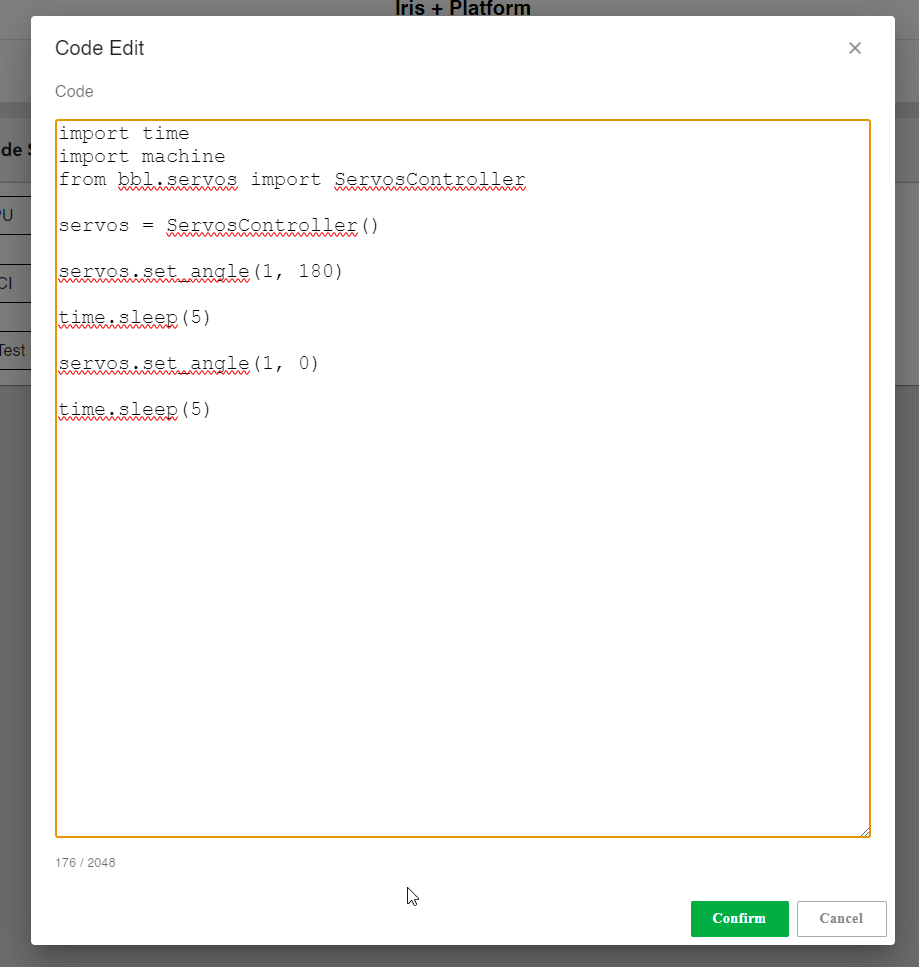
I’ve managed to make a code block that can move the servo to a specific angle:
import time
import machine
from bbl.servos import ServosController

servos = ServosController()

servos.set_angle(1, 180)

time.sleep(5)

servos.set_angle(1, 0)

time.sleep(5)
(where you set the angle to something else than 90, which is the center)?
The whole Timer0 task should already run in the bg, so IMHO no need for you to explicitly do anything with it:
You could try to get some debug info flowing back to you by attaching a REPL terminal via USB to the CyberBrick (e.g. Arduino Lab for MicroPython), so that you can follow on the terminal what it is doing.
Hey, you are right, the timing_proc() of each actuator (such as servos, LED and motors) has been called periodically by timer(0) in the background, so in the code block you only need to call the function interface (such as servos.set_angle_stepping(2, 90, 10), so you don’t need to trigger servos.timing_proc() again in the code block.
But it didn’t work. I eventually discovered that the ServosController module doesn’t use the new method to implement a singleton, unlike the LEDController and MotorsController design, like this:
This caused the ServosController instance running in the background to become inoperable. I believe this is a bug that CyberBrick engineers will fix soon.