Complaints about Customer Service

I am posting this publicly because I have attempted to resolve this matter privately through Bambu Lab’s support system, but after nearly two weeks, I still have not received an acknowledgement of the concern I am actually raising. My customer-service complaint has repeatedly been treated as a duplicate technical-support request and redirected back to the original support agent whose handling of that case is the subject of my complaint.

I resolved my printer issues on my own, in no part due to any advice given by the support team.

My A1 Mini began producing inconsistent prints and inaccurate dimensions. Before contacting Support, I performed extensive troubleshooting and provided multiple photographs showing the problem occurring with both Bambu and generic filament.

Despite this, Support told me:

“It looks like the issue is low quality filament, as the bambu filament prints look perfect.”

The Bambu filament did not produce a perfect print. It was only marginally better, and my photographs showed that the same underlying problem was still present. I explained this to Support.

From my perspective as a customer, this was particularly frustrating because Bambu filament retails for roughly twice the price of the generic filament I was using. Being told that my problem was caused by “low quality filament” and that Bambu’s much more expensive filament was the apparent solution felt less like a diagnosis and more like being directed toward purchasing Bambu’s filament before the printer itself had been properly diagnosed. If I had not pushed for further help, I would have been stuck with the same issue, having wasted money on filament that I did not need to spend money on.

While waiting for their next response, I continued troubleshooting and discovered the actual issue myself: I had been using the wrong lubricant on the printer’s motion system. After completely removing the old lubricant, the problem was resolved.

I fully acknowledge that using the wrong lubricant was my mistake. My concern is that I provided evidence showing the problem persisted with Bambu filament, yet Support still identified filament as the apparent cause before establishing whether the printer itself had a mechanical issue.

I subsequently opened a separate customer-service complaint about how the technical-support case was handled. I explicitly stated that I was not seeking further technical support, compensation, or replacement parts.

That complaint was labeled a duplicate of my original technical-support ticket. After explaining that it was a complaint about the handling of that ticket, rather than a request for technical assistance, I was told it would be redirected to the same agent whose handling of the original case is the subject of my complaint.

My question to Bambu Lab is simple:

Why was “low quality filament” identified as the apparent cause despite the photographic evidence I provided showing that the same problem occurred with Bambu filament?

I am not disputing that checking the motion system was a reasonable troubleshooting step. I am questioning why the evidence I provided was apparently insufficient to prevent Support from treating filament as the likely cause.

I have spent a great sum of money on Bambu products and had previously been a satisfied customer. I would really like to see this reviewed by someone in Bambu Lab’s customer-service management rather than being repeatedly redirected to the original support agent.

I wouldnt mind seeing the “photographic evidence” so I can put your post into context.

Low quality filament can cause a lot of issues. Especially the really cheap Alibaba stuff. If you mean something like Insignia or Inland (bestbuy and microcenter) thats probably not the issue.

Support works with what you give them. These things are hard to diagnose over a chat log. I find it best to go into it with a few ideas or just flat out diagnose the printer yourself and ask for parts.

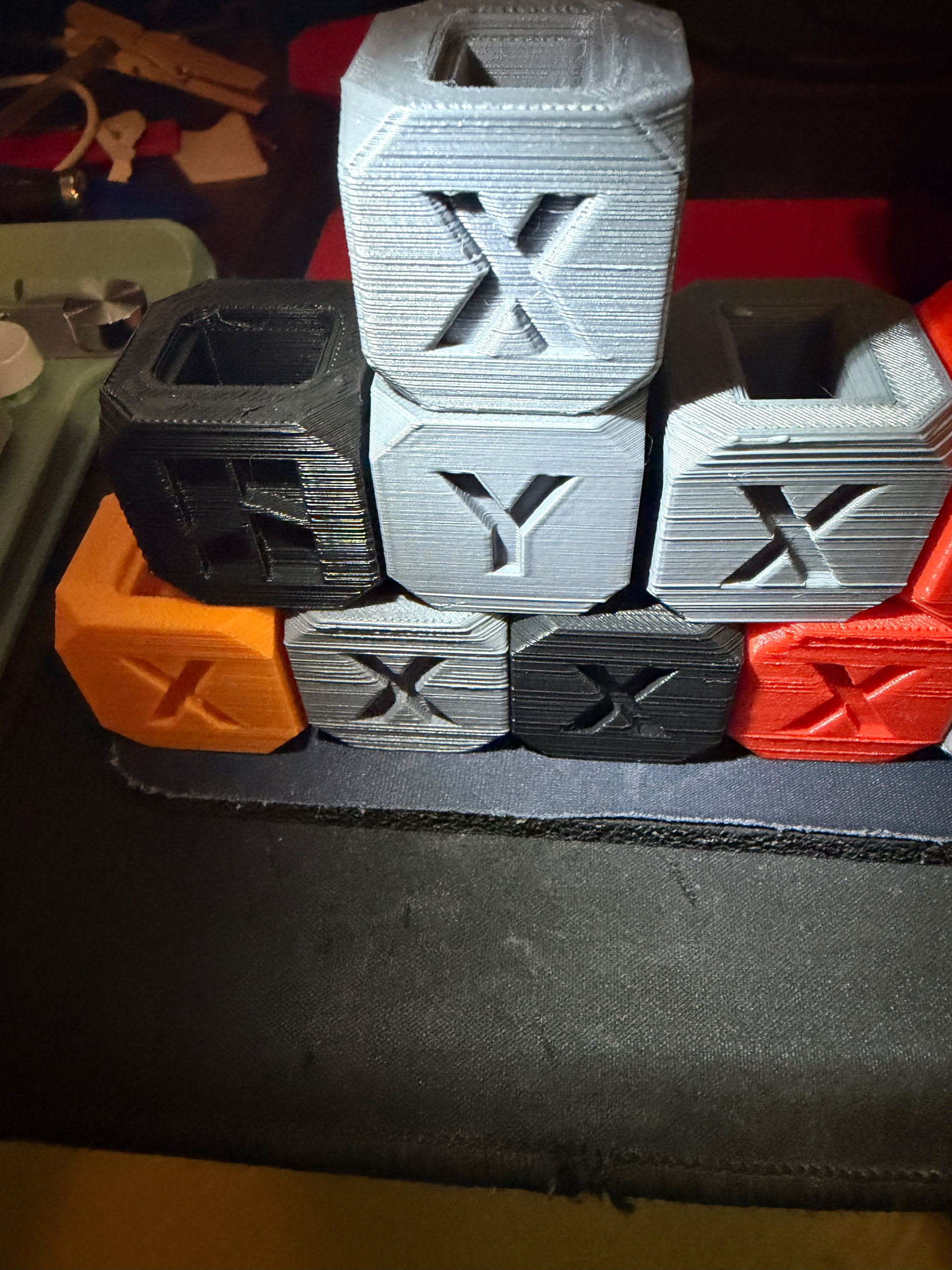
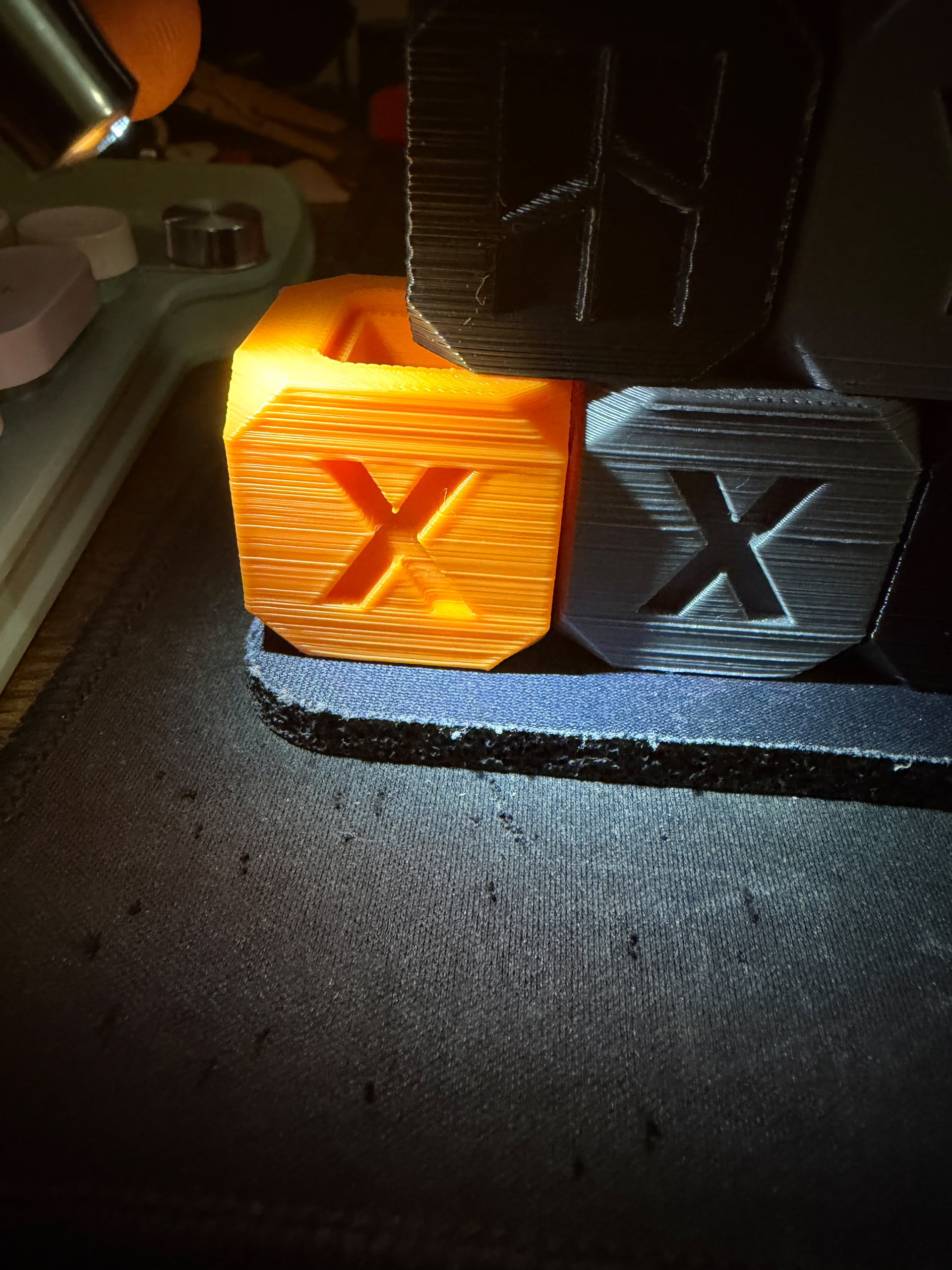
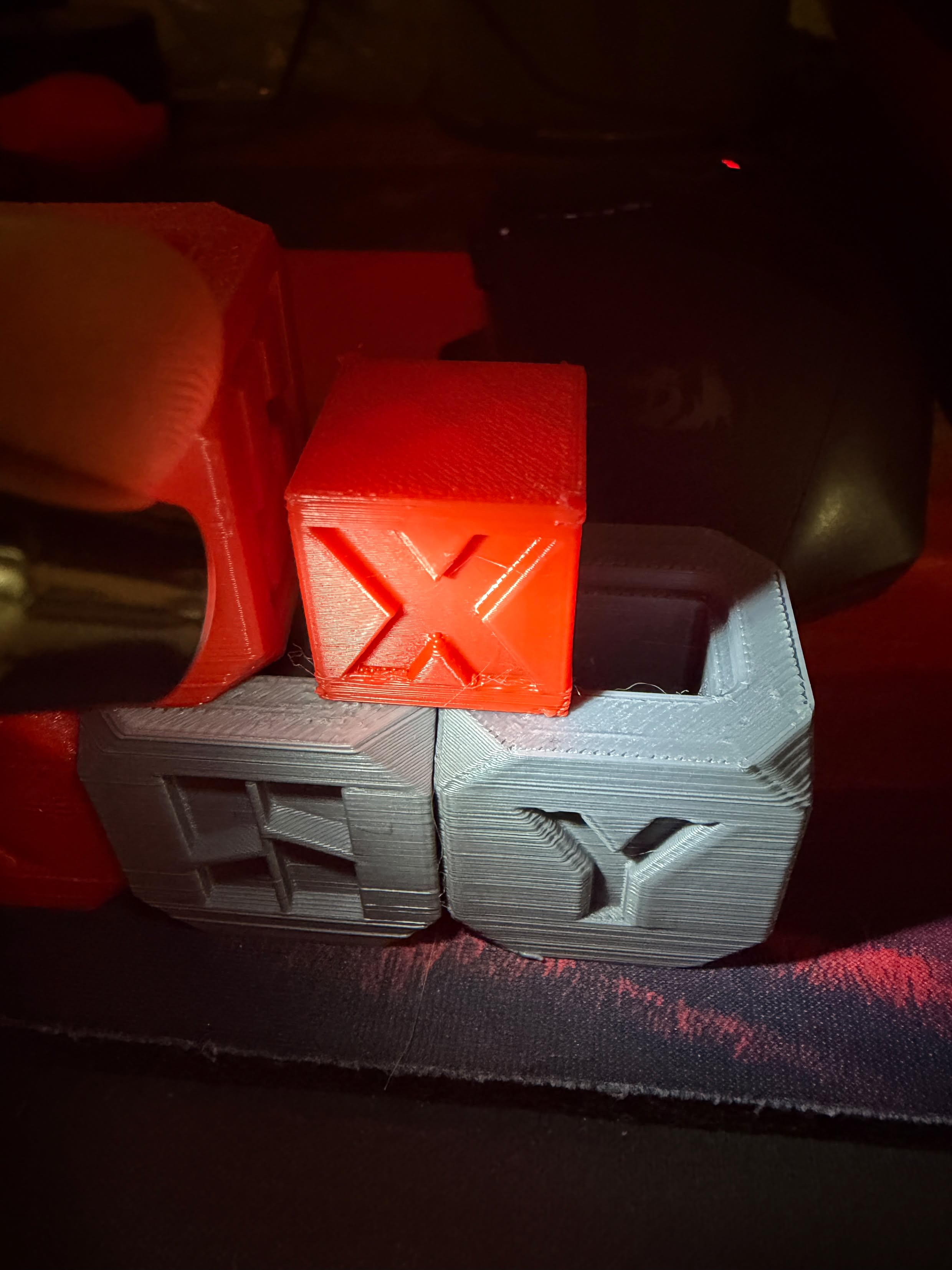
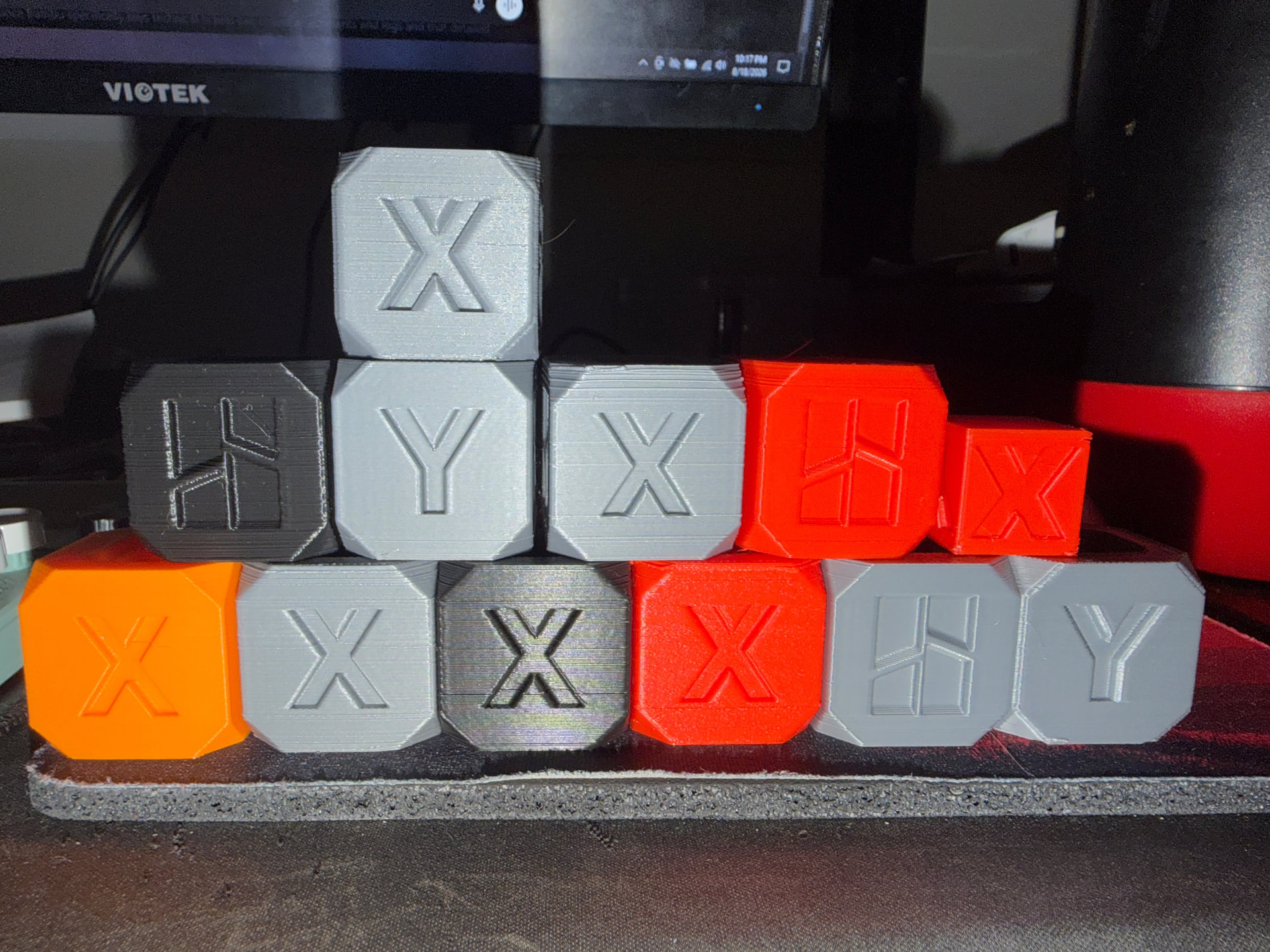
Gladly. As you can see, all of the prints, regardless of orientation and print direction, had the same banding. All prints were made from generic filament, with the exception of the orange cube, printed in Bambu PLA basic. The rest were printed from Kingroon PLA+, a filament that I’ve been using for 3 years now, without issue.

I gave support a comprehensive list of everything I had done to troubleshoot, including firmware and software updates, belt tensioning, cold pulls, unclogging with a “needle” tool, changing nozzles, changing filaments, lubing the Z screw, drying filament, watching the Z screw and seeing no side to side motion (to rule out a bent Z screw), and I even went as far as to disassemble the entire extruder assembly to clean it out (and it was basically spotless, but I still brushed out small bits of filament dust). After all of those fixes, I had come to the conclusion that the extruder was the likely culprit, so I asked support if I could get a new extruder as an act of goodwill. I gave them print logs and everything, so it felt a bit insulting to have it all chalked up to being bad quality filament, because I knew this same spool of filament printed fine on my other printers just a few weeks ago.

Some filaments just show more banding because of color and shadows. Thats where the confusion might be.

I havent used kligroon, but I havent heard anything too terrible about it. I assume you are using a custom tuned profile for it?

First thing I would check is the hotend assembly. Making sure it is tight and the nozzle is installed correctly.

Look at point 4 in this wiki article…

Second thing I would check is your belt tensioning…

The extruder is a wear component. You will need to buy a new one. They are decently cheap, buy two while you are at it.

Out of curiosity, what is the age and hours on the A1 mini?

To their credit, that is exactly what bad quality filament can look like when shoved thru an otherwise functional machine. But seeing the orange cube, which you say is a diff vendor, would suggest a different cause

Have you checked you A1’s hotend heater screw tightness?
Take off cover plate
Take off nozzle
Unscrew 3 visible screws on the black heater plate that holds the nozzle holster, completely
Gently fold down that black plate to expose 4 more, smaller, screws on the backside
Tighten THOSE

oh no man, I solved the issue, I made this post to get the attention of Bambu, because their customer service was horrible, and I couldn’t reach them through the tickets or contacting their corporate email. Like I said, the issue was ultimately me using the wrong kind of lubricant on the rails.

Printer is 2 years old, sitting at about 1050 hours right now.

What lube where you using? I kinda have a hard time believing that was the issue.

Bambu customer service is not the best. They tend to be slow, but almost always are able to fix the issue, even if they have to throw hundreds of dollars of spare parts at you.

I think their initial conclusion was reasonable since you already said you did most of the troubleshooting steps.

I had been using the Z screw grease for hundreds of hours without knowing that it was only intended for use on the Z screw assembly. After doing some research, that was certainly causing my issues. It was a bad case of human error on my part.

I think I would try a different hot end. I find smaller things print better for me with my 0.2 hot end.

But then, I also do a lot of Ludicrous speed printing. Which in my experience’s seems to smooth my objects out.

My only experience with support was with a dual surface Bambu plate that cannot be read by my printer. They told me to shut off the plate identifier in my settings. Not the solution I had hoped for.

I’m running a P2S with Bambo hot ends (960ish hours now). But I have been using generic filaments more and more. Hope things do sort out for you.

Just so you know: Unfortunately, using the Tickets system to complain was the wrong approach. The support mainly focuses on technical issues and orders. Your message was simply sent to the wrong place. Even worse was opening a second ticket instead of using the old ticket number - those get deleted immediately because they’re duplicates. Always use the old number, if it relates to a previous case.

So you made a few mistakes, too, when it comes to the ticket system, but how were you supposed to know? It’s not your fault.

It’s often better to just ask in the forum beforehand.


This forum is probably the right place to discuss this, but even here, you should lower your expectations. Although support staff are available here occasionally, they mainly deal with tickets relating to technical issues or orders.


I think it’s good that, in your case, this isn’t a rant but is presented in a factual manner. Still, as I said, keep your expectations very low. The forum is more of a “users helping users” kind of place, without - or to be precise, very rarely - involvement from Bambu.

On top of that, there is the significant language barrier, which is often overlooked.


You have a hundred times more chance of getting a replacement part for free through the ticket system than of submitting a complaint. Even if you had emailed it to them, you might have received a free roll of filament. However, given that it was your own mistake, it is unlikely that you would have received one.


We all need to let off some steam from time to time, but then it’s important to move on. Bambu has definitely improved when it comes to technical support in general, even if it’s not perfect, as your case shows. But filing a complaint? Don’t hold your breath. You might get lucky and a support team member will stumble across this thread and offer you a spool of filament, but I wouldn’t count on it.


To put it pragmatically: You made a mistake, and they made a mistake by misjudging your mistake. Consider it a draw.

Trying to identify the wrong lubricant based solely on photos of the printout - in which the actual printer isn’t visible - would likely cause any support to fail.

@5150_Prints I am sorry to hear you had a bad experience with our customer support.

Can you please send me a private message with the Ticket ID so we can look into what went wrong, and ensure we do a better job next time?

Thank you

Brother, the title of this topic is “Complaints about Customer Service” and the OP stated he diagnosed and corrected the issue that initiated the customer service contact.

Just how far did you read past the headline before you proceeded to discipline OP, whose financial situation is thus far completely unknown, condescendingly suggesting the extruder is not only “decently cheap” but in fact flippantly instructed him to “buy two while you’re at it.”

Don’t lose sight of the fact that the source of the issue, as clearly stated in OP’s mea culpa, was an incorrect lubricant.

You’ve provided the same level of support as the Bambu CS who stated, I’m paraphrasing, that even though the orange cube printed with the expensive BL filament had the same horizontal layer offset banding issue, he should buy more of that.

■■■■, as careless as Bambu support’s response was, at least they didn’t tell him to double up on the garbage.

Do better.

Every post you have made on this forum has been complaining about something. I cant take you seriously with that additude.

The point that I am making is that support are not magic. There are 10 different reasons to see banding, you need to consider them all. And you need to put in a little work and help support when you can.

And really? Your point about financial situation is idiotic. This is an expensive hobby to begin with. I am recommending basic maintenence items.

Be more positive.

Good thing I submitted a ticket on their customer support ticket system instead of their technical support system. That’s why I’ve been frustrated that they keep saying I’ve made duplicate tickets, because they are submitted under separate issues and don’t contain the same contents

The other guy is right. Bambu made 3D printing more accessible and cheap to consumers compared to other companies (Like Prusa, I have nothing but love for them though). Financial situations do matter here, because if I had excessive money to throw towards a malfunctioning printer, I would not have to jump through all of these hoops to capture the attention of the manufacturer. Customer support should be provided all the same, regardless of how much money a customer has spent.

I would probably credit Creality a little more for that. The shear power of cheap chinese manufacturing.

We are not talking about an excessive amount of money. We are talking about a 30 dollar part that is considered a maintenance item. We are not talking about keeping a spare motherboard laying around.

Stuff goes wrong. I value being able to quickly switch out a component instead of having excessive downtime.

Having spare parts on hand is a completely reasonable recommendation.

I think there’s an important distinction between a replaceable component and a maintenance item. A critical printer component shouldn’t be considered a “maintenance item” simply because it’s relatively inexpensive or replaceable.

Bambu’s own documentation seems to make this distinction as well. Their A1 mini Essential Consumables Kit specifically lists things such as lubricant, grease, PTFE tubes, filament cutters, wipers, and silicone socks as consumables. The extruder is not included in that consumables kit; Bambu sells the extruder separately as a replacement part. I also haven’t found any Bambu documentation specifying a routine replacement interval for the A1 mini extruder.

I would consider lubricant, hex keys, and nozzle-cleaning needles to be maintenance items—things used as part of routine maintenance. A complete extruder assembly that is expected to function for a substantial portion of the printer’s life is different.

It’s similar to a car. A spark plug is relatively inexpensive, but it’s considered routine maintenance because the manufacturer expects it to be replaced at a specified interval. A starter motor, on the other hand, can also be relatively inexpensive compared with the vehicle, but you wouldn’t normally call replacing the starter “routine maintenance.” It’s a repair necessitated by a component wearing out or failing.

1,000 hours also doesn’t seem like an obviously normal replacement point for an A1 Mini extruder. There are community reports of A1 Minis reaching 1,300 hours with the original printer still operating normally after an extruder gear replacement, and another A1 Mini owner reported replacing the extruder at 2,628 hours. There are also A1-series machines reported with several thousand hours of operation, including 5,000+ hours, although those reports don’t establish that the original extruder lasted that entire time.

So I don’t think it’s reasonable to characterize an extruder failure at around 1,000 hours as inherently an expected “maintenance” event simply because the replacement part costs around $30. Replaceable does not necessarily mean consumable, and inexpensive does not necessarily mean routine maintenance.

Just to put this into perspective: The statement about hours is only relevant if you know which filament was used. Some filaments cause more wear and tear on the extruder than others. How often the extruder was cleaned also plays a role. Raw numbers alone don’t tell the whole story.


See the first part of my comment: Then Bambu would have to specify that for every possible filament. It’s doable, but unrealistic.


That’s a weak argument, because the repair kit doesn’t include any extra nozzles, any extra print plate, or any extra belts. The kit just contains small parts - but of course, not all of the wear parts.


Furthermore, some of your statements are incorrect; there is indeed a maintenance guide for the A1 - and extruder. However, it does not specify exact hours; instead, it is expected that you simply judge the condition with your own eyes and clean it every now and then:


Like I said, I understand your comment - and your frustration - but you’ve taken some stuff out of context, and that’s not accurate. There’s a lot of documentation on this. There are certainly a few things one could criticize about Bambu. A lack of documentation is not one of them. There is also transparency regarding which parts are subject to wear and tear, as well as the ability to order those parts.


No matter how you look at it, at the end of the day, it’s still a wear part - just like your belt, your nozzle, and your print plate. Whether it wears out too quickly is up for debate, but the fact that it’s a wear part is not.