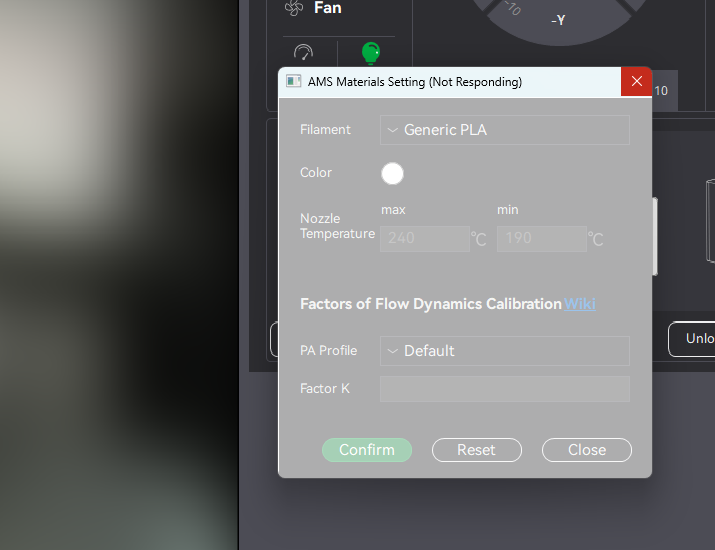
I am on the newest Bambu Studio 2.4.0.70, and I have reinstalled it to see if that would fix it. It has been running perfect for a bit and all of a sudden when I go to the device settings, and attempt make changes to the colors on any of my printers. Heck even select one of the six I have in the list this thing will lock up for 3-5 minutes, then does it again once I select a color, and hit confirm.
I know it isn’t a PC issue, I am running everything else just fine on a i9 12900k, 64GB ram and a RTX 5070. Unless there is some sort of interaction between the device area and the GPU, which could be possible with the live video in there(which I am not using).
Mine crashes occasionally. I tend to have multiple instances open, one for each machine and a fourth for putzin around in, and usually when running the X1C it will crash, JUST that one, the others are fine.
Someone posted elsewhere, can’t remember if it was here or on FB, but if you go into settings and choose something regarding video, it might help, I just don’t remember what it is. It helped when I had locking issues.
I’m having the issue since a few days.
Before that, no issues that I would recall.
Has anyone checked network connections to Bambu’s servers? I haven’t yet.
Might be that the many P2S sold during the black Friday (uhh… black months I mean) are finally kicking in network load wise.
Wouldn’t surprise me that this is the culprit considering forum and store are close to unusable each day in the (european) evening for roughly two hours or so since months now.
Seems like Bambu hasn’t purchased sufficient bandwidth.
I have an F2 Ultra UV that has wireless connection issues occasionally. My wireless network has not had updates in quite some time. If it Ain’t broke, Don’t Fix it. What that means is usually when there are wireless issues, its the client, not the wireless thats the issue. In this case, where the software freezes, its probably a driver thats corrupted in the operating system. I have had zero wireless issues with 3 Bambu printers and Studio, though I found that Suite will lock up completely after a job has run, thats the software for the Laser. Not related to networking either, so that tells me the issue with my Xtool is either the Xtool software, or the wireless component on the machine itself, though leaning more towards buggy software.
Here is what I see in how the software works with the printer. When connecting, Syncing, or running controls in device, its connecting directly to the printer. When jobs are sent, they are uploaded to the cloud, then sent to the printer. I think it is doing this to buffer the job and take the PC out of the equation so as to not lock the PC up while the job is printing. If there are communication issues between the PC and Printer locally, its a driver issue if ONLY the printer is affected. If other things are affected not related to the printer, then its the PC or Network. I am running 2.4.0.70 and its the smoothest running so far for me, even when the laptop screens are disconnected and reconnected, it no longer fill all three screens and have to kill the program in order to close the program.
I have almost the same specs, except I have an i9 14900k, and I’m suddenly having this issue too. I tried a fresh install of the program, and still the same issue. It only popped up about a week or two ago.
Yea that didnt help any, I have it set in Nvidia Control Panel for the non threading thing that everyone says works. Nothing has worked. At this point I think there is a bug in the software. If only orca supported the H2 and P2 I would just use it lol.
I thought it was just me! Having the same issue here.
Tried uninstalling/reinstalling studio, rebooting the network and the printer and the PC. Its ony like this in the device tab and the printers take forever to show as connected.
Happening to me as well. Not just the Device tab, but anytime the software touches the printer (device status, syncing, printing, etc). It’s a new issue that started with the most recent release.
This is happening to me, too - printer P2S Studio 2.4.0.70. I’ve noticed it about 5 days ago. Issues mainly on device page: video streaming slow to start and sometimes even throwing error 403; XYZ commands took 20 seconds to execute (although funny enough sometimes XY commands were slow and Z commands were quick to respond and sometimes it was reversed). Interesting was that Bambu Handy on the same network was not affected and also direct controls on printer are OK. I was not aware of any changes done on my PC, so I started some investigation.
I was suspecting network issues and maybe connectivity to Bambu Lab servers, so I decided to switch printer to LAN mode. I started capturing network traffic with WireShark and didn’t find any obvious network problem. All connection conversations seemed to be established correctly and bidirectional traffic working as expected. Bambu Studio still does some communication to internet, but the communication with printer seems to be LAN only and OK. Later I found communication is still over the LAN even if LAN mode is disabled but printer and studio are still able to establish direct connection over the LAN. So I started investigation on client side.
On the same PC using Oracle VirtualBox I installed Linux Mint 22.2 and Downloaded Linux version of Bambu Studio. Logged into my account in Linux version of the Studio, synced the configs from the cloud and checked the Device tab. Eeverything worked as expected, no delays, no lockups.
At this point I decided to switch back from LAN only mode to cloud mode and to perform full reinstall in Windows (still the same PC). Uninstalled, deleted everything in ‘C:\Program Files\Bambu Studio’ and ‘%USERPROFILE%\AppData\Roaming\BambuStudio’ and reinstalled Bambu Studio. Logged with the account, synced the configs from the cloud and checked the Device tab. Everything worked as expected, no delays, no lockups. Well well, worked, but only for 1 day. I printed one thing with reinstalled Studio and am seeing lockups again.
Out of curiosity I checked my Linux Bambu Studio and that one is still working with no lockups or delays. On the other hand, virtual machine has limited resources and mainly VRAM is only 256 MB. Not sure if it is because of that, but Studio is sometimes crashing there, so for normal printing I am sticking to Windows installation.
My conclusion is this is definitely client side issue and only Windows client seems to be affected. Linux client and Bambu Handy app seems to be unaffected, too.
That’s some awesome troubleshooting! Thank you for doing all that. I actually created a support ticket shortly after posting here and linked this post to the ticket letting Bambu know others were having the same issue. I’ll keep yall updated as to what they say.
Just heard back from Bambu. TLDR: Issue still not rest but they had me try this.
For your current issue, we suggest navigating to the C:\Users\Your User Name\AppData\Roaming directory and deleting the BambuStudio folder. After that, check if the problem is resolved. Please back up the user folder before deleting it, as it contains your custom parameter files.
I’ve tried this and the plugins folder… doesn’t help at all. I knew they were going to ask for that to be done(support has people do this 1st or 2nd step, almost with any issues)
Wenn ich jetzt im Bambustudio unter „Gerät“ egal was, anwähle, hängt sich Bambustudio auf.
Es dauert ca. 20sec. bis Bambustudio wieder reagiert und ich, z.B. Veränderungen an Filamenteinstellungen vornehmen kann.
H2D und AMS, Up to Date und Werksreset mit sauberer Neuinstallation durchgeführt.
Bambustudio neu installiert auf einem Win11 Laptop der ca. 2 Jahre als ist und keinerlei Probleme macht.
Glasfaserinternet und Fritzbox aktuell in Sichtweite. Stabiles Internet.