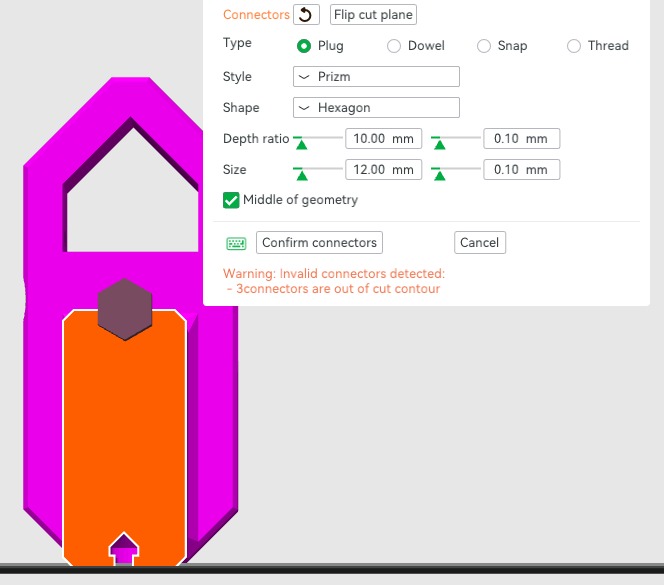
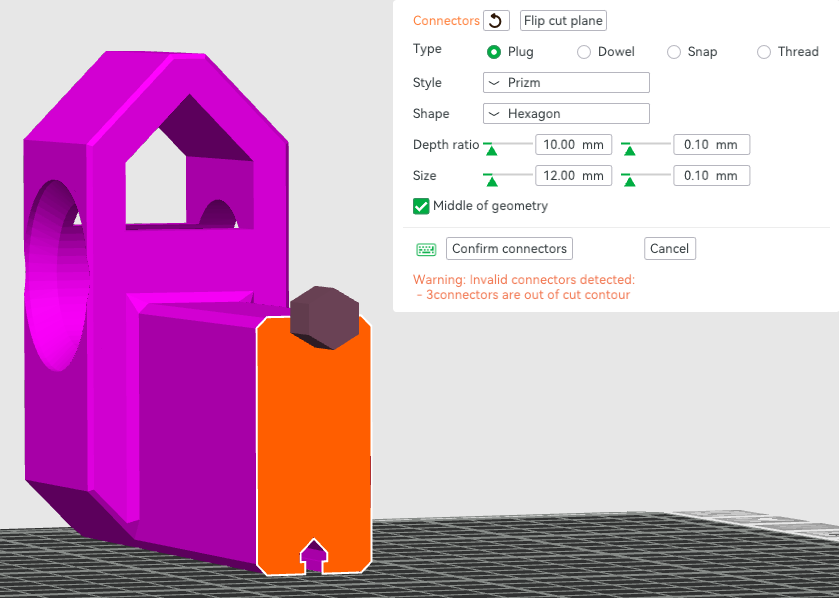
In Bambu Studio, when cutting (C), the “Edit connectors” option is great, but the option to place the connector in the “Middle of geometry” is limited to the middle of the overall profile of the object being cut.
An additional option (“Middle of cut face”) to place the connection at the middle of the “cut face”, which might not be the same as the object’s overall profile, would be even better.
Example screenshots are provided. The cut face is orange, but the “Middle of geometry” is based on the entire object profile (purple and orange).
Actually, this feature is really just a last-resort solution if you forgot to design it in CAD or Blender. Bambu Studio will never do it perfectly because it isn’t designed for that. You should always do this kind of thing in CAD or Blender.
Only if you’ve truly, completely forgotten to take this into account beforehand should you resort to this rather crude and unpolished feature in Bambu Studio.
In fact, there are many drawbacks to using this feature. For example, the object cannot be exported along with the connectors. Making adjustments later on is also a bit of a hassle.
Recognise the feature for what it is: a last-resort solution that was hastily added for those who failed to plan for it in advance. By the way, this also applies to the cut function as a whole, which can only perform flat cuts. Unfortunately, it often damages the mesh in the process, too.
Trust me, once you’ve done this using a tutorial in CAD or Blender, you’ll never use it in the studio again. Time required: One hour to learn it.