Cut Tool Limitation: Need Scalable / Local Cut (Not Full Plane)

Hi,

I’d like to suggest an important improvement to the Cut tool in Bambu Studio.

Current limitation:
The cut operation is based on an infinite plane, which always affects the entire model.
This makes it impossible to cut only a specific part of an object.

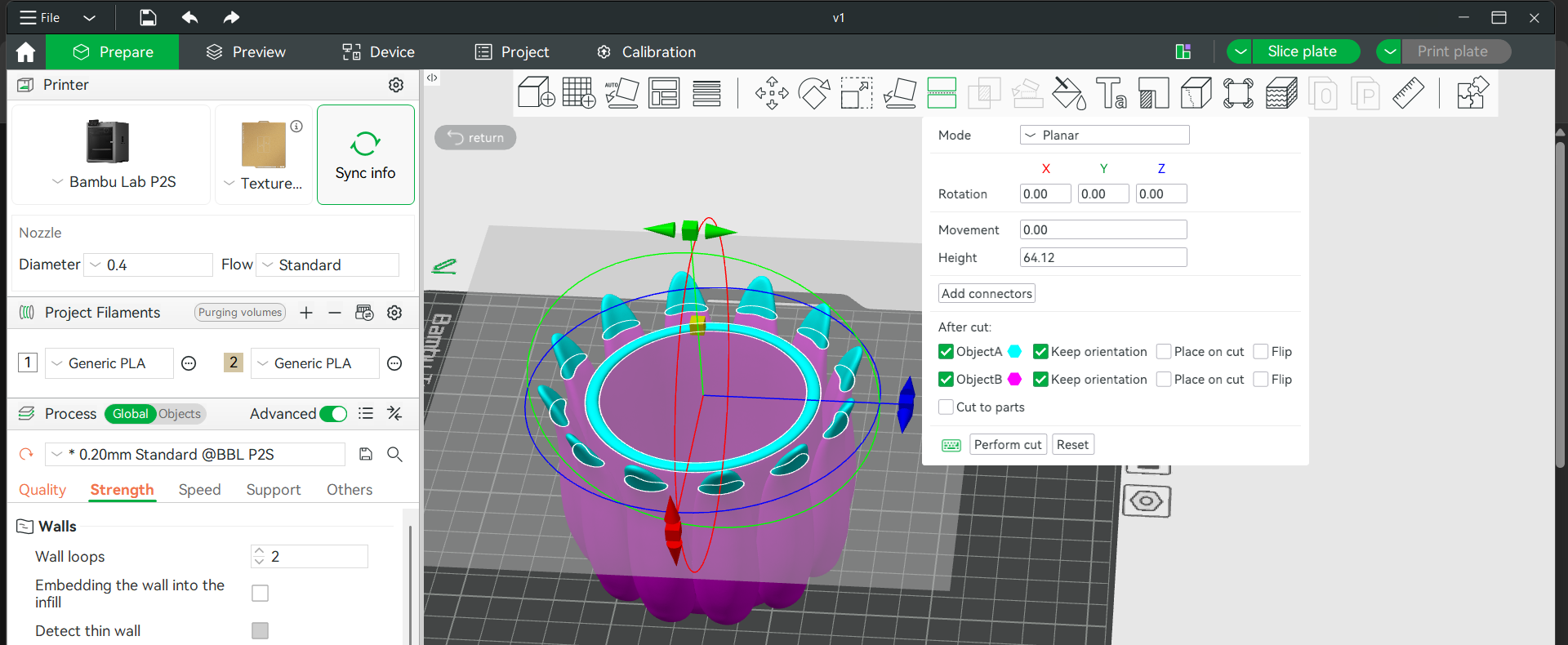
Example (see attached image):
I have a cylindrical shape with decorative petals on the outside.
I want to cut only the inner rim of the cylinder, without affecting the outer elements.

At the moment, this is not possible because the cut applies globally.

Suggested solution:
Introduce a scalable / bounded cut area instead of a full infinite plane.

For example:

  • a circular cut region (like a cylinder with adjustable diameter)
  • or a rectangular bounded cut zone
  • optionally movable and scalable in X/Y/Z

Benefits:

  • precise local edits directly in Bambu Studio
  • no need to use external tools like Blender or Meshmixer
  • faster workflow for modular and decorative models
  • especially useful for MakerWorld creators

This would be a huge upgrade for modeling flexibility inside Bambu Studio.

Thanks!
This would also be extremely useful for:

  • splitting only functional areas
  • editing decorative models
  • preparing modular prints

Would love to hear if others need this too.

You can already use negative parts as cutting tools. Cylindrical and rectangular cuts are easily made from primitive shapes, or you can load a complex mesh (.stl) file as a cutting tool. If multiple objects are merged into one assembly, you can also right-click an object to make it negative with Change type.

Keeping the parts on both sides of the split may require loading the original model multiple times and using complementary cutting shapes.

This type of editing is pushing the boundaries of a slicer’s purpose. Such work is usually much easier and more precise when done in a dedicated design program.

Thanks a lot for the detailed explanation — I’ll definitely put it into practice! :blush:
That said, I still wish there was a more intuitive built-in feature, like a scalable/local cut tool, to make this process easier and faster.

Hi, I don’t have anything to add, but I’m curious from a developer perspective. In what situation(s) do you find it easier/faster to do modeling operations in the slicer? Is it some one-time operation where all you have is the mesh of a model to work with? (Like to fit a published model to a smaller build plate, for example.) Or something else?

Thanks!
-Max

Think of the cut operation being based on an infinite sized box, not a plane. Everything inside the box is removed with a Boolean subtract operation.

In that context, a non-infinite cut operator is going to be a box primitive with a finite size. Same as the box primitive you’d make yourself to do a Boolean subtract to slice away a part of your model.

So you essentially already have exactly what you want. If BBL implemented a dedicated feature, it’d basically be the exact same thing - a finite sized box that takes a bite out of your STL. :slight_smile:

That’s not the case. The planar cut tool has useful functions for preparing the parts to rejoin afterwards - with placeable dowels, or various shapes of stud and hole, guaranteed to line up neatly.

Using a negative box doesn’t give us any such option; instead there’s a difficult and tedious job to do lining a connector up by hand.

I don’t have anything to add, but I’m curious from a developer perspective. In what situation(s) do you find it easier/faster to do modeling operations in the slicer?

This is a very common for people who print parts or miniatures for gaming. We’re often buying STL files directly from the artist and only have the mesh, and those shapes are complex organic forms with a lot of detail. They’re very difficult to support without scarring the detail, and sometimes hard to print at all.

But a simple cut in the right place often produces a shape which is much simpler to support.

Imagine, for example, a simple human figure carrying weapons and wearing complex clothes. Normal supports will often fail to support the flowing parts of the clothes, tree supports will often surround it so much to support the upper body details that they can’t be removed without damage.

But a cut at the waist produces two parts that support very easily and well - an upper body that needs only minor tree supports to hold up the chin, and a lower body that can be printed waist-down, feet up, needing little or no support at all.

The cut tool makes it very convenient to make this happen, with a correctly sized and matched hole and dowel to reconnect the parts after printing…

…except that trying to cut at the waist will usually go through the arms as well, leaving a couple of floating hands that there’s no good way to reattach.

Likewise, we often want the print direction of a weapon to be vertical (because supporting a long thin blade extended horizontally is a bad idea!), and need a way to cut off one arm and the weapon at the elbow, without cutting a line through the leg on the same plane.

A setting in the cut tool which reduces the plane to a cylinder, or even just a box, would solve this kind of issue while keeping access to the convenient cut utilities that are already in the slicer.