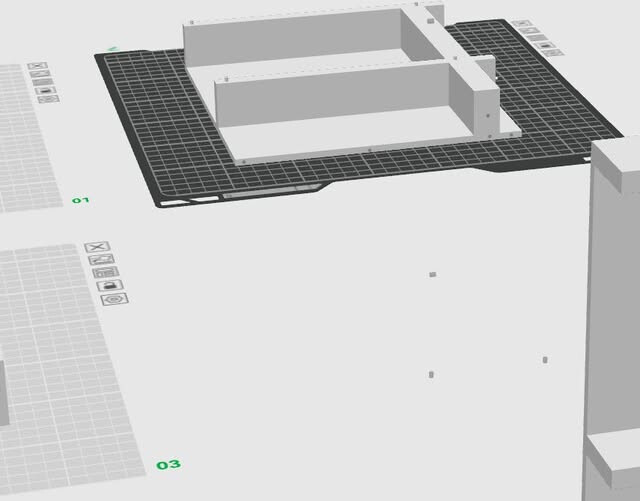
I made a rather large design to hold up a piece of test equipment with possible drawers under it.
It is way to large to print on my H2S or H2C.
I am very, very new to cutting up a print in Bambu studio.
So when cutting, I choose and place “plugs”. Afterwards, I have to mover the pieces around. When I do it looks like it leaves the “dowels” (plugs) at places on the screen. I’ll try to paste an image of what I mean.
How do I avoid that? When places plugs, why don’t they stay with the part?
Thanks kindly, for the help. I find this cutting fairly difficult.
It is usually easier to cut the model in whatever you made it with (or design it that way from the start). Usually cutting in slicer is done when you don’t have the source CAD files.
I don’t remember how to use the slicer cut or I could be more helpful. I did it once for an STL I downloaded, and had to fiddle with it for a while. But if all you need is dowels, and the slicer has positioned the holes correctly, you can just delete the pegs and make pegs either in the slicer or another program or just cut up one of the numerous pairs of chopsticks from the kitchen.
(EDIT I find it amusing watching handicraft channels saying buy these special sticks, dowels, rods etc and everyone here “out east” just opens the kitchen drawer and there’s dozens of wooden chopsticks)
TinkerCad. Splitting the large model is very possible in Tinkercad, but getting the alignment pegs and hole correct may be a challenge in that simple program.
There are sights that can automatically make models for you. I wonder if there is a site that can automatically split a model with alignment pins? LOL
I think I did figure something out. If I right click on each cut piece, before moving them, and selecting “Fix model”, then I can move the part around without leaving pegs behind. Boy, is splitting a model up a PITA. At one point a section had been up in the air and I could not get it to the plate unless I selected “Split to Objects” and then it went down to the plate without leaving anything behind.
Bambu Studio could use continued refining and work done in the splitting function.
I watched a video yesterday, on YouTube on how to split a model up using those alignment pins and the guy didn’t have any of the problems I did.
If that helps, I think plugs remain attached to the object and dowels are made separately.
edit You mean group or merge instead of fix? Fix appears to be working but from what it does, likely isn’t guaranteed.
Fix. I didn’t notice a merge. I’ll look again, but fixing an object allowed me to move it without leaving the pegs behind.
No, I was not using dowels. I saw those as an option in the video I watched. Now they are a thought. With the pegs, I need some tree support (but have to lower the threshold angle to like 20% to get the tree support to show up. Otherwise, BS was happy leaving pegs stick out in to thin air.