Hi!
Is there a way to delete stored data from Cloud(Filament,Printersettings etc…)?
Or do you really have to create a new account every time as reported in Facebook?
Greetings!
Hi!
Is there a way to delete stored data from Cloud(Filament,Printersettings etc…)?
Or do you really have to create a new account every time as reported in Facebook?
Greetings!
I am not aware of any one-step method to delete all data in the cloud.
Individual user presets for printer, filament, or process can be deleted using the “X” next to the floppy disc icon:

Hi,
thank you very much for your answer. But when you sync with the cloud, they are back again.
Hi Wolfgang,
I am not sure what you mean when you sync with the cloud.
I can add a new filament, preset or printer, and it will be synced automatically with the cloud and shared within computers or slicers; it works identically if I delete it.
Can you explain how you sync?
The only thing that I can remember is the wrong sync settings. Mine are:
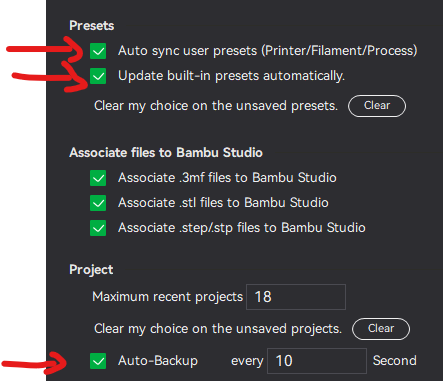
As an example,
if you reinstall the software then it will be syncronized with the cloud. Then everything comes back with it.
And this data that is there in the cloud I want to delete.
That only my newer profiles come along and the old ones are completely gone.
Greetings!
Yes, it is true. But if you delete all your current custom items(presets, printers and filaments), it will sync that info with the cloud. Wait to finish syncing and have only one studio app open.
Afterwards, if you install a new one, these files are not synced as they do not exist.
I had done that a long time ago but when I reinstalled it they were back.
Ok I will wait until the next installation 
Ok. I am unsure if there is any bug with the current software versions. I did it once and factory reset my printer, and it worked flawlessly. But this is something that I expect not to need to do anymore.
I wonder why you wish to start from scratch every time you install.
i had try a lot and dont want it back I save my files from pc app folder.
Thats enough for me, i only need the cloud for the camera.
If that is the case, you may try not to sync with the cloud.
Yes, that’s how I do it now. But it would be nicer if I could manage everything myself. For example, I choose which profiles to download when syncing. Or I can select and remove them. Let us wait for the next updates
I understand. You may try a feature request.
Did you ever figure out how? I deleted my presets and they reappear.
well it would be good if bambu lab added this option to delete all cloud saves because I need to do that too
I deleted them locally and they dont reappear - but they arent clearing from the cloud as i keep getting the pop up… very frustrating
I have the same issue.
I have some eSUN filaments that don’t show up in the custom filaments list, so I can’t delete them there.
On top of that, they are considered “Unsupported Filament profiles” so I can’t even select them so I can do the “Edit” and click the “X” trick.
When I delete the local files, they come back next time I open Bambu Studio
Any workaround to this at all?
I have been beating my head against a wall with the return of filaments/settings that I keep deleting, and they keep popping up again.
Just in the prepare window, add every printer in the unsupported filament list. then change to printers individually and delete the files one by one…. real pain.
I had this same issue and solved it with the File > Batch Preset Management tool within the menu of the Bambu Studio app for PC.
