

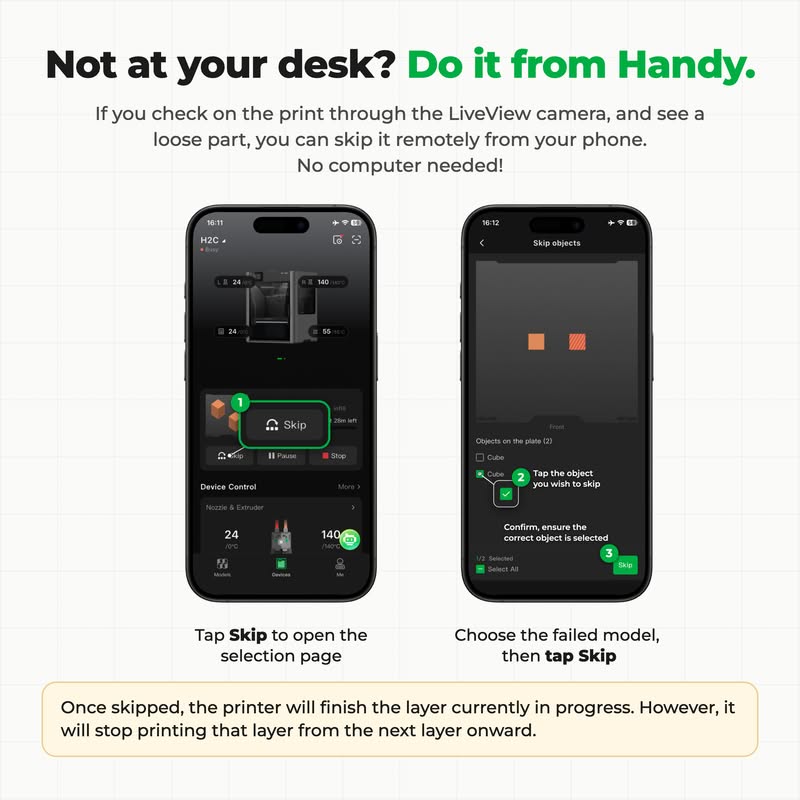
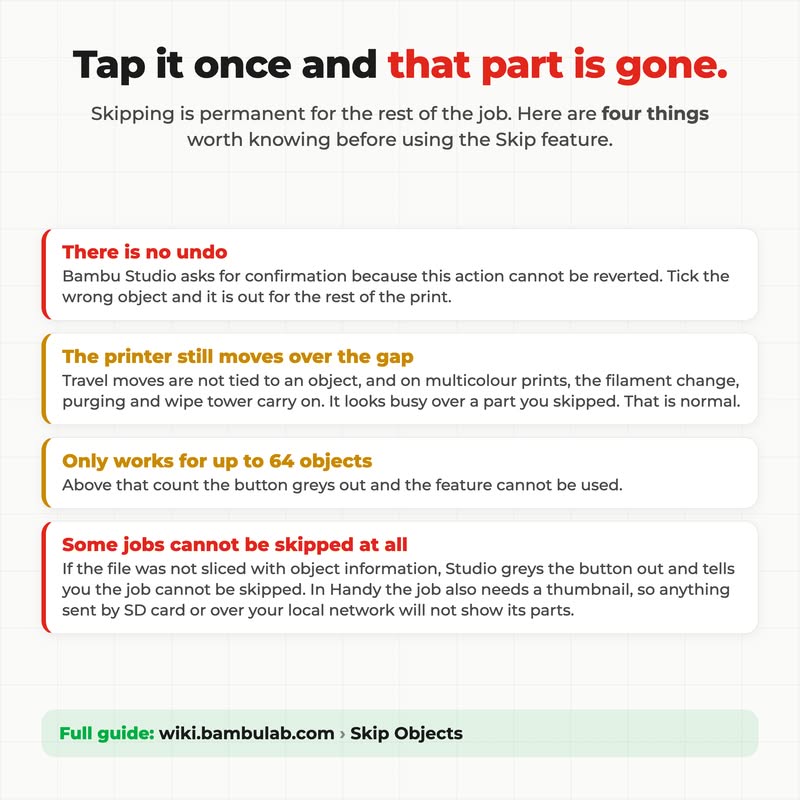

Learn more about the Skip Objects function from the Bambu Lab Wiki: Skip Objects | Bambu Lab Wiki
Oh, I noticed it. But never used it because I didn’t know WHAT it skipped.
Now I am apt to use it because I do clone items to do multiple copies of an item. And occasionally one will come loose.
My defense has been to use Brims to anchor things better.
Thanks for posting this often ignored feature.
I used it yesterday and today.
Two different projects had difficulties accepting embedded magnets, one model was good, the second wasn’t.
I skipped one of the models in each case, let the print finish and then reprint.
It is a shame the option isn’t available in Bambu Studio. But, it being on Bambu Handy and some of the bigger screen printers is good.
For everyone else, there are limitations.
My original comment:
Good news: it is! The button is present, if unlabeled.
(With all the screen space of a PC, why isn’t it labeled? There is such a thing as too much simplicity.)
My first follow-up edit:
Bad news! Nobody can find it, including me! See follow up comment below.
We found the answer in the wiki! Not all printers can skip objects in Bambu Studio: The A1, A1 Mini, P1P, and P1S do not support it yet. If you are using one of these, you will need to use Bambu Handy to skip objects.
Supported Printer Models:
- X1 series, H2 series and P2S.
- A1 series and P1 series: Currently not supported. Feature support coming in future firmware updates.
Thank you to @SupportAssistant for the help!
Damn it.
Let’s make it a game “hunt the feature “.
I can’t be the only one who hasn’t found it (about to hunt), assuming you are not playing with my heart strings.
Poor mobile phone UI/UX started this trend. If it fails the obviousness test, it fails full stop.
Definitely not present in the Linux AppImage version.
I was just about to go and look for it when I noticed it in the screenshot above.
Damn, I have been using this for 21 months and never spotted it.
The definition of a lack of obviousness, especially as I see I am not alone (here and other places).
Thanks again.
I have to ask; in what version of what software did you see that button, other than in Bambu Handy. Thinking that maybe they just left it out of the Linux version of Bambu Studio, I set up a Windows VM and installed the Windows version of the software. It’s not there either. In both case I’m talking about the latest version of the software.
The Wiki documents the answer: This feature is available on most but not all of Bambu’s printers:
Supported Printer Models:
- X1 series, H2 series and P2S.
- A1 series and P1 series: Currently not supported. Feature support coming in future firmware updates.
@SupportAssistant helped shed light on this, and I’m updating my comments here to reduce the chance of confusing future readers. See my updated comment #4 and updated comment #15.
Well. Guess what. I was wrong; I assumed the screenshot provided by @SupportAssistant was correct. It is not. ![]()
When I try to find the skip button on my own Mac, it’s not there. Bambu Handy mobile app, yes. Bambu Studio, no. Not the current release version, nor 2.8.2.61 (latest beta). I thought maybe it had something to do with a weird mobile app interaction, because Bambu doesn’t really keep the mobile and desktop apps functionality in sync.
Maybe skip is an unreleased feature and someone made the graphic using a pre-release version? (I tend to assume accident rather than malice.) I definitely would appreciate a follow-up from @SupportAssistant on this. Thank you!
Thanks for confirming. In a way that’s better than you having the button and me not having it. At least it’s consistant. I’d also like to see Support come back to us on this.
I like your printer name!
Hi there,
Can you confirm you have sent this print through the cloud, and you are running the latest version of Firmware for your printer?
More information available here: Skip Objects | Bambu Lab Wiki
Thank you
Thanks, because of this link I found the issue: It’s not been implemented for the P1S!
Supported Printer Models:
- X1 series, H2 series and P2S.
- A1 series and P1 series: Currently not supported. Feature support coming in future firmware updates.
I would be really really happy if that feature shows up sometime. Really weird that I can skip by Handy but not by Studio.
Anyway, I’ll go back up-thread and update my comments to reflect this info! Thank you for the assist! (No pun intended.)
I have an A1. Either I failed to see that when I read the article or it’s been added in after seeing the response to this topic. What I don’t get is that we can perform a skip using Handy, so why hasn’t it been implemented fully in Studio?
never used the skip option bc my h2c never fails me. awesome machine!