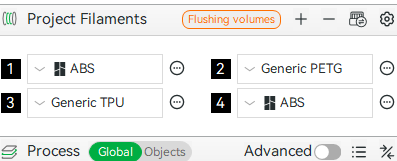
When ever I launch bambu studio, ‘Bambu ABS’ has been added to my list of filaments in the prepare menu.
- I have not installed ABS ever
- I am not downloading from maker world etc that would cause a change to the filaments
- To add insult to injury in most cases the filaments that are actually loaded do not show until I click on device then back to prepare a resync
- But the ABS still remains
I got up to 12 instances of ABS before I cleared it out again.
Please, please. Just fix it!
Skraaj
2
I have a similar thing with filament settings, can’t remove the ones I’m not using and it’s cluttering the list.
Neiljt
3

It can be deselected here , it looks to of been added by default
Thats not the problem. In my list I only have bambu and generic PLA and PETG selected.
This is the problem:
The two ABS are not my selections, every time I launch bambu studio another instance of ABS in black is added.
I recently cleared it out so its only showing two but I had 12 of them at one point.
Two of the filaments I have loaded are not showing.
This has been a bug for over a year or more.
Neiljt
5
Sync your loaded filaments (overwrite) add your own generics to your printer info if you use them, otherwise it will display model colours/filaments
or those colours / filaments that were last saved
top images is with the model second images is a new project (no model loaded)
I do this every time! There are four items in my AMS, so why does it slap in a ABD every time I load the programme?
It never shows the last saved filaments, each time the app is loaded a new ABS is added to the list.
Neiljt
7
even with the above warning studio still displays the last filaments and colours saved
Thats amazing, but not for me. So here we are.
Yup, having the same issue
Delta
10
Anyone ever find a fix for this?