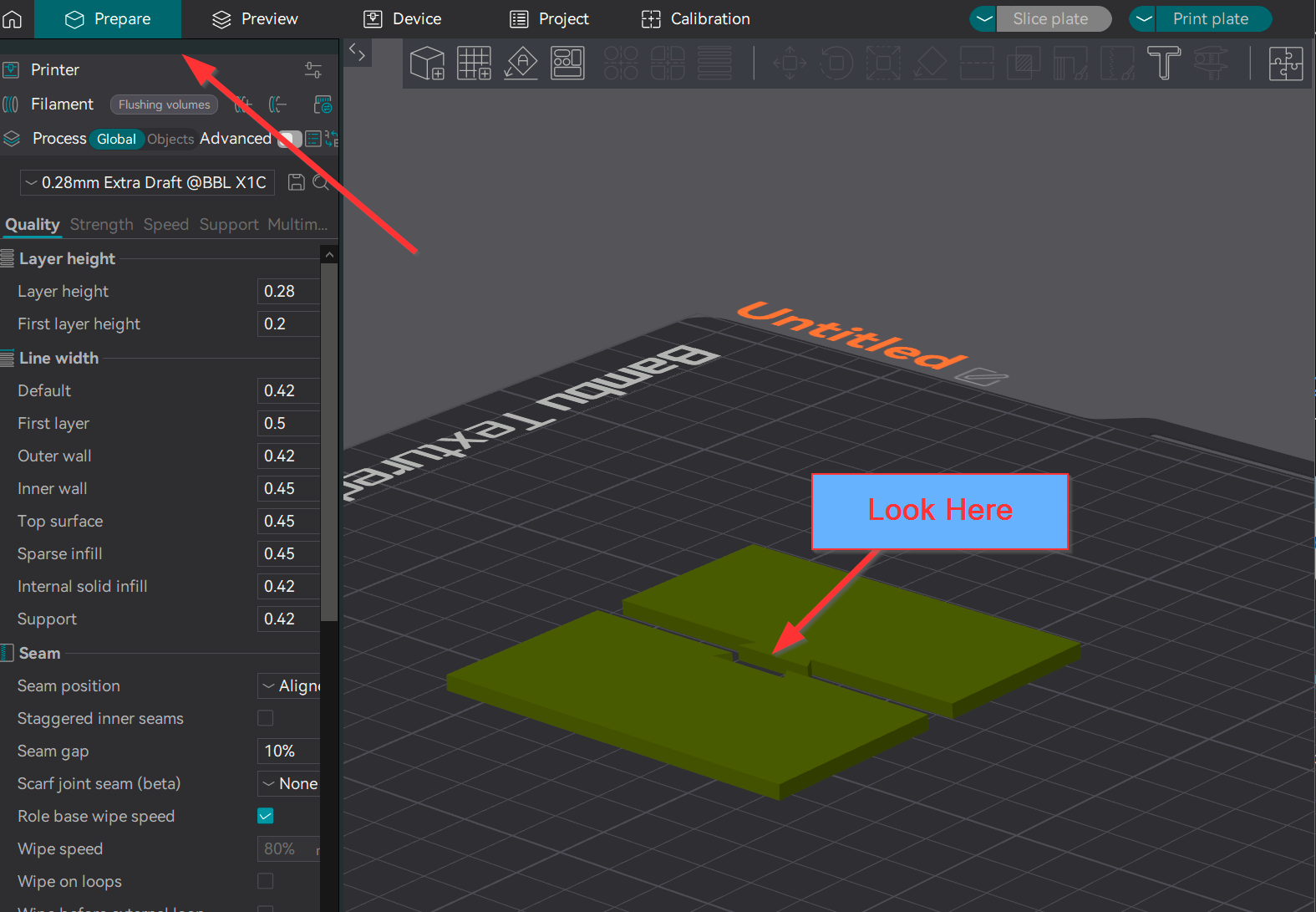
You’re asking too much of the slicer and the filament. I’ve wasted weeks trying to get plugs to work. While it is possible to tune in X-Y values to compensate, you will end up doing trial and error many times over.
Follow my post above. I realize it’s long but switch to dowels and abandon plugs. There is no benefit to plugs and dowels are much easier to reprint if they are too large or two small.
I saw this post linked by another post. Somebody asked earlier how to switch the side of the male and female connectors.
I recently posted the solution in another post.
When you place your splitting plane, the purple side of the model will get the male connector, and the blue side the female connector. If the wrong side has it, flip the splitting plane 180 degrees and it will switch the connector to the other side. Make sure you are switching one of the two axes that flip the plane instead of the third one which will just rotate it and have no effect.
Use the square frustum connector. It is placed with the corner of the square on the bottom and also raises to a point at a pretty good angle, so it will print more cleanly when on the side of an object. I also use a 0.2 tolerance for both tolerance values.
Does anyone know how to join two stl files with connectors without cutting them?
I have a model that has come in several different stall’s and the guidelines are to just glue the parts but I’d like to add connectors to them instead.
I have tried importing both stl files (both are just about max size of my x1c build plate, so I’d like to print each model as one piece but have a way of joining them with snap or dowels etc.
Obs the cutting tool is great when you cut a model and it places the corresponding connectors on both plates but I would like to match up two separate stl files and the join them so the cut tool doesn’t really help me.
If you’re asking a question, since this topic was already marked solved, it will close in two days and you should have received a message when you posted to start a new message. You should post a separate question if you want help because responses will be blocked in two days.
To answer your question, there is no way to create connectors without the cutting tool. But it can be faked… if you have the patience and skill.
I’ve had the need for the same before and solved it by aligning the 2 objects as needed and exporting it as a single stl file. Add a new second plate and import the exported stl. now that it’s one object go ahead and add your connectors to the cut. Hope this helps.
Sorry to dig up an old post but I have come across this issue with connectors hoping someone can shed some light on.
If i was to make a hollow light box, I wanted to add some snap (or dwells) connectors, after i sliced it, you can see its not mounting or fixing onto anywhere… What can I do? I want to extend the depth to the bottom of the both parts so it can be fixed on there but it would let me go that deep.
Can you upload the 3MF file. It will take a lot of guesswork out of your question. Based on the image, it does not look like you have sufficient material in your model to accommodate a connector.
No, it does not have much in the wall as i put zero to top layer and zero for infill so i can just get the outer shell… but i would have thought the connectors function would have accommodate it…
i might just have to build a thick enough wall for those connectors then… kind of defeat the purpose for a light box really
Unfortunately that is not how the connector tools work. They are designed for solid geometries.
The only way would be to add some cylinders to the model and then join them into an assembly. After the cylinders are in place, only then will you have support structures to mount a connector to.
@fire_bb No I’m glad you brought this post back up because I was about to do it myself (and it’s still useful)!
@Olias Not sure what you were fighting with, but I’ve had a very different experience with plugs!
I needed the connectors to be very small (far too small to print as a dowel, I think), I shortened the plugs to the minimum depth (2mm I think), and they’ve been working flawlessly for me. They can get a bit brittle if you also reduce them to the minimum diameter, but that was also mostly usable for me when I tried. Also I’ve just been doing simple cylinder plugs with the other settings like tolerance at the defaults, using a .4mm nozzle.
I would also say that plugs have a few advantages over dowels:
You can’t lose them (useful if the thing is meant to be taken apart sometimes)
Slightly faster/easier assembly if you have a lot of them (I like redundancy…)
If they’re tiny I guess they’ll be easier to print than a dowel… (can dowels even be printed at the minimum size?)
In the post above by @sikoprint , doesn’t it look like it was printed with the plugs horizontal? They look sloppy at the top which I guess is why those were hopeless. Maybe simple cylinder plugs would have done better, but I suspect that if it was printed so that the plugs were sticking up vertically, it would probably work a lot better.
This brings me to my own question (maybe sikoprint already figured this out for me)…
Do we pretty much need to print connectors like these vertically, or can these things work when printed horizontally (I assume they need support… which maybe won’t work out well)?
Cool. Any opinions on horizontal printing of these things using support?
Trying to crack a tougher nut than I have before. Printing the plugs vertically worked okay, but the rest of the print wasn’t very happy with that orientation.
That purple piece appears to printed with no supports; it then “bridges” out the dowel, making it larger. Your options are to slim it down with a razor blade, or reprint with supports on.
After I perform the cut, I notice that my hole still is covered by a layer and when I slice it, the slicer shows printing one later before the hole. What is causing this?
Unfortunately, it’s impossible to visualize what you’re describing without a screenshot of what you’re seeing. If you’re seeking help from this forum, you’ll get better responses by including a screenshot of the model as it appears on the build plate and another of how the slicer rendered it. This removes much of the guesswork from your question and allows community members to provide more accurate responses.
Here’s an example of what I’m referring to:
Prepare screen with the model angled to show what you are referencing on the build plate. Arrange the angle to show off the feature you are not happy with.
what I see is that the hole is still shown covered, and if I slice it, there is still shown a layer. I attempted to export it as an STL and the STL file, when reloaded is now solid without the hole.
The one on the Left is the exported STL reloaded into the slicer. The hole is now gone.
I am attempting to upload pictures but the forum isn’t allowing it for some reason
You are too new of a user, you must read for 10m and fulfill a few other requirements to be able to post pictures. Which connector method are you trying to use?
I am using the plug method, I will set the split area and make the connectors. Once done, I can see the plug on one piece and on the other what appears to be a shaded hole. Today the slicer is acting differently than yesterday and it’s slicing a hold without the first “ghost” layer appearing on the layer view after slicing the piece. However, when I export the piece as an STL, the hole disappears, but the plug remains.