So this morning everything is taking forever to download to the printer. It sends to the cloud fairly quickly however downloading from the cloud to the machine is taking anywhere from a couple minutes to 15+ minutes. This is silly when some of my prints take less time to print when I am prototyping and I don’t want to walk back and forth to change a micro-SD card constantly.
You can use the “Send” function to send the prints directly to the SD card.
can I send it across the network in this method?
Wouldn’t I need to still walk over to print it at that point? I found what you are talking about - however not sure how to print it remotely once it is on the SD card - still an extra trip as I don’t need my printer in the same room as I develope/design
You can start any print that is on the SD card from the Device tab in studio
When you’re prototyping your stuff, switch your printer into LAN mode and print that way. Your LAN should be way faster than “the cloud.”
Facing the same issue now. Anyone else? Downloads to printer taking 15 min plus. Super slow. Super frustrating @BambuLab
I’ve had the same problem on and off since Monday (Feb 09). Uploads to the server go fast, but then downloads to my printer take forever or time out altogether. I ran the Bambu Studio network tests and everything checked out. Reformatted SD card as a precaution. No unusual network traffic.
Workarounds to try:
-
Use LAN mode instead of cloud - In Bambu Studio, switch to LAN-only mode to send files directly to your printer over your local network. This bypasses the cloud entirely and is much faster.
-
Use the SD card or USB drive - Export your sliced file and physically transfer it to the printer.
-
Wait it out - Sometimes the transfers complete eventually, even if painfully slow.
I also tried the same, then the only option was to use LAN mode.
Its a Sunday morning, currently at 45 minutes waiting for the cloud. Getting worse every week. Especially bad nights and weekends
It has been a long time since I thought about this but in America internet speed is often related to the distance one is from an AT&T trunk line. The internet was initially built on top of AT&T’s infrastructure and is still its largest component. Those who live in tech corridors tend to have better internet service.
People who live in rural and remote areas tend to have slower internet connections because the infrastructure is not there to support faster speeds. In those areas where part of the signal path needs to be air bound, the internet is even slower.
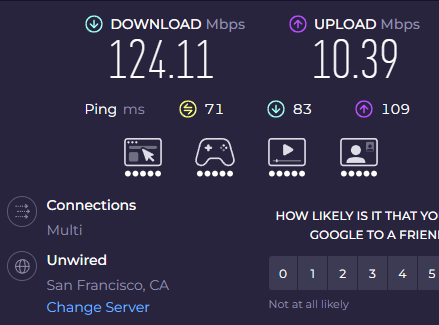
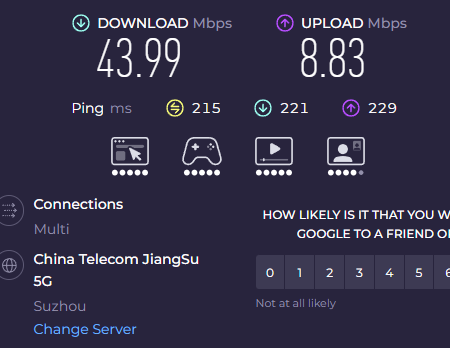
My brother used to live in a place without internet connections and used a satellite link to access the internet. Uploads tended to be fast enough but downloads took much longer with numbers that look very similar to what is shown here.