This is a simple guide for everyone on how to recognise AI just by looking at it. Although there are more complex methods, this guide is primarily aimed at beginners, relying on our most important tool: our eyes.
One of the most obvious characteristics: details are missing from the cover to the real 3D model. Why would an artist deliberately delete details?
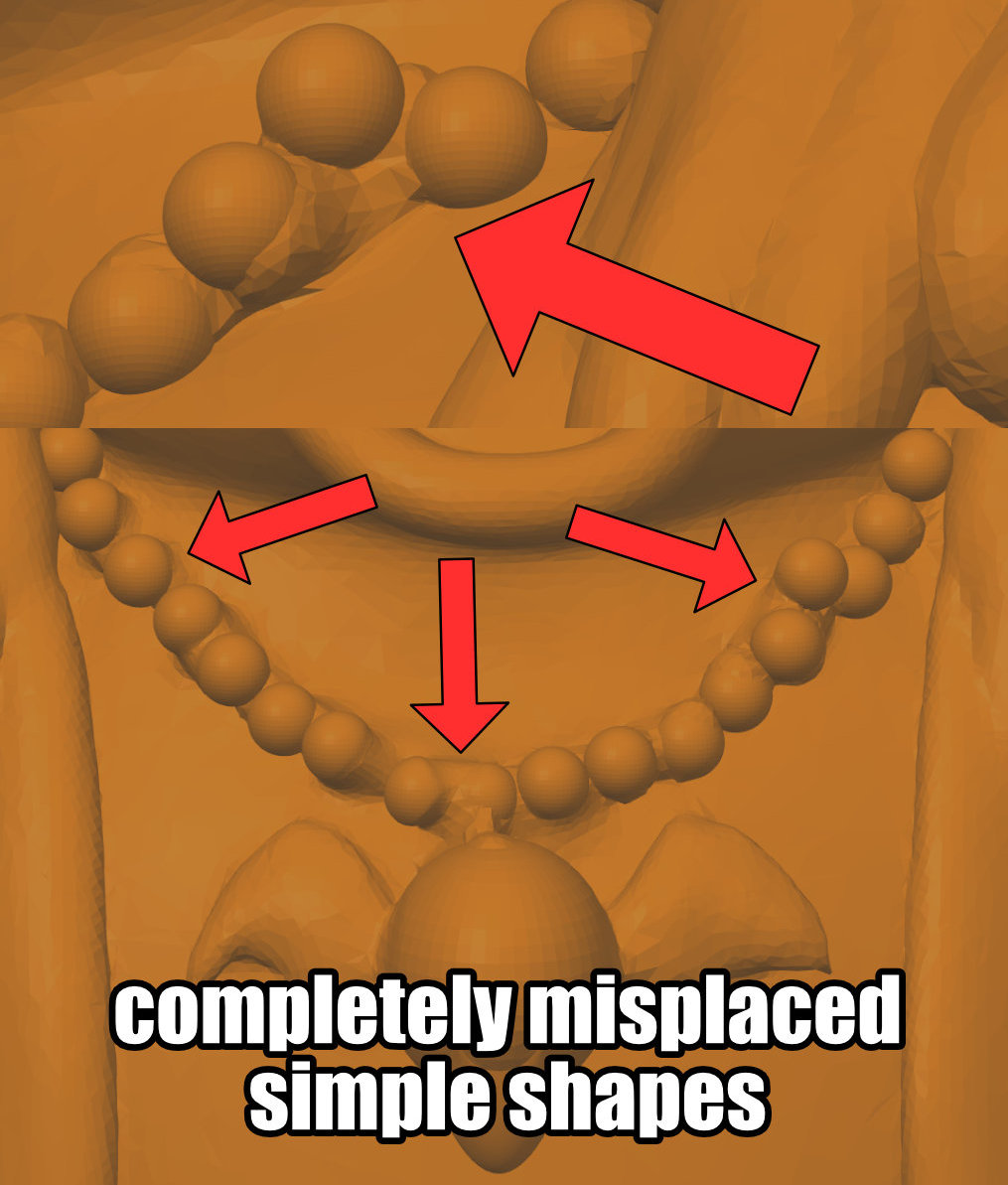
Even the simplest shapes are misplaced and out of order. A beginner could not make these mistakes. In fact, only an AI would make such complex mistakes. Pay close attention: this is not about simple mistakes, but complex errors that would take hours to deliberately create.
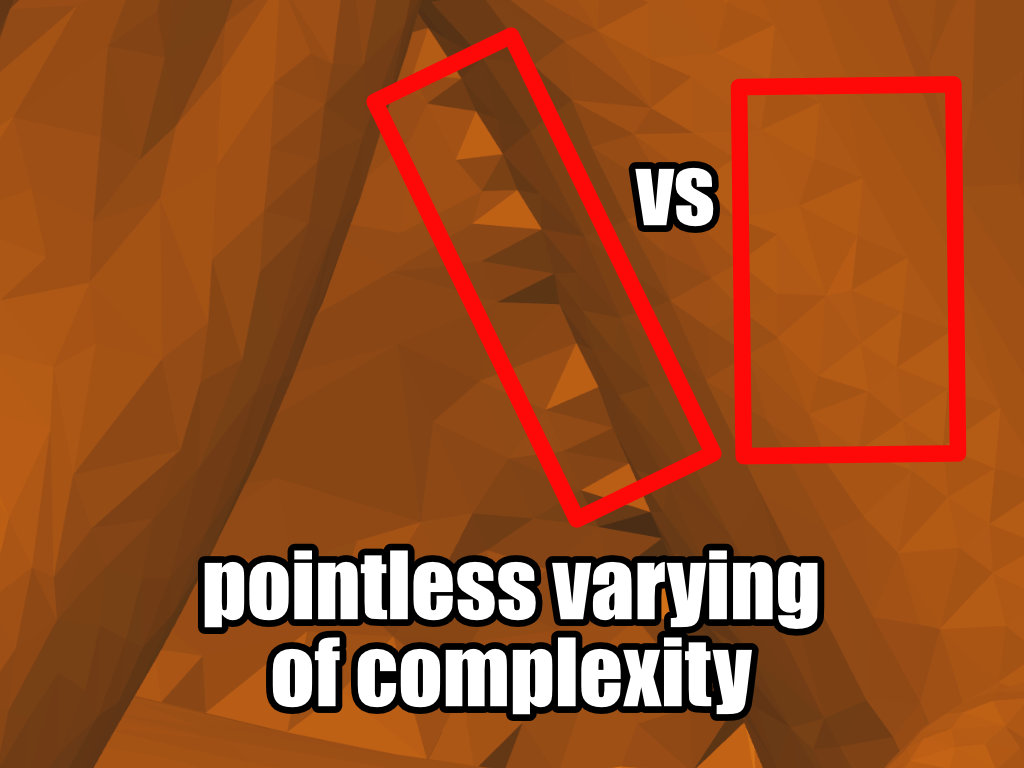
The complexity of the project varies. Why should creators do that? They commit to a level of complexity before the project begins. In this example, the level of complexity in one area is insufficient to round it off. Just look at the pointed pyramids/triangles, where the 3D model struggles to make them round, while the other surfaces are round without any problems.
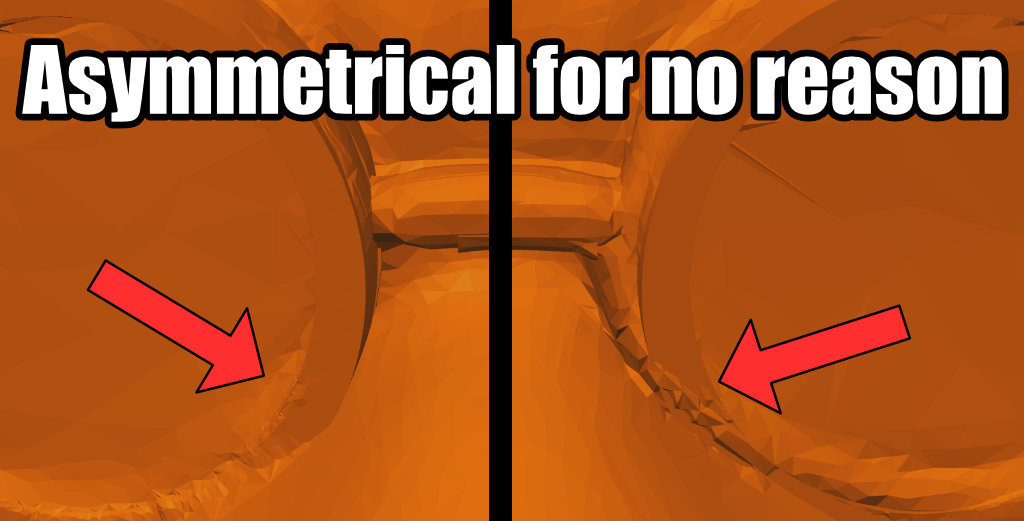
Symentire is wrong for no reason. While this is sometimes a design decision, most creators are lazy and only design one side, mirroring the second. This is precisely where almost all AI models fail. Think about it for a moment: Why would a creator want to do twice the work? Of course, they don’t, and they use mirror tools instead.
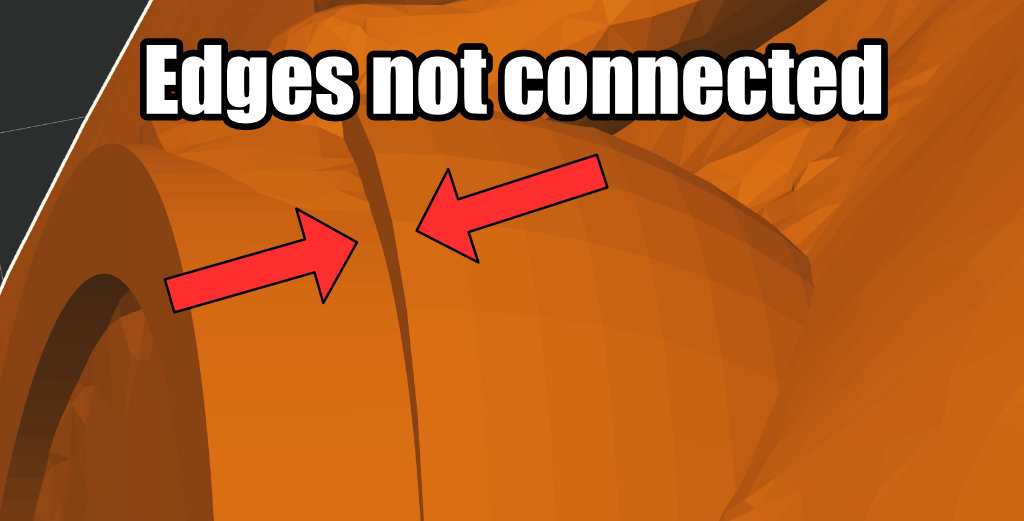
Faces are simply not connected for no reason. No one would ever do that, as it is almost impossible to achieve unintentionally in Blender. You would have to deliberately separate the faces.
Please note: These are, of course, only indications and clues, so never be too quick to suspect someone of being AI. Always ask yourself:
- Is this a mistake that a beginner would make?
- Or is it a complex, absurd mistake that no human would ever make because it would cost hours of extra work (AI)?
- Designers are “lazy” and want to save themselves work: Is it a “shortcut” or is it “completely nonsensical extra work that also looks bad” (AI)?
All true, and I was just struck for a moment about how “preyed upon” the phone people are; who only know to use Handy for their printer. Does their app even present a screen through which they could interrogate the stl to find these differences?
That’s a very good question: The app offers a 3D preview of the STL model, but it’s a bit hidden. Depending on the screen size of the mobile device, some people may find it easy to see, while others may find it more difficult.
My guess, not a fact: Most people don’t use it and just press print.
For this fact alone I’d love if the main model picture had to be a real print. However, I’d prefer if any use of AI generated images would be forbidden. There’s too much garbage on MW
Currently Makerworld only allows rating the print profile, but there needs to be a secondary rating system for experienced users to warn others of low quality models. Something simple like high and low quality buttons. Many of us who spot deceptive models in the wild are more than willing to click a button to warn less knowledgable users.
As for deciding who is experienced enough to leave these quick ratings? Maybe this is something the levels on Makerworld could determine.
Finally make those model ratings highly visible, and roll it up to the overall quality rating of a given designer, i.e. JJTechPrints, 82% high quality
The point about looking for inconsistencies is useful, but visual clues alone can be unreliable as AI-generated images become more convincing. For questionable images, using an imagedetector alongside a careful visual check can provide another layer of verification instead of relying only on what our eyes notice.
Thanks for the comment, but this guide actually focuses solely on what you can see with your eyes. This is primarily about the 3D model. To the best of my knowledge, there is no 3D model AI check.
On the topic of AI image checks:
Unfortunately, image detectors are extremely prone to errors and trigger unnecessary false alarms, which leads to incorrect classifications as well as heated discussions in various communities.
The problem with image detectors: They’re also AI. So you’re using AI to detect AI. The much bigger problem: These AI detectors usually cost money and come from the same companies that produce generative AI. So the company wants to get you to sign up for a subscription = conflict of interest.
It’s as if someone were making and selling you both the poison and the antidote.
In short:
Unfortunately, that’s not true; on the contrary, it’s a source of insecurity because of the massive number of false positives. Scammers know how to get around detection anyway. In the worst-case scenario, you’ll make yourself unpopular or make the wrong decisions because an AI - which is supposed to recognize the AI - provided incorrect information.
That’s why tools that can supposedly detect AI are now banned in many creative communities. They realized that relying on AI to detect AI was a really stupid idea.