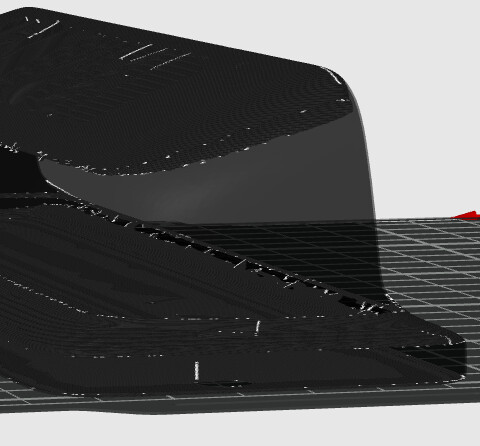
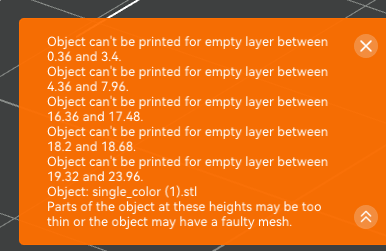
I thought I’d play with the Image to 3d Model tool today. Has anyone had issues with the resulting file rendering nicely but then being unprintable in the slicer? I tried it twice with two different images of the same item. Both created files that look great, neither are actually printable. I don’t have a subscription to the main Meshy site to download the file it creates but the Makerlab versions look very similar.
I tried fixing the models, simplifying them, resizing them with no luck.
AI-generated models often have the problem of not being manifold. If you’re not familiar with that term: it means there are small holes or defects in the mesh that can confuse the slicer’s geometry processing.
To put it more simply, your mesh is either damaged or so complex that the slicer struggles to interpret it correctly.
If you take a closer look at the error message, it actually tells you that the mesh is damaged and that some walls are too thin to be printed in the first place.
One possible solution would be to try repairing the model in Blender. However, judging by the sheer number of error messages, I suspect the mesh is so badly damaged that it may not be worth the effort.
As pragmatic as it may sound, I’d try simplifying the image, run it through the AI again, and hope for a better result. Sometimes it takes several attempts before you end up with a model that has reasonably clean geometry and can actually be sliced without issues.
In general, though, it’s fair to say that MakerLab’s focus is more on producing models that are at least printable. It may not always generate perfect geometry, but it tends to prioritize creating something the slicer can handle rather than an overly detailed model that ends up being full of mesh errors.
Besides the need for a good quality stl (you can use the repair function straight from Studio), there has been a bug in Studio a while ago which this pic reminds me of.
In memory heavy situations, Studio would do really weird things, the most common of which was these missing layers in a slice. Restarting the laptop usually resolved it for me at the time. Maybe that bug os back?
 &

AI image-to-3D meshes are a common source of this. They usually aren’t just missing a few triangles: they have self-intersecting surfaces and shells inside other shells, which is why “Fix model” and simplifying don’t help much. Those close holes, but they don’t untangle overlapping surfaces, so the slicer still loses track of inside and outside on some layers.
What has worked best for me with these files is rebuilding the surface instead of repairing it: in Blender, add a Remesh modifier in Voxel mode with a voxel size around 0.3-0.5 mm (with the model at real scale), apply it and export the STL again. You lose a bit of fine detail, but you get one closed shell that slices without empty layers.