I have had several models that when loaded into Bambu Studio I get the non-manifold edges error. Honestly, I don’t know exactly what a non-manifold edge is. I click on the “Repair” and, once complete, am notified it has been repaired and it prints OK.
I thought I could then save the “fixed” model as an stl or 3mf to avoid going through the repair again, but each time I load the fixed model I get the same error.
Is there a way to fix the non-manifold edges for good?
The simplest is Meshmixer from Autodesk. It is no longer updated but it is free and it still works although it has a small learning curve. Search on YouTube for the 1,001 tutorials on fixing non-manifold edges with Meshmixer.
Or if you managed to install it on your computer before Microsoft pulled it from the Microsoft store, 3D Builder will do it too but not as well as Meshmixer. FYI, Bambu Studio uses the Windows repair tools when you right-click repair.
_____________________________________________
It sounds like the model itself has intersecting folds. I say that because if you repaired the model only to have it complain about non-manifold edges, that indicates a faulty model.
The simplest way to think about a manifold is to remember that the model is made up of connected triangles. If one triangle does not properly connect, you get a hole. In a folded manifold, you get three points sharing the same edge or a missing edge.
Think of it like a watertight vase that broke into 1,000 pieces. Someone carefully glued it back together, but one piece was missing, so the vase is no longer watertight. That missing piece represents a non-manifold edge in what the slicer is expecting to be a sealed container.
As for “non-manifold”: it means that the 3D mesh is bad due to open edges or self intersecting parts. Basically the software is saying that the shape isn’t completely solid (won’t hold water, can’t be voxelized correctly, etc.) and will likely have problems when sliced.
Every triangle in a mesh has 3 vertices, two of which define an edge that mates with another triangle. The shared edge must also share the exact same placement and number of vertices or they will be non-manifold.
There are a couple of basic ways this requirement can be violated, edges that have no mate or edges that mate but have more vertices than the edge they’re mated to.
These errors do not always result in a problem for the slicer. For example, two mated edges, where one has an extra vertex, are still water-tight (no gaps). Or if the error occurs in the interior of the model. All the slicer cares about is that the exterior surface is contiguous with no gaps.
So in a lot of cases you can ignore the warning and the slicer will slice it just fine.
“FYI, Bambu Studio uses the Windows repair tools when you right-click repair.”
That is exactly what I did. After some period of time it states it was repaired. I thought I could then save the repaired model, so when I opened that model again in Bambu Studio I could avoid the non-manifold edges error. That did not work.
So repairs were made, but those repairs could not be saved.
This was a model I downloaded from MakerWorld. It very well could have had the problem you report here, the model was a fully manifold but when it was exported as an stl is where the problem began.
As you can tell I am a newbie. At this point this is more of a nuisance than anything. I am just trying to understand why, if Bambu Studio repaired the model, I cannot save the repaired model. It must only be repaired for that one session and I have to repair it each time I use the model.
Can you share the model link? This removes a lot of guesswork and allows for a direct answer instead of theory.
The problem with MakerWorld, unlike Thingiverse or Printables, is that Bambu deliberately rigged the system. At launch, they handed out free hardware and materials to flood the platform with content. The result was predictable: quantity over quality.
_____________________________________
How to avoid bad models on STL sites
If you’re new to their ecosystem, watch for a few red flags (this applies to other sites like Printables as well):
Makers who spam the site with copycat “me-too” models or the dreaded “remix” without a meaningful change.
Listings without genuine photos. CAD renders are a common trick. Fusion360 can generate photorealistic images, and with a bit of Photoshop they can be made to look like a real print. Without a trained eye, it’s easy to be misled.
Files created in Blender. Blender is one of the best open source tools for animation and complex organic modeling, but its STL exports are notoriously poor. That’s not on the devs, it’s the math.
Whenever possible, export a STEP file. STEP to mesh conversion in slicers enforces closed manifolds. If you cut a model and expose an open manifold, the slicer will prompt to repair it. The core model remains watertight, with only rare exceptions most users will never encounter.
Because Bambu rewards posts without real curation, the system favors volume over quality. Many models look polished but were never printed, and some cannot be printed at all. Although this happens on other sites too, Bambu has taken this to a new level of wasted filament… hey, maybe that’s the whole point. They sell filament, don’t they?
Great question. It made me retrace my steps. I had modified the original model I downloaded off MakerWorld. I downloaded the model again from MakerWorld and I got no errors at all, so it was my act of modification in TinkerCad that somehow ended up creating the non-manifold edges.
The adapter bracket alone downloads to Bambu Studio without errors. The bracket downloaded from MakerWorld, again, downloads in BS without errors. I must have done something to the model to cause the non-manifold edges when I modified it in Tinkercad.
Update. It is not something I did. I again downloaded the file directly from MW. I opened it up in Tinkercad. It looked odd. Had artifacts just like my previous model. Anyway, I saved the fresh MW model from Tinkercad as a stl and opened it in BS. Now it has non-manifold edges.
So the non-manifold edges are being introduced when opening in TC or when being saved as an STL in TC.
I included the original as downloaded from MW. I verified it would load into BS without errors. I loaded that file into TC. As mentioned before, it may just be my eyes, but just loading the file appears to have introduced artifacts into the model. Possibly the non-manifold edge issue. Without editing it at all, I save the file as “Saved as STL in TC.STL”. I changed the extension as instructed to .3MF.
FYI: Neither of these are valid 3MF files. My guess is you renamed STL files as 3MF. That’s fine if you’re working around the forum’s file filter, but as a courtesy to those helping you, it’s best to mention it. Otherwise someone might just see the error, assume you don’t know what you’re doing, and move on. Quality information begets quality help.
There’s the culprit - cutting the model in TinkerCAD.
TinkerCAD exports solid bodies as hollow shells, which doesn’t match how most CAD systems handle geometry. This is one of the most frustrating incompatibilities in 3D mesh workflows. I repeatedly ran into the same issues when modifying other peoples STLs and it took a lot of trial and error to figure out what was happening and how to work around it. I will freely admit that it was maddening and nearly drove me away from 3D printing for a while.
The same problem can also show up if you import an STL into one program (e.g., Bambu Studio) and re-export it. Once you cut the model, you expose a face and create an open manifold, even if you try to repair it. The slicer then guesses how to close the gaps, which may allow it to print but prevents you from having a portable, properly closed STL. (BTW: One solution is to export to STEP whenever possible)
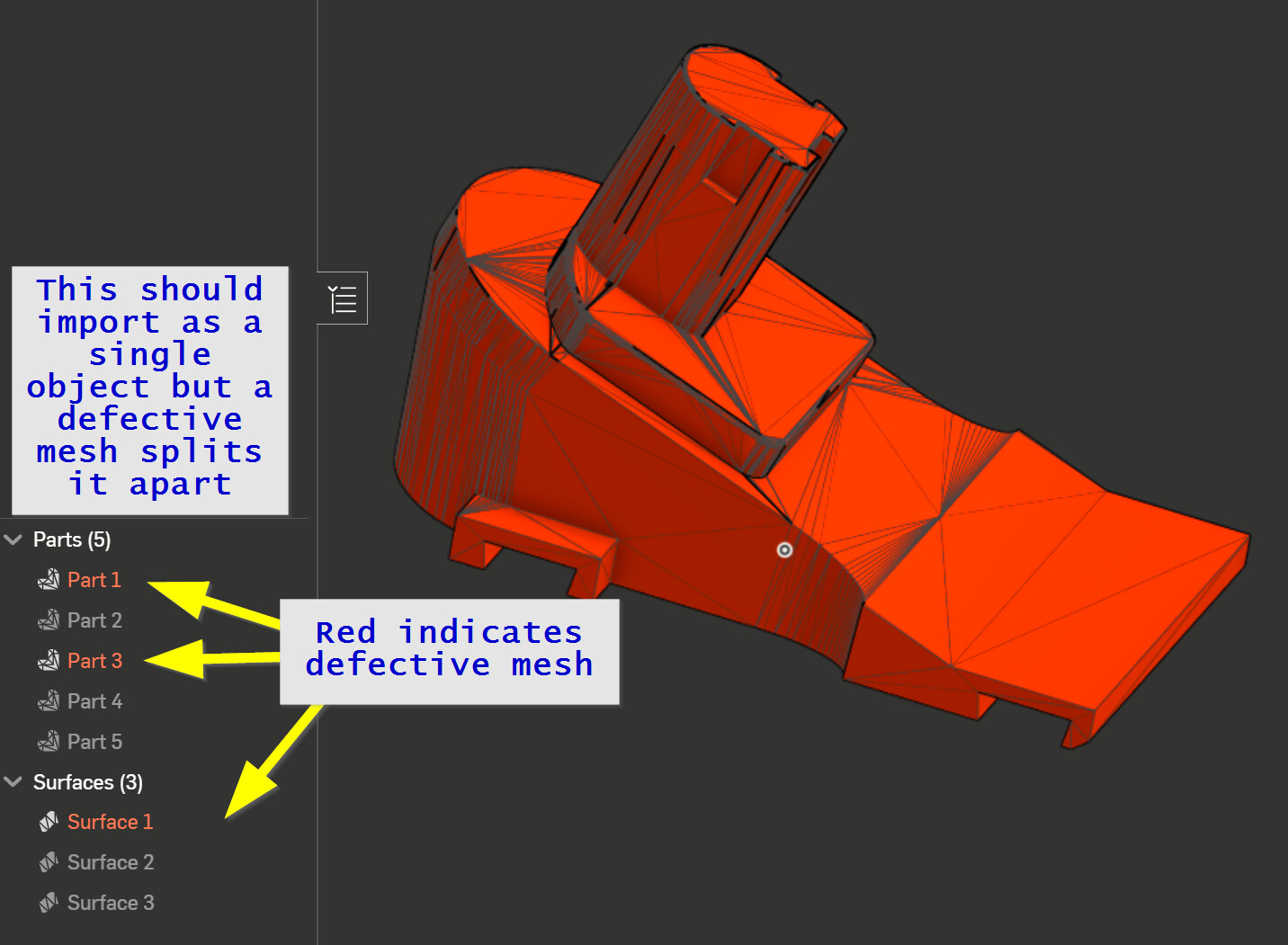
Here’s an example of how another CAD program interprets the same file. It doesn’t know what to do with the broken faces so it splits it into three sub-models and one defective surface. These are mathematical defects, not something you’d normally see in a rendered view. That’s why diagnosing them is so tricky without understanding the underlying math - which, frankly, I only grasp at a surface level myself.
So @Olias got to the root of the actual problem… but regarding not being able to save the file after you fix the errors in BS, it worked for me. When I re-opened it the errors weren’t there. Here, rename this to .stl and try it on your end.
I noticed in your screen shot you had the mouse on “replace with STL” instead of “Export as one STL”. Could it be you were clicking the wrong option?