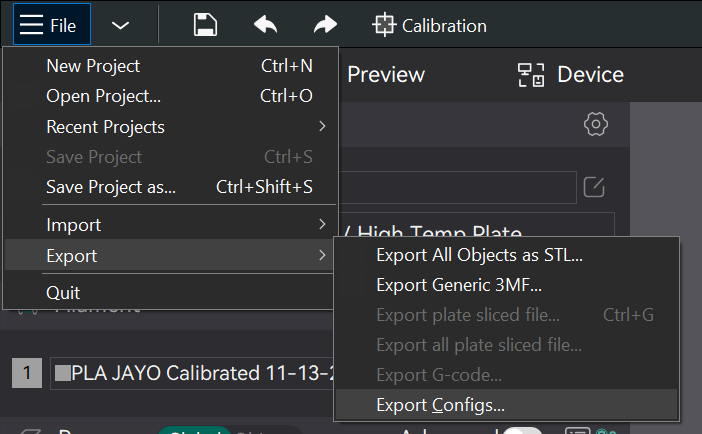
I’ve printed a couple of the ‘Lightbox LED’ by Magic Studio 3D (Fantastic). I want to save my print setup (loops, brim, quality, etc). for setup of more projects (more little kids). I have also made a couple of negative objects to cut a wire access hole in the rear panel. How can I save this. I click on it, but don’t see an export option.
tnx
p.s. up to now, I save it as a new name, then replace the parts of the new project.
Within the slicer simply “save as” and selecting a folder or thumb drive location will be enough to save almost everything. By almost, what you won’t be able to do is to freeze the print. Any subsequent changes will modify the file.
But if I read between the lines. I think your question is how do you get the state of your project frozen so that it’s repeatable the exact same way, each time.
The way I would approach it would to export the G-Code. Let’s say you want to freeze everything because you got your print into a perfect state that you want to preserve. Then for that, you want to export your G-Code. If you haven’t worked with a G-Code file before, think of the G-Code as being a pre-complied version of your model description.
After you’ve sliced your mode, drop down the “print plate” and export G-Code
A basic experiment involves taking a simple shape like a cube, reshaping it into a smaller, unique form suitable for experimentation without excessive filament usage. Then, position it at an unusual angle and create a sliced version. This will confirm to you that when you reload the file, it will retain its original settings as you wanted them.
Next, export the G-Code and open it in the slicer to become acquainted with the G-Code’s constraints. Please note that once you export the G-Code into the slicer, you won’t be able to make further edits. It’s a one-way process, but if you have your original model files in a 3MF format, this won’t be a problem.
Sorry if I’m confusing. I’d like to save the parameters of the project , ie; slicer settings, but not the objects. If I save gcode, that only saves the executable code for the project and the ability to print another exact duplicate on the same machine. I would like to load the current slicer settings, with no objects, then import new objects so that they get the same slicer settings. This type of project uses a lot thin layer colors, thin wall sides, and modified fill settings. As a bonus, Id like to be able to save and reload the negative objects I’ve created.
If you only need to save the slicer settings (loops, brim, quality, etc., with no objects), just save the Process as a user preset. Select it and add objects as needed.
I think what you want is to save the project (.3mf) which saves all the settings and objects. You could even delete the initial model, leaving only the negative objects. The project would then serve as a template to which you add other objects to be printed. It will, of course, need to be re-sliced before printing.
I believe what I would do is, once you have your settings and negative objects and everything just as you want them, do a “Save Project as” and save that to use as a starting point for future related projects. Just open that project with the settings and negative objects you want and immediately do another “Save Project as” with a new name and then proceed with designing the new project based on the original settings. As another step to ensure I don’t accidentally mess up my template project, I would drop to the computer file system and make the project with my desired settings “Read Only” to prevent overwriting it and maybe also back it up somewhere else.
The Project tab has not been editable since before MakerWorld was opened to the public. All the information on that tab now has to come from a MakerWorld download. The tab is not useful for your own projects.