External Ventilation for ABS: Using Cooling Mode at 55 °C

Instead of doing this nonsense, read my original post.

You have H2-series printers—don’t think in terms of passive heating (that’s P- and X-series thinking). Take advantage of active heating and hack it to work with the flaps open, which completely eliminates smell. Or use it as intended by Bambu; in both cases, you’ll get better results than with your passive-heating approach.

I’ll definitely try using the active heating with the rear flaps open though… but I can’t say I lack imagination :rofl: and hot glue too…

Got these printed. Made one filter panel with a pretty fine infill so it will allow some flow but not a lot.
Going to try that one just to see how it compares with what I already see with no restriction before the solid one like you did.

Well, I learned something very interesting and was not what I expected.
Started my ABS print and let everything settle in. cooling and heating off.

Chamber reached 64c.

Cooling set at 10%.

Installed filter holder with my fine mesh version. Temp dropped to 56c.
Installed filter holder with solid blank version. Temp dropped to 48c.
Removed frame and blank and temp is climbing back you towards 55c currently.
I lost more temp with the vent blocked and fan at 10% than with the vent unblocked and fan at 10%.

I’m a bit confused by your explanation.

You mentioned that cooling and heating are turned off, but then you say cooling is set to 10%. So which is it—off, or set to 10%?

Typically, you would have either cooling or heating active. If the top vent was open, it sounds like cooling was enabled.

Did you modify the filament temperature and the “set air duct mode” to make this work, or are you running stock code? With stock code, the fan power usually changes automatically based on temperature, which would explain what you’re seeing—the higher the temperature, the more the fan runs.

Also, how exactly did you set cooling to 10%?

Finally, did you modify the code to support 60 °C? The configuration I shared is intended for 50–55 °C for ABS.

I can see the confusion.
I meant that no cooling turned on by default and no heating at all. Started the print and let it run for a while like that to stabilize the chamber temp.

Then via Studio device tab I enabled cooling/exhaust by selecting “air conditioning” and enabled the exhaust fan and then set it at 10%.

Then installed filter holder with my fine mesh version. Temp dropped to 56c.

Removed it and let the chamber recover to about 64.
Then installed filter holder with solid blank version. Temp dropped to 48c.

Removed that and temp recovered to 64 again.
No active heating is being used.

Today I installed the Voxel rear filter setup for the H2S.

Right now running the rear fan at 20% and maintaining 60c in the chamber for 3 hours so far. Chamber reached 63 before turning the fan on.
I did not modify the gcode at all.

So, it seems the more I blocked the front vent the more the chamber lost heat. No idea why and not what I expected.
Anyway, interesting and now I can run the rear filter with the fan manually set at 10 to 20% and not lose much chamber heat. It is helping with ABS fumes and smell.

You got me curious—can you explain how you’re doing this?

When you say “no cooling is enabled by default and no heating at all,” I’m a bit confused. On my setup, when I send a print job, the printer automatically enables either cooling or heating based on the filament profile. For example, ABS enables heating, while PLA or PETG enables cooling. I don’t see how your configuration is possible under normal profiles.

What filament profile are you using that allows printing without either cooling or heating enabled?

On my end, I can’t manually enable cooling while printing ABS—I get an error saying the current filament doesn’t support that mode. Likewise, I can’t enable heating when printing PLA. Are you using a custom ABS profile that reports/pretends itself as PLA?

Also, without active chamber heating on the H2C, turning on the rear fan doesn’t make sense. Venting won’t work properly, and even with the bed at 10%, it won’t heat the chamber fast enough—at least not in my environment, where ambient temperature is around 20 °C.

Lastly, if you run the rear fan, the top vent is open, right?

OK!

Correct, I have cooling and heating disabled in the profiles, only ABS at this time. I make my own profiles based on generic profiles such as Generic ABS. That way I can tune as I need and even do profiles based on nozzle size. I run -.4 and 0.6 on the H2S.
So, a couple things to do if you haven’t already for more control.
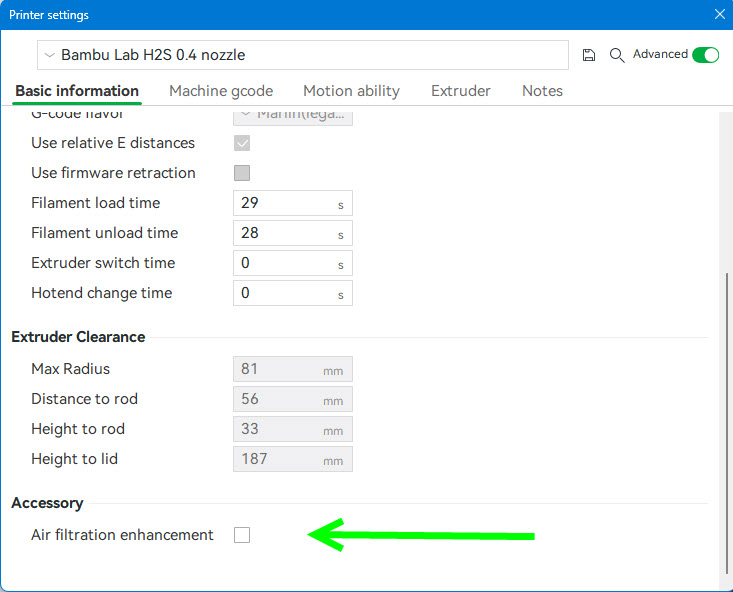
Go to the settings for the actual printer, not filament or process, but the printer. On the basic info tab scroll to the bottom and add a check mark where it says “air filter enhancement”. Not sure if it will let you save a default printer profile like this but I make my own.
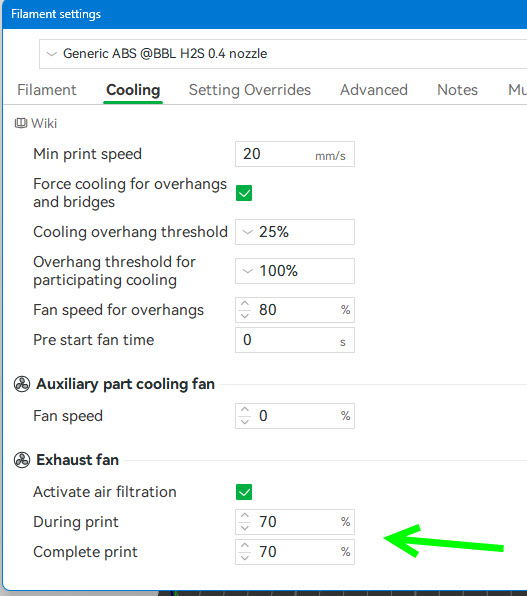
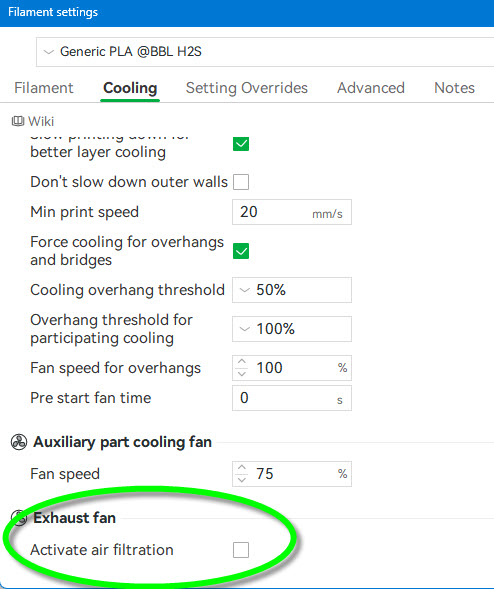
Next, go to a filament profile such as your ABS one and go to the cooling tab, scroll to the bottom and add a check to “active air filtration”.

Now you will have exhaust fan speed selectors for “during print” and “after print”. This is going to be rear exhaust fan speed and top vent will open.

I turn these both to zero which disables auto cooling. I also set chamber heat to zero which deactivates it.

I think once you deactivate heating and cooling it defaults to cooling. On my ABS profile I cannot select heat once the print has started. I can however go under “air conditioning” and enable “exhaust” and then set the rear fan speed percent.

If I want heat for ABS I set the chamber temp in the filament profile before the print.
It’s still either or, heat or cool.

As far as the chamber heating without active heat.
I keep my house at 66f during the winter so the room the H2S is in is around that temp. Once I start an ABS print, nozzle is set to 270 and bed starts at 105 and drops to 100.

My printer’s chamber temp will be up to 60c in 30 minutes or so. Never timed it but it is pretty fast.

After I am several layers into the ABS print I go to “air condition” on the device tab in Studio and then enable exhaust and then set the percent to 10%. The print’s chamber still manages to maintain about 60-61c and if I set the fan to 20% it will slowly creep down but still stays about 58-60c.

Yes, the top vent is open and with my tests I posted about I found I am losing less heat by not blocking the top vent at all. Strange but the numbers are there and it has been consistent with the test I have run. Each print, same part over and over, runs 8.5 hours so the numbers do stay stable over time.

This is all on my H2S in my environment so how it will work in other environments I don’t know.
As a side note my X1C’s will maintain chamber temp at about 40, same part in ABS, with the rear fan running at 20%.

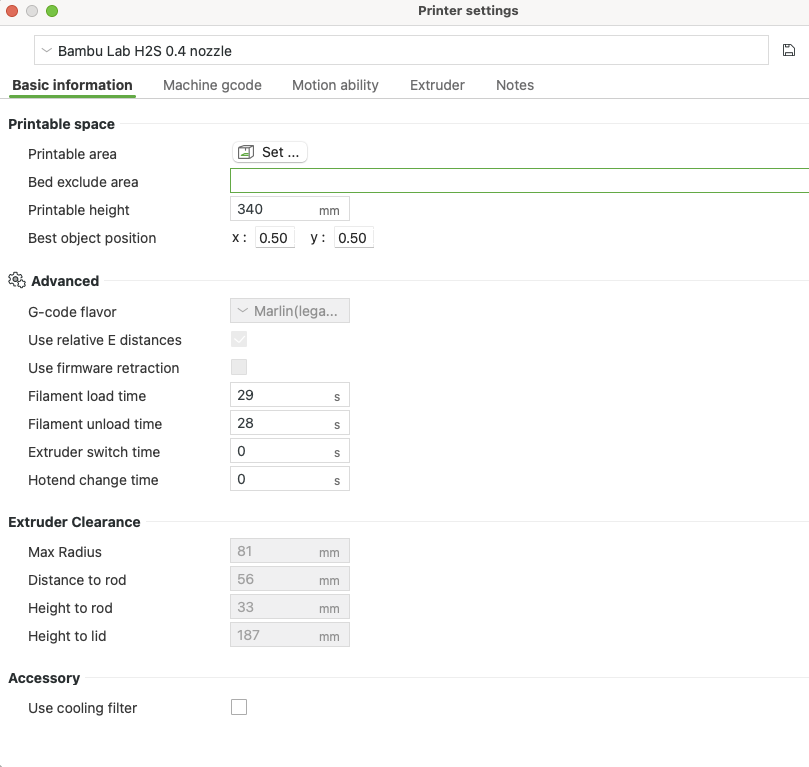
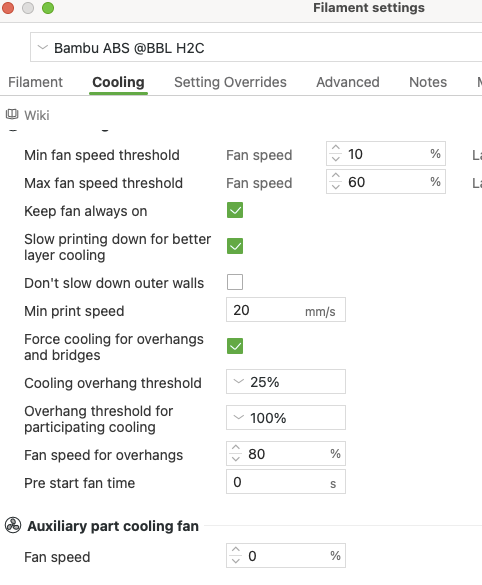
The H2 series does not have an “air filter enhancement” option. It only has “Use cooling filter,” which has no effect.

My P1S and X1C both include an “air filter enhancement” option, but not H2C.

Could you share a screenshot of your BS H2S showing the “air filter enhancement” setting?

These are from default Bambu profiles for the H2S w/0.4mm nozzle and a Generic ABS. Not my modified ones.

Check this box for air filtration enhancement and you will get the items at the green arrow in the filament cooling section below after checking active air filtration.

wow here is my screen grab BS ver: 2.4.0.7 could it be windows ver having different options?

I’d say at the bottom, use cooling filter.

I tried it doesn’t do anything…

do you have any option on the printer itself , which could bring more choices ?
My X1C had the aux fan ticked off, on the “settings” page, I just had to touch the screen to put it back to “installed”

Once you check mark that area under the printer properties, go to the filament you want to use and go to the bottom of the cooling page/tab and add a check under exhaust fan to active air filtration.
Possibly need to restart studio in between.

that check box doesn’t do anything.

Odd, it gives me the extra fields below auxiliary part cooling fan.
It would be a little surprising if a Mac and PC version were that different.

For anyone that has a H2C (and possibly H2D) that is missing the “exhaust fan” settings (because BBL removed them), you can get them back by doing the following:

If you don’t already have a user printer preset, create one. In the top left where you can select your printer, press the edit button, and save this under a different name, making a system preset a user preset. This saves the user configuration to disk as a json file, which on Windows is located here:
C:\Users\{your-user}\AppData\Roaming\BambuStudio\user\{user-id}\machine
It will have the name you’ve given it. Sorry, I don’t know where this would be on Mac or Linux.

Edit this file and add the line below to the collection:

“support_air_filtration”: “1”,

Save, restart Bambu Studio, voila, settings will show up in the filament settings under cooling if you have this printer selected. Swapping to the system preset will hide the setting again, but comes back when selecting your own user preset.

Hope this helps.

Do you know if it still works? I’ve tried, but I can’t get the option to appear for the filaments.