Feature Req: Selective surface area ironing

(It wouldn’t let me add the feature request tag.)

There are times I’d like certain surfaces of a model to be ironed, but it isn’t the topmost surface layer, I don’t want all surface layers ironed, nor all solid layers ironed.

In the example below I’m creating some custom nametags for a school. The area circled in yellow is set back to give a bit of depth to the model. This area is where a student’s name will be written likely with a chalk pen. I would like to iron that “surface layer” yet not all surface layers and not all solid layers. The idea being I want that area as smooth as possible to make wiping off the name easier when a new student arrive.
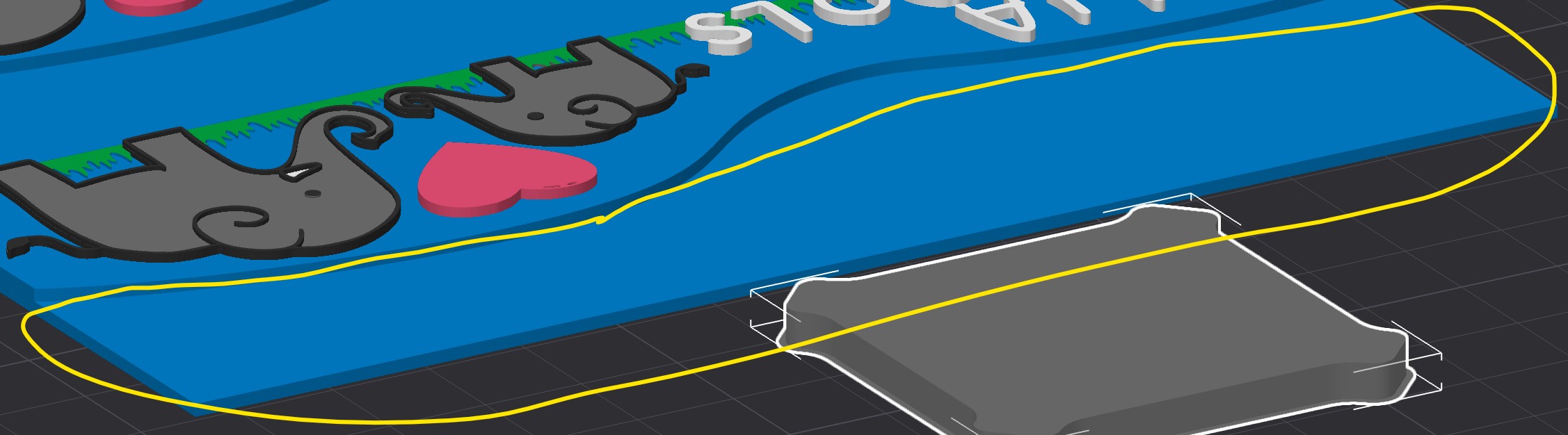
Thank you for the consideration.

You can do this right meow with this model

  • Right click your model
  • Add modifier → cube
  • Stretch your cube to cover that area, and NOT contain any of your other top surfaces. Use a Z that nestles in under your organic swoopy curve.
  • Select modifier cube
  • Process → Objects
  • Enable ironing on the modifier cube

Slice, check preview to confirm your cube was shaped right to hit all the parts.

4 Likes

Ok wow that didn’t even occur to me to try. Thank you! That did work.

I still present it as a feature I’d love to be able to click or paint that profile/plane and tell the app “Iron that” :slight_smile:

1 Like

Glad to help. Agreed, paint would be nicer, the modifiers would be trouble to do with more complex topology.

Moved to the official feature request area, now that I know there is one. :slight_smile:

Added to GitHub