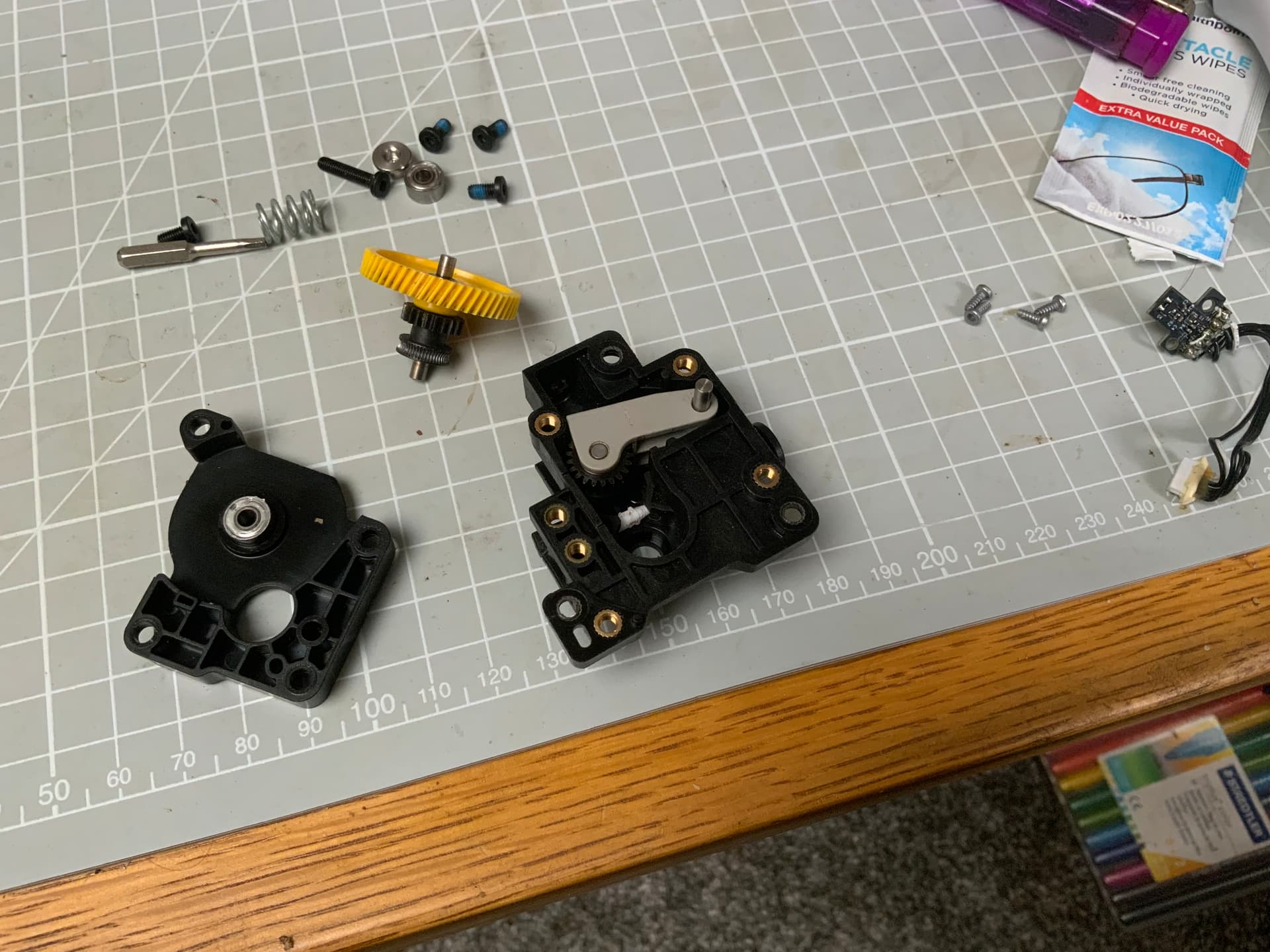
Hey all, so I have an issue that keeps ruining prints. Every so often (and fairly frequently lately) filament will refuse to unload (using AMS) to the point where it is jammed in there hard and no amount of assistance by hand can budge it. I end up having to cancel the print and try and uncouple a tube from behind the printer (even though it is under massive tension) cut the filament then retract it by hand.
The result is always that the filament is stuck in the extruder. I have no idea how this keeps happening and whether I need to buy replacement parts for extruder internals (owned the printer for 2 years now) but I can’t let it keep going on as it’s wasting time and money.
My filament is kept inside the AMS and isn’t brittle or anything, I’m really not sure what is going on in there but it’s really frustrating
Anyone have any suggestions?
To better understand what’s going on and help identify the root cause, could you clarify the following:
- What filament brand, material, and diameter are you using when this occurs?
(Some filaments swell or soften more than others, which could affect unload reliability.)
- Have you noticed if this only happens with specific spools or materials, or is it random?
- Does the filament unload properly if you manually trigger an unload from the AMS when the printer is idle, or is the problem only during/after printing?
- Have you inspected the PTFE tubing for wear, deformation, or internal friction, especially at couplings and sharp bends?
- When the filament gets stuck, is it inside the extruder gears, hotend, or further back in the tube between AMS and toolhead?
- Have you ever cleaned or replaced the extruder gears, filament cutter, or the filament sensor assembly inside the toolhead?
(After two years of use, buildup or wear in those components could definitely affect feeding and unloading.)
- Do you notice any grinding, clicking, or partial retractions before the filament gets jammed?
- What’s your nozzle temperature and retraction settings for the material you’re printing?
(Too low temperatures or aggressive retraction could cause melted filament to solidify mid-unload.)
- Have you run any diagnostic or calibration tools recently (e.g., filament cutter test, AMS path check)?
- Are there any visible signs of wear on the filament path components, such as the cutter blade, extruder gears, or feed rollers?
1 Like
- so far it has happened with BL PLA, BL PLA GLOW and Flashforge PLA, all 1.75mm, 0.4mm hardened nozzle
- did think that, but it seems random
- no it still remains jammed
- yeah all the tubing seems fine
- inside the gears
- yeah I clean it out every time I have to unblock it, not replaced any parts though
- can’t say I have no, but then im not in the same room when it happens
- just the default BL settings for PLA
- no, I havent
- have changed the cutter blade, and also cleaned out the feed rollers, and applied tiny amount of white grease to the pinion gears
So this is what it looks like when I have to clear it out. It’s not even a break of filament, it’s chewed up and wont fit back through the hole
Then I’m out of ideas.
Could be a few things and I would change PTFE tube’s.
1 Like
It happens because of heat creep. The top of the machine is getting too hot for the filament, and when the extruder drive wheel tries to push the filament in to the hot-end, the filament “accordions”, it splooges out and you get a section of filament that is now too thick to pull back or push through. You have to take the extruder apart and cut the blob out.
There’s plenty of discussion on this in the forum. Open up the top of the machine when printing PLA, problem should disappear.
2 Likes
Hey, that’s a great bit of advice thanks, I will give it a go. What you described is exactly what happens, it seems to be doing it more during summer - maybe because ambient temps also warmer?
I think I’ll give the hotend a once over, maybe the fan is faulty, or thermal paste dried up etc
Absolutely. It might only take a few degrees higher ambient to get from below to above the glass transition threshold where the filament really starts to soften up. PLA has a low threshold, which makes it very susceptible to this. I use PLA for supports for PETG sometimes, it’s always a challenge to get the PLA to not jam up, because PETG likes a nice, hot build chamber but PLA does not. 
2 Likes