Hi everyone,
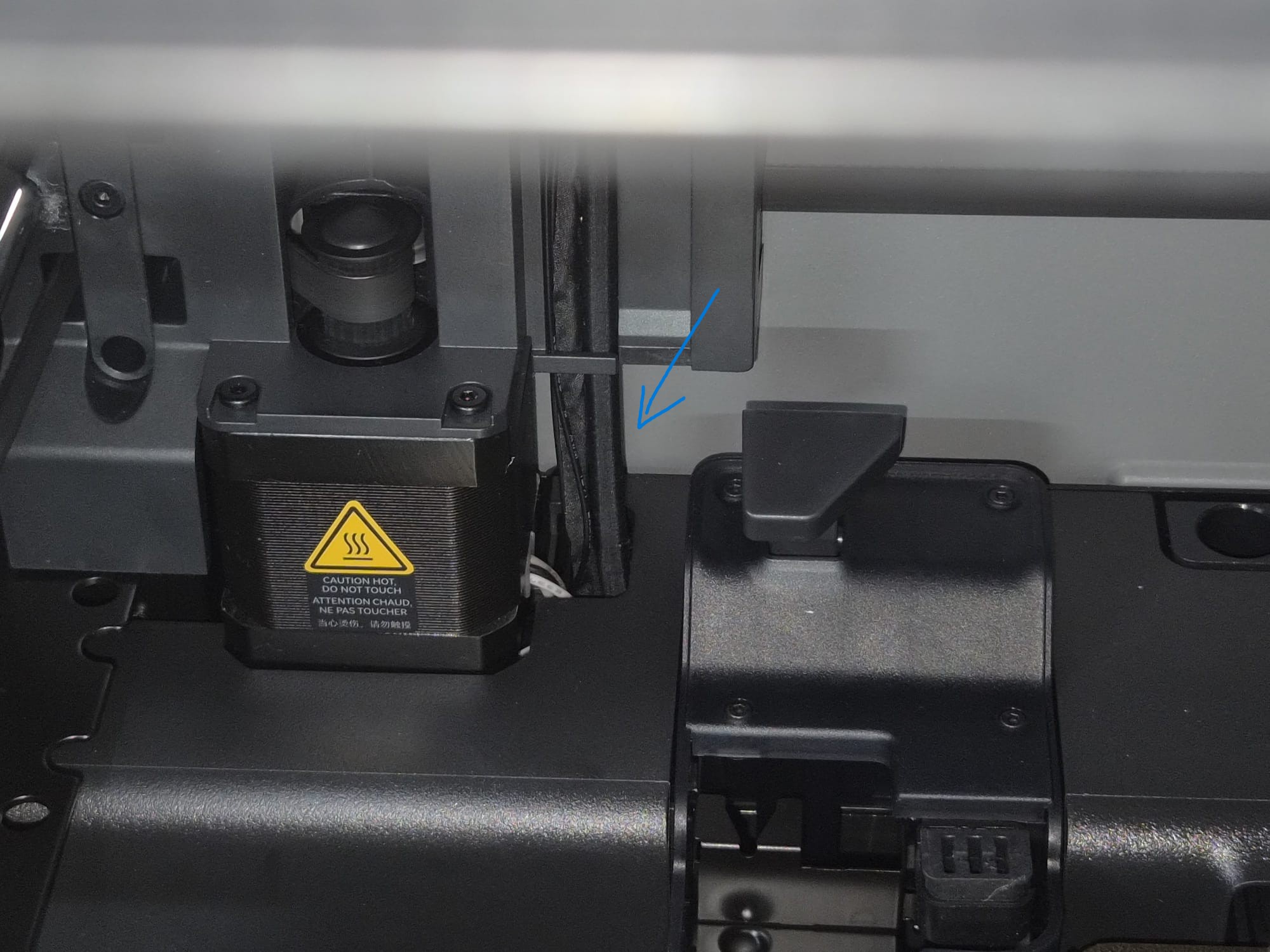
I just bought a new P2S combo to upgrade my previous Creality Ender 3. I really wanted to try the AMS, so I started printing a multicolored object and everything was going fine. Suddenly, I noticed some filament waste in the back corner of the printer, which I wanted to remove after printing. However, I then noticed the print head hit the residue, which ended up in the hole indicated by the blue arrow in the picture below, which seems rather difficult to reach… So, should I be worried? What should I do now? The print finished without any problems.
Thanks to everyone who will take the time to help me, and sorry if the question seems a bit newby, but there am I…
Hi @user_3394797737, same thing happens to my X1C, I haven’t ran into any issues with debris falling back there, but YMMV. If you’re concerned, you can open the rear panel and clean it out, I’ve done it a couple times, super easy and quick.
@Kioto thank you very much for the answer! But to be honest it also concern me to remove the back panel alone, since I am not very practical in such things (which is also the reason why I bought a bambu lab in the first place). Maybe if you and other users, who may want to share their experience as well, agree that is safe to continue printing for a while, I would rather wait a friend of mine coming back from holidays and help me do what you suggested. What do you think?
X1C here and I get those little bits too. Except for when they fall on or near a print they aren’t really an issue and I just clean them up with tape.
What causes them for me is during filament changes little bits can ooze out of the nozzle that the wipe doesn’t always knock off on the first wipe but can get thrown on the second wipe.
At least on mine they don’t cause problems unless they fall on or near the print. And usually I only get them during the print start. Filament changes don’t seem to generate them here.
One thing that can help is carefully cleaning the outside of the extruder nozzle. Melted filament on it seems to help grab those. I have some tweezers I use to pull any bits off the nozzle.
Hi @user_3394797737, I wouldn’t worry at all for the debris falling back there. These are robust printers, despite the various issues you see here on the forums. If there’s ever a situation where the debris becomes an issue (very very low chances the issue would come from debris back there), the printer is “smart” enough to throw you error codes to narrow down an issue, and at that point you’ll have to act, but until then I wouldn’t worry.
Let me re-iterate, the filament poop or debris falling back there should not be alarming to you, it’s quite normal. With that said, part of maintaining the printer is cleaning and lubricating, when you get to that point, it may be beneficial to remove the rear panel to clean and lube the rear lead screw, and while you’re there vacuum up any dirt and debris. It really is simple when you follow the wiki I posted, take your time with it.
@MZip There were just 2 debris, one that I removed when the print was finished and the one that fell in the hole I poninted, anyway I will try to clean often any melted filament outside the nozzle as you suggested. Thank you very much for answering and sharing your experience as well.
@Kioto Thank you very much as well for reassuring me, I think I will follow your suggestion, it concerned me to open my brand new printer (which I know very little about yet) after just a couple of days from receiving it. Ofc I will schedule a maintainment as I did for my old creality and maybe by that time I will be more confident (and hopefully in good company) to do so and clear the back of the printer from the wasted filament.