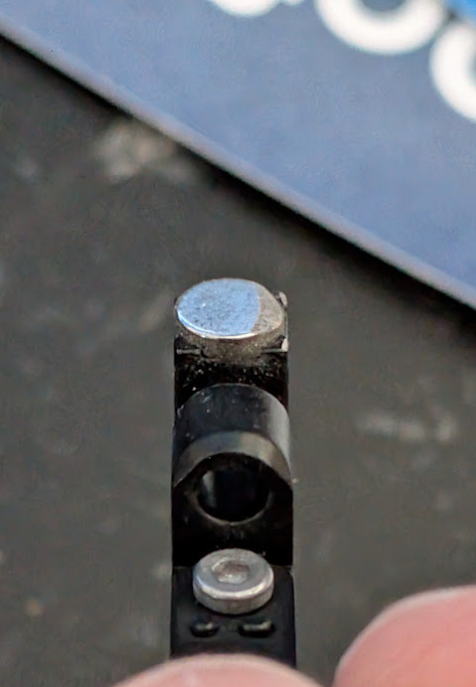
I’m having an issue with my H2D where the Flow blocker doesn’t switch properly anymore. Has anyone else experienced this, and how did you fix it?
If it tries to switch four times and fails, it throws an error. At this point, it doesn’t manage to switch at all — not even when there are no nozzles installed. So it seems to be a mechanical or alignment issue.
It’s working somewhat again now — you can still hear some grinding and slight resistance, but it manages to complete the tool change on its own. I tightened the screws on the nozzle blocker and oiled the mechanism on the flow blocker, and mysteriously, it started working again, though with the issues mentioned. I’ll keep an eye on it and post updates.
I just ran into this issue as well. The flow blocker moves over under the other nozzle but it’s at a strange angle and don’t fully lock into place 100%… which then of course leads to a failure. Occasionally it will work, but it definitely looks like it’s hitting something because it stops, then goes quickly after that, like it over to overcome a ridge. I guess time to pull it apart, judging by the wiki, I guess there can be filament stuck in there?
In my case the thin metal bar was slightly bent out of place and there was a piece of warped filament preventing my left nozzle from moving up. The flow blocker and nozzle movement systems are mechancally linked so if your left nozzle can’t move neither will the blocker. I fixed this by simply taking apart the extruder until I could remove the filament stuck in the guide.
After about 4 weeks of printing I ran into the same issue. The blocker would attempt to move over to the right a few times then error out.
Turns out it was getting “caught” in the movement ark and would get stuck kinda off center instead of settling under the right magnet . To fix it I filed down the corner of the magnet a bit and it hasn’t gotten stuck since.
fwiw the blocker no longer gets stuck before seating properly on the right hand position. ymmv.
I have the same or similar issue. The extruder ran amok during a print and the silicone sock was torn off, plus the nozzle blocker plate is damaged. The end of the plate is broken off, and the nozzle blocker itself will no longer move in its full range of motion from Left-Right. The left hotend will not move up and down in its full range of motion, and it appears to be stuck half way.
I looked for filament stuck in the blocker’s actuator arm, but found none. Evidently the blockage is deep inside. I cannot see deep enough with extruder on the printer. I looked into disassembly of extruder, and stopped when I found its not an easy thing to remove ribbon cables just above the fan (on the PCB). I do not wish to damage the printer. Is there any other way to clear a jam on the filament blocker.
I am also having issues with the flow blocker not seating on the right nozzle. I’ve tried everything, new flow blocker, new bracket, tried positioning the orange friction pads… Even tried grinding down the magnet one one of my blockers as recommend above. I’m at a loss and out of options. Any ideas? I opened a ticket.