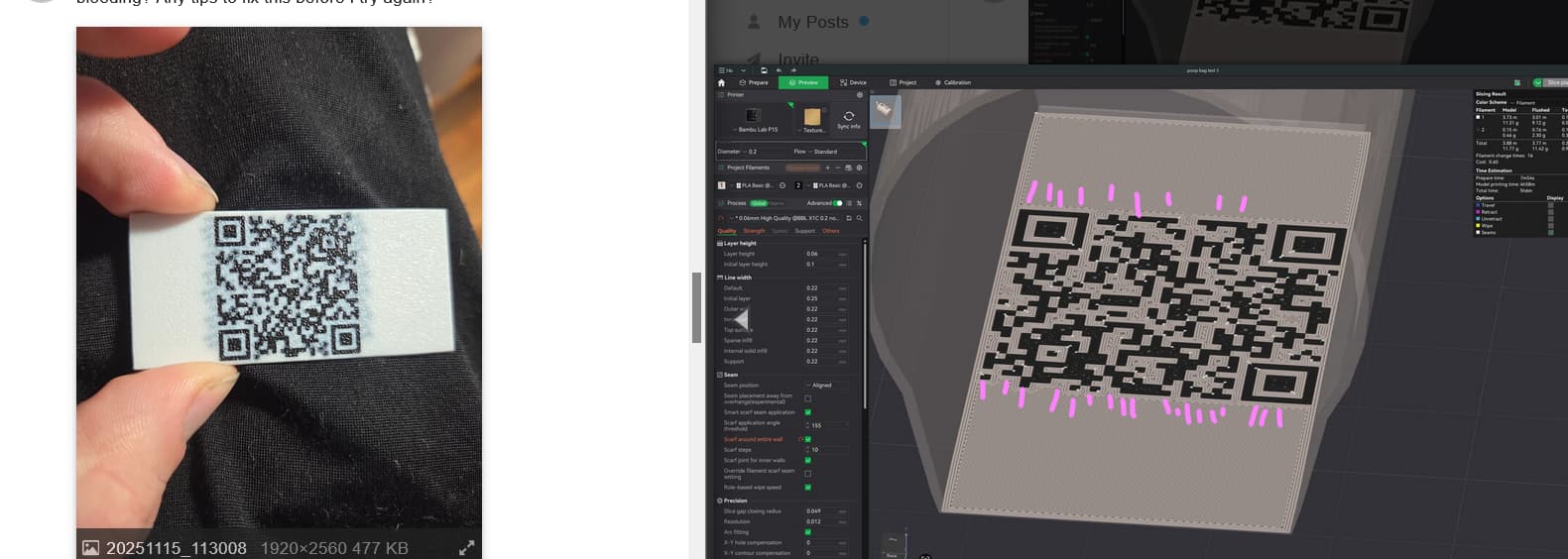
The line patterns of that “bleeding” picture are really strange. Bleeding in directions that dont seem to make sense.
You’ve shown us pics of layers 1 and 2 which look within normal - but what about higher? Do you see any wierd “fragments” of the QR’s lines spreading out? The strategy slicers use to determine how far multicolor penetrates is … sometimes not ideal. I guess what I’m getting at is: do you see only black on only layers 1 + 2 and NOT on layers 3+? In the preview.
I’m out of suggestions on this one now. At least with the settings as they are, you’re hitting densities I aim for in stuff I do which shows much less mixing between colors. By what I know you should be getting better results so it could be the other guys are closer to sorting this. And Bullocks is I think right to focus on the 2d issues like why it bleeds in one direction and not the other.
From the pic alone, which may seem different IRL, I think we’re seeing light transmission to deeper layers, not bleed from purge/etc. Purge bleed comes out necessarily in the nozzle, on extrusion paths. There are no extrusion paths in layer 1 or 2 that follow these lines. I suspect layer 3/4/5/6 etc has some, for lack of a better term, “Beam interlocking” features trying to make all those black lines join and fuse.